

The Smart Budget
Omar Al Homaidi Finance iPhoneiPadiPod touch
The Smart Budget is a free Finance app for iPhone and iPad by Omar Al Homaidi. Rated 5.0/5 from 2 ratings. Requires iOS 26.4. Updated October 20, 2026.
- Rating
- 5.0
- 2 ratings
- Price
- Free
- on the App Store
- Size
- 16 MB
- Age 4+
- Updated
- Oct 20
- 2026 · v2.1
Screenshots


About The Smart Budget
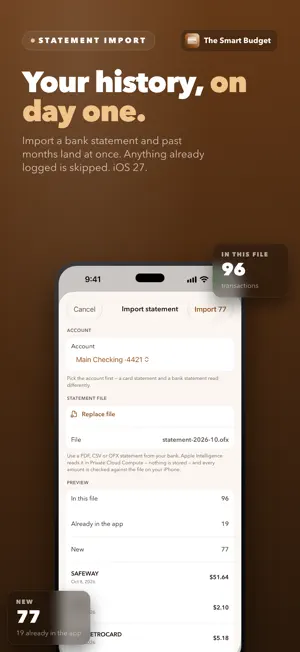
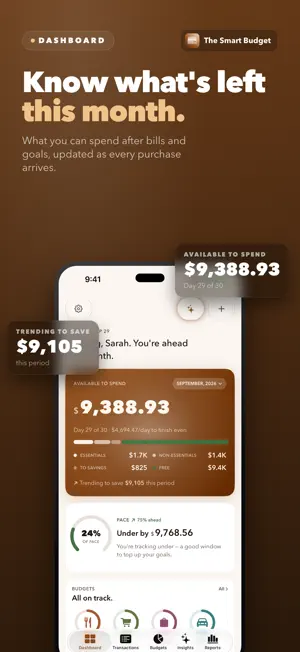
The Smart Budget does the work for you. Set it up once and your spending logs itself — captured, cleaned up, categorized, and checked for anything odd. You open the app to review, not to type. Private, built on Apple Intelligence — and free to start. Smart Budget reads the merchant, amount, currency, and date — on your iPhone or in Apple's Private Cloud Compute — cleans up the messy bank text, picks the right category, and quietly flags anything unusual. No bank login. No third party, ever. Prefer to add one by hand? Log it in seconds, snap a receipt, or say it out loud. Your data stays yours. No accounts to create. No bank-linking required. No data sold or shared. iCloud sync is optional and runs through your own Apple ID — your transactions never reach us. — FREE FOREVER — • Hands-off capture — set it up in seconds and your bank texts and notifications log themselves • Import a bank statement — PDF or CSV, read by Apple Intelligence (iOS 27) • Automatic cleanup + categorization — messy bank merchant strings become clean, sorted entries • Anomaly detection — the Notable card flags spending that doesn't match your patterns • Add transactions by hand too — type in seconds, dictate, or snap a receipt • Unlimited logging, budgets, goals, and incomes • Dashboard with "available this month" hero • "Tell it once, learn forever" merchant aliases — name a merchant once, it's applied forever • Reports: Spending by category, Income vs spending, All transactions, Anomalies & alerts • Lock Screen + Home Screen widgets • Spotlight search for any transaction • Siri Shortcuts for quick logging • Multi-currency with automatic FX conversion • Full VoiceOver, WCAG AA contrast — SMART BUDGET PRO — The intelligence layer, optional, shareable with your family: • Full history — every month, not just the last 15 days • Smart Insights — LLM-narrated story cards on the Insights tab: looking-ahead pace forecasts, goal coaching, category-mix shift detection, recurring-charge audit, what-if scenarios, savings opportunities, period summaries • All Reports — Top merchants, Largest transactions, Recurring charges, Merchant frequency, Budget history, Goal progress, Savings, By account, Year in review, plus per-member household reports Pro pricing: • Monthly: $2.99 • Yearly: $24.99 (3 months free vs paying monthly) • Lifetime: $49.99 (one-time payment, never expires) — SMART BUDGET HOUSEHOLD — Everything in Pro, for your whole household on one shared ledger: • Household Sharing — invite a partner; share budgets, goals, and reports through a private CloudKit Share you control • Members don't pay — the owner's plan covers everyone in the household Household pricing: • Monthly: $4.99 • Yearly: $49.99 (2 months free vs paying monthly) • Lifetime: $99.99 (one-time payment, never expires) Bought Pro before version 2.0? Household sharing stays included in your plan. All Pro and Household plans support Apple Family Sharing — one purchase covers up to six family members at no extra cost. Cancel a subscription anytime in iOS Settings → Apple ID → Subscriptions. — PRIVACY — The Smart Budget runs on Apple Intelligence — on your iPhone or in Apple's Private Cloud Compute, Apple's own hardened servers. Nothing is stored, and no third party is ever involved. No accounts to sign up for. Anonymous app analytics help us improve — never your transactions, amounts or merchants — and you can turn them off in Settings → Privacy. Read the full privacy policy at zaatarlabs.com/privacy-policy. Terms of Use (EULA): https://www.apple.com/legal/internet-services/itunes/dev/stdeula/
What’s new
Version 2.1 · Updated October 20, 2026
• Reports in 3D. Every report is new: income against spending, savings, cash flow and every category, in glass you can turn. Tap any month to see the transactions behind it, and Compare puts last year beside it. • Each report's period and household member are in one Filter menu, and ⓘ explains what the numbers mean. • The Quick View cards on the Reports tab now open their report.
App privacy
The developer, Omar Al Homaidi, reported these privacy practices to Apple.
Data Linked to You
The following data, which may be collected and linked to your identity, may be used for the following purposes:
- Purchases: Purchase History
- Identifiers: Device ID
- Usage Data: Product Interaction, Advertising Data
- Diagnostics: Other Diagnostic Data
Used for: Analytics
Alternatives to The Smart Budget
Looking for apps like The Smart Budget? Here are 6 similar apps on the App Store. The highest rated is Smart Budget App (5.0/5), and all 6 are free to download.
-
 Ledgr-Journal
-
 Smart Budget - Finance App
-
 OneCheckPlease: Split Bills
-
 CashWhisper: Expense Tracker
-
 WalletWhisper: Voice Expense
-
 Smart Budget App
5.0
Smart Budget App
5.0
| App | Rating | Price | Last updated | Compare |
|---|---|---|---|---|
| The Smart Budget | 5.0 / 5 (2 ratings) | Free | October 20, 2026 | |
| Ledgr-Journal | – | Free | Aug 18, 2026 | Compare |
| Smart Budget - Finance App | – | Free | Jun 26, 2026 | Compare |
| OneCheckPlease: Split Bills | – | Free | May 18, 2026 | Compare |
| CashWhisper: Expense Tracker | – | Free | Oct 22, 2026 | Compare |
| WalletWhisper: Voice Expense | – | Free | Jun 16, 2026 | Compare |
| Smart Budget App | 5.0 / 5 (3) | Free | Oct 1, 2025 | Compare |
Compare The Smart Budget with the top alternatives: ratings, updates, ASO score and keyword gaps →