

OneLimit: Parental Controls
Rene Winkelmeyer Lifestyle iPhoneiPadiPod touchApple Watch
OneLimit: Parental Controls is a free Lifestyle app for iPhone and iPad by Rene Winkelmeyer. Rated 1.0/5 from 1 ratings. Requires iOS 17.6.
- Rating
- 1.0
- 1 ratings
- Price
- Free
- on the App Store
- Size
- 16 MB
- Age 4+
- Updated
- Oct 5
- 2026 · v1.2.0
Screenshots

About OneLimit: Parental Controls
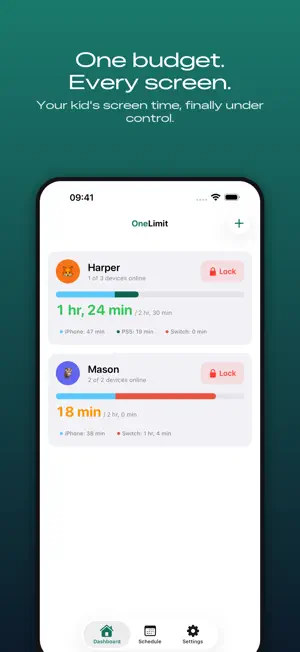
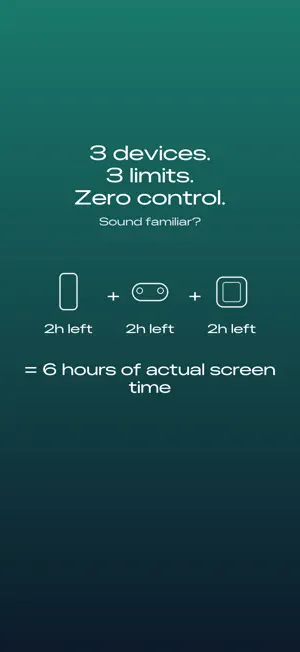
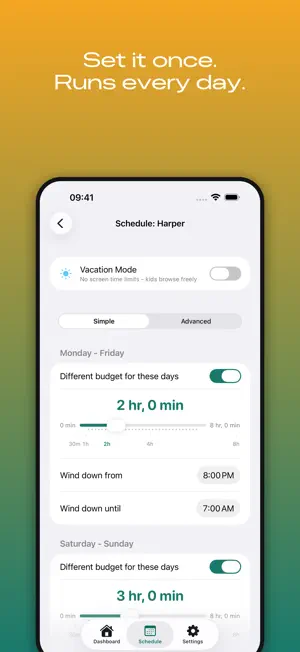
Your kid finishes their iPhone time, walks to the PS5, and starts a fresh clock. You set limits on three devices but manage none of them together. Sound familiar? OneLimit gives your family one daily screen time budget that counts down across every device - iPhone, PlayStation 5, Nintendo Switch, Xbox, and Windows PC. When time runs out on one, it runs out on all of them. No loopholes. HOW IT WORKS Set a daily budget for each child (say, 2 hours on weekdays, 3 on weekends). OneLimit tracks usage across all linked devices in near-real-time. On iOS your child sees a budget ring that fills up as they play and browse. When the budget is spent, every device locks. Simple. KEY FEATURES - Unified budget: One pool of time shared across iPhone, PS5, Switch, Xbox, and Windows. No more device-hopping. - Budget ring: A clear, color-coded gauge shows exactly how much time is left. Green, amber, red - your child always knows where they stand. - Streaks: Kids earn streaks for staying within their daily budget. Positive reinforcement, not just restriction. - Ask for more time: Your child can request extra minutes directly from their app. You approve or deny with one tap. - Emergency lock: Lock all devices instantly from the dashboard. One tap, no confirmation needed. Unlock when you are ready. - Bonus time: Grant +30 minutes with a single tap when plans change. - Activity log: See which devices were used, for how long, and when. No guesswork. - Schedules: Set weekday and weekend budgets, bedtime lockout windows, and per-device overrides. - Vacation mode: Relax the limits without deleting your settings. Toggle it on, toggle it off. - Bedtime countdown: Automatic lockout windows keep devices off at night. - Co-parenting ready: Designed for households where both parents need visibility. - Widget: Check each child's remaining budget from your iPhone home screen without opening the app. - Daily summary: A warm "good night" notification recaps the day. "Today was a 2h 14m day. Busiest: PS5." - Weekly email: A concise weekly report delivered to your inbox (optional). SUPPORTED PLATFORMS - iPhone / iPad - PlayStation 5 - Nintendo Switch - Xbox (Series X|S, One) - Windows PC PRIVACY FIRST OneLimit collects only what is necessary to track screen time budgets. We do not monitor content, read messages, track location, or store photos. All data is encrypted in transit and at rest. Terms of Use (EULA): https://www.apple.com/legal/internet-services/itunes/dev/stdeula/
What’s new
Version 1.2.0 · Updated October 5, 2026
Linking a console now tells you which account you are signed in as, and stops when that account cannot set limits. - The PlayStation link shows which PSN account you are signed in as, both when you pick a child and on the screen that says no child accounts were found, with a way to sign in as someone else. - If that account is not the family manager, the link now stops and names the child and the account to use, instead of appearing to work and then limiting nothing. - Linking a Windows PC or Xbox no longer reports success when every platform for that Microsoft member already belongs to another child. - Roles and age groups in the PlayStation member list are now in your language. - If your child declined Screen Time on their iPhone, the panel now shows the way through Settings, because iOS does not ask a second time. - A console locked because the shared daily budget ran out now reads Out of budget in the activity log, and Budget restored when the lock lifts.
App privacy
The developer, Rene Winkelmeyer, reported these privacy practices to Apple.
Data Linked to You
The following data, which may be collected and linked to your identity, may be used for the following purposes:
- Identifiers: User ID
- Usage Data: Product Interaction
- Contact Info: Email Address
Used for: Analytics, App Functionality
Data Not Linked to You
The following data, which may be collected but is not linked to your identity, may be used for the following purposes:
- Diagnostics: Performance Data, Crash Data
Used for: Analytics, App Functionality
Alternatives to OneLimit: Parental Controls
Looking for apps like OneLimit: Parental Controls? Here are 6 similar apps on the App Store. The highest rated is Parental Control App NannyHere (5.0/5), and all 6 are free to download.
-
 PearGuard
-
 SmartDaddy Child Screen Time
-
 ParentalEdge: Parental Control
-
 Kupola: Parental Control
-
 Parental Control App NannyHere
5.0
Parental Control App NannyHere
5.0
-
 CapyPoo by Safemykids
| App | Rating | Price | Last updated | Compare |
|---|---|---|---|---|
| OneLimit: Parental Controls | 1.0 / 5 (1 rating) | Free | October 5, 2026 | |
| PearGuard | – | Free | Oct 9, 2026 | Compare |
| SmartDaddy Child Screen Time | – | Free | Jan 9, 2025 | Compare |
| ParentalEdge: Parental Control | – | Free | Sep 29, 2026 | Compare |
| Kupola: Parental Control | – | Free | Oct 6, 2026 | Compare |
| Parental Control App NannyHere | 5.0 / 5 (1) | Free | Dec 30, 2024 | Compare |
| CapyPoo by Safemykids | – | Free | Feb 21, 2025 | Compare |