

FawnGuard: Parental Control
Jan Daniel Naftanaila Lifestyle iPhoneiPadiPod touch
FawnGuard: Parental Control is a free Lifestyle app for iPhone and iPad by Jan Daniel Naftanaila. Requires iOS 17.0. Updated September 7, 2026.
- Price
- Free
- on the App Store
- Size
- 44 MB
- Age 4+
- Updated
- Sep 7
- 2026 · v2.2
Screenshots
About FawnGuard: Parental Control
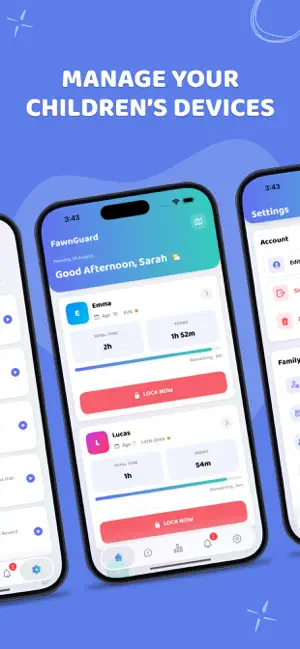
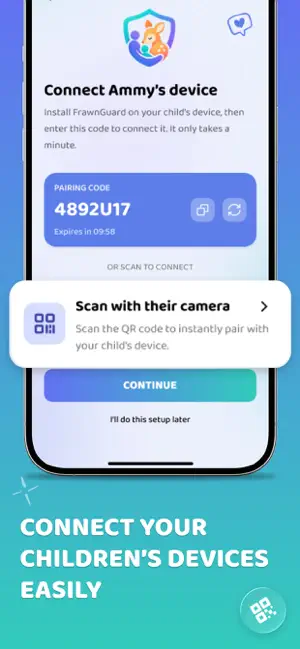
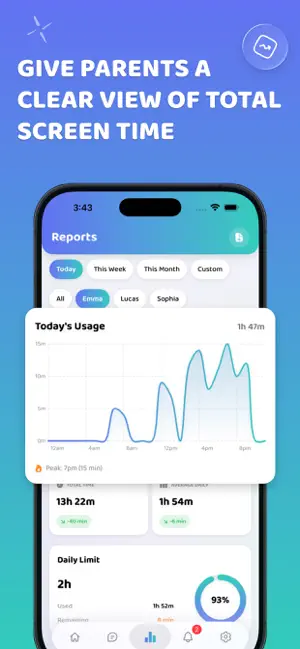
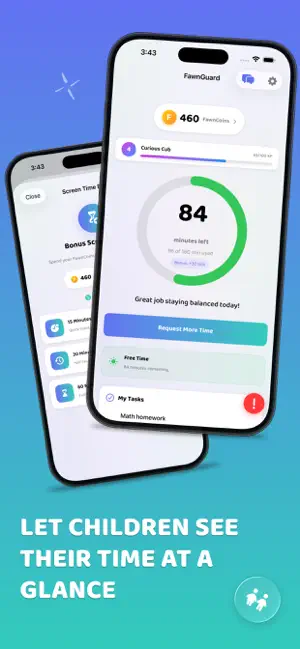
FawnGuard helps parents build healthy screen-time habits for their kids — without the guesswork. Set a daily limit, block the apps that get in the way, and reward the good stuff. Everything is managed from the parent's phone. SCREEN TIME LIMITS THAT ACTUALLY STICK • Set a daily screen-time limit for each child. • When the time is up, FawnGuard shields the device using Apple's Screen Time technology. • Kids can ask for more time; you approve or deny right from your phone. BLOCK & LIMIT APPS • Limit specific apps or whole categories. • Set a 0-minute limit to block an app entirely. • Changes sync to your child's device automatically. SCHEDULE DOWNTIME & BEDTIME • Create school-time and bedtime windows that block the device automatically. • Great for homework focus and a calmer night routine. REWARD GOOD HABITS • Kids complete tasks you set (chores, homework, reading) to earn coins. • They redeem coins for bonus minutes or a short app unlock in the Reward Shop. • Turns "screen time" into a positive, motivating system instead of a fight. ONE DASHBOARD FOR THE WHOLE FAMILY • Manage multiple children from a single dashboard. • Invite a co-parent so you're both on the same page. • See how screen time is being spent with clear usage reports. PEACE OF MIND • A child can send an SOS alert with their location to parents in an emergency. • A parental PIN protects the settings on your child's device. PRIVATE BY DESIGN • FawnGuard is built for parents to manage their own family. • We do not read your child's messages, browse their social media, or track their location in the background. • Your family's data stays in your private account. Requires iOS 17 or later. Screen-time enforcement uses Apple's Family Controls (Screen Time) framework and requires granting Screen Time permission on the child's device. Terms of Use: https://fawnguard.com/terms Privacy Policy: https://fawnguard.com/privacy
What’s new
Version 2.2 · Updated September 7, 2026
A refreshed FawnGuard is here — smoother to set up, easier to read, and more private than ever. • Redesigned onboarding & sign-in — a cleaner, faster first-run and login flow. • Polished child dashboard — refreshed screens with smooth loading and an improved Break Time view. • More reliable alerts & notifications — accurate app-icon badge counts and instant remote device lock. • Stronger privacy — chat previews are hidden on the lock screen, wellbeing history stays on-device, and you have clearer control over your data. • Bug fixes and performance improvements.
App privacy
The developer, Jan Daniel Naftanaila, reported these privacy practices to Apple.
Data Linked to You
The following data, which may be collected and linked to your identity, may be used for the following purposes:
- Identifiers: Device ID, User ID
- Location: Precise Location
- Contact Info: Email Address, Name
- Usage Data: Product Interaction
Used for: Analytics, App Functionality
Alternatives to FawnGuard: Parental Control
Looking for apps like FawnGuard: Parental Control? Here are 6 similar apps on the App Store.
-
 Family Safe - Parental Control
-
 GapNest: Family Coverage
-
 QuietCheck: Elderly Check In
-
 Kidoks - Parental Control App
-
 PearGuard
-
 Ourlittlebird Parent Control
| App | Rating | Price | Last updated | Compare |
|---|---|---|---|---|
| FawnGuard: Parental Control | – | Free | September 7, 2026 | |
| Family Safe - Parental Control | – | Free | Sep 24, 2026 | Compare |
| GapNest: Family Coverage | – | Free | Oct 4, 2026 | Compare |
| QuietCheck: Elderly Check In | – | Free | Aug 4, 2026 | Compare |
| Kidoks - Parental Control App | – | Free | Jul 30, 2026 | Compare |
| PearGuard | – | Free | Oct 9, 2026 | Compare |
| Ourlittlebird Parent Control | – | Free | Aug 2, 2024 | Compare |