

Family Guardian - Kids Safety
Jewaro Ademo Lifestyle iPhoneiPadiPod touch
Family Guardian - Kids Safety is a free Lifestyle app for iPhone and iPad by Jewaro Ademo. Requires iOS 14.0. Updated June 24, 2026.
- Price
- Free
- on the App Store
- Size
- 80 MB
- Age 4+
- Updated
- Jun 24
- 2026 · v1.0
Screenshots



About Family Guardian - Kids Safety
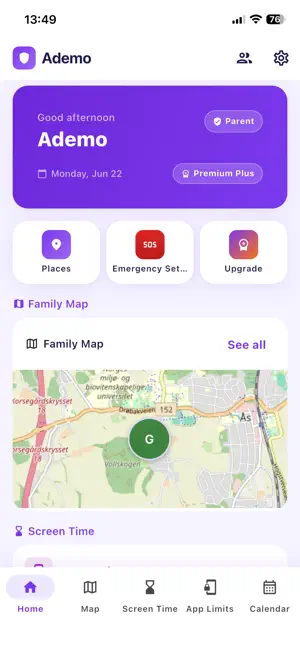
Family Guardian helps parents and children stay connected, safe, and organized every day. Designed for modern families, Family Guardian combines safety features, screen time management, family communication, and daily organization in one easy-to-use app. Key Features • Family Safety Receive emergency SOS alerts, share locations securely, create safe places, and stay informed about important family events. • Screen Time Management Set healthy device limits, manage app usage, approve extra time requests, and encourage balanced digital habits. • Location Sharing View family locations in real time, receive arrival notifications, and stay connected wherever your loved ones are. • School & Daily Schedules Keep track of school schedules, family events, bedtime routines, and important reminders. • Tasks & Rewards Motivate children with tasks, challenges, achievements, rewards, and positive reinforcement. • Family Challenges Create healthy family goals and activities that encourage teamwork and engagement. • Check-Ins Allow children to quickly check in when they arrive home, school, or other designated places. • Emergency Assistance One-touch SOS alerts help children contact family members quickly when they need assistance. Premium Features Unlock advanced family management tools including enhanced screen time controls, bedtime management, school schedules, challenges, and more. Why Families Choose Family Guardian • Easy to use • Family-focused design • Safe and secure • Cross-platform support • Built for parents and children Family Guardian helps families build healthy habits, improve communication, and stay connected every day. How Family Guardian Works 1. Sign up or log in using your Google account. 2. Create your family and invite children using a secure invitation code. 3. Set up important family features, including: o School schedules o Bedtime mode o Safe zones and school areas o Location sharing o Screen time limits o App usage limits and app blocking 4. Parents can monitor their children's safety through the Family Dashboard, while children use a simplified Child Dashboard. 5. Parents can receive alerts when: o A child leaves a safe area o A child travels beyond a distance limit (such as 5 km or 10 km) o A child requests additional screen time o A child's device battery is low o A child arrives at or leaves school 6. During Bedtime Mode, children can be restricted from accessing apps according to family rules. 7. To prevent children from disabling protection, logging out of Family Guardian requires a Parent PIN. Only parents can create and manage the Parent PIN. Family Dashboard Features • Real-time family location tracking • Safe zones and distance alerts • School schedules and events • Screen time management • App blocking and usage limits • Tasks, rewards, and family challenges • SOS and emergency features • Trusted contacts • Family calendar Child Dashboard Features • School schedule • Tasks and rewards • Family challenges • Check-ins and events • Screen time status • View-only app usage information Children cannot change parental controls, remove restrictions, or log out without parent approval. Family Guardian helps families stay connected, organized, and safe while providing parents with tools to manage digital wellbeing and child safety. Terms of Use: https://www.apple.com/legal/internet-services/itunes/dev/stdeula/
App privacy
The developer, Jewaro Ademo, reported these privacy practices to Apple.
Data Linked to You
The following data, which may be collected and linked to your identity, may be used for the following purposes:
- Location: Precise Location
- Contact Info: Email Address
- Identifiers: User ID
- Usage Data: Other Usage Data
Used for: App Functionality
Alternatives to Family Guardian - Kids Safety
Looking for apps like Family Guardian - Kids Safety? Here are 6 similar apps on the App Store. The highest rated is Kidopal: Parental Control App (5.0/5), and all 6 are free to download.
-
 Family Guardian: Safety & GPS
-
 Kidopal: Parental Control App
5.0
Kidopal: Parental Control App
5.0
-
 Parental Controls: TapGuardian
5.0
Parental Controls: TapGuardian
5.0
-
 OneLimit: My Screen Time
-
 New Covenant Bible Church
5.0
New Covenant Bible Church
5.0
-
 Parental Control App – KidSure
5.0
Parental Control App – KidSure
5.0
| App | Rating | Price | Last updated | Compare |
|---|---|---|---|---|
| Family Guardian - Kids Safety | – | Free | June 24, 2026 | |
| Family Guardian: Safety & GPS | – | Free | Sep 29, 2026 | Compare |
| Kidopal: Parental Control App | 5.0 / 5 (1) | Free | Sep 14, 2026 | Compare |
| Parental Controls: TapGuardian | 5.0 / 5 (1) | Free | Oct 5, 2026 | Compare |
| OneLimit: My Screen Time | – | Free | Oct 6, 2026 | Compare |
| New Covenant Bible Church | 5.0 / 5 (8) | Free | Jun 20, 2025 | Compare |
| Parental Control App – KidSure | 5.0 / 5 (1) | Free | Jul 10, 2026 | Compare |