

PearGuard
Timothy Hudgins Lifestyle iPhoneiPadiPod touch
PearGuard is a free Lifestyle app for iPhone and iPad by Timothy Hudgins. Requires iOS 15.1. Updated October 9, 2026.
- Price
- Free
- on the App Store
- Size
- 77 MB
- Age 4+
- Updated
- Oct 9
- 2026 · v1.0.25
Screenshots

About PearGuard
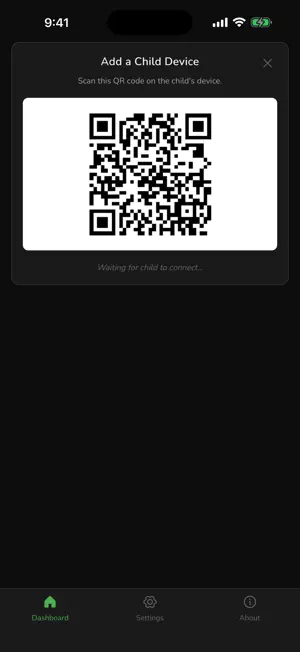
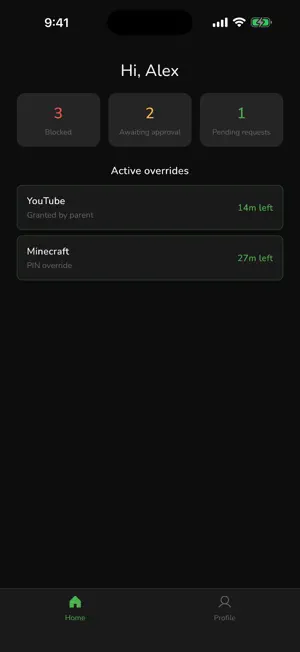
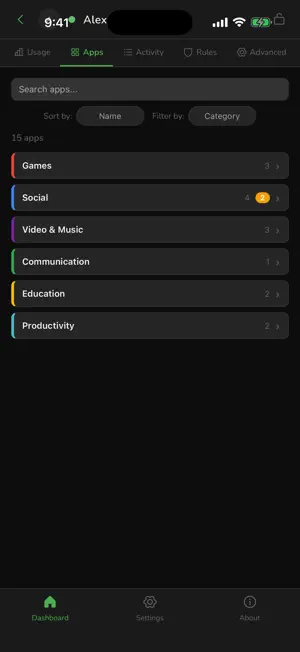
PearGuard is a privacy-focused, peer-to-peer parental control app. The parent device pairs directly with the child device — no accounts, no servers, no subscriptions. Your family's activity data lives only on the devices you pair. PearGuard is designed for families where the child uses an Android device. The parent can use Android or iOS. FEATURES Screen Time Limits Set daily time budgets and bedtime windows on the child device. Per-App Policies Allow, block, or time-limit individual apps by category or one at a time. Activity View See what's been used and when, directly from the parent device. Time Requests The child can request extra time; the parent approves or denies from their device. Privacy First No account creation. No email address. No tracking. No ads. Activity never leaves the paired devices. Open Source PearGuard is free and open source. Source code is available on GitHub. PERMISSIONS Camera — used to scan QR invite codes when pairing with a child device. Photo Library — used to set profile photos.
What’s new
Version 1.0.25 · Updated October 9, 2026
New Features - Bedtime extensions: when bedtime blocks the phone, your child can ask for more time for all their apps at once. One approval unlocks them until the extra time runs out. Apps you've blocked stay blocked. - Lock or pause every child at once: with two or more children, the Dashboard has "Lock all children" and "Pause all children" buttons. - See when an offline child was last seen: a child's card shows how long ago their device was last connected. - Add a note when you say no: when you turn down a time request, you can add a short message such as "homework first". - Your child sees your answers: the child's requests list now shows past answers, including any note you added. - Clock tricks no longer work on Android: if a child changes the date or time by hand, their apps stay blocked until they turn automatic date and time back on. Calls, texts and Settings still work. Improvements - The parent Settings page is grouped into clear sections, and every setting saves as soon as you change it. - Computers now drop programs that were uninstalled from the app list, and send daily totals so usage trends fill in. - You're told when extra time you granted never reached your child's device. Bug Fixes - Changing time zones on a computer no longer resets the daily screen-time allowance. - Fixed repeated "PearGuard was stopped" alerts when a child's device reconnects. - Fixed a case where a child's device stopped hearing from a parent that was still connected. Performance - PearGuard wakes up less in the background and sends less data, which saves battery on both phones. - The parent app does less work when checking on each child, so it stays quicker as the app list grows.
App privacy
The developer, Timothy Hudgins, reported these privacy practices to Apple.
Data Not Collected
The developer does not collect any data from this app.
Alternatives to PearGuard
Looking for apps like PearGuard? Here are 6 similar apps on the App Store. The highest rated is OmoSafe (5.0/5), and all 6 are free to download.
-
 OneLimit: My Screen Time
-
 Jiayin Family
-
 OmoSafe
5.0
OmoSafe
5.0
-
 FawnGuard: Parental Control
-
 Zentime: Parental Control App
5.0
Zentime: Parental Control App
5.0
-
 OneLimit: Parental Controls
1.0
OneLimit: Parental Controls
1.0
| App | Rating | Price | Last updated | Compare |
|---|---|---|---|---|
| PearGuard | – | Free | October 9, 2026 | |
| OneLimit: My Screen Time | – | Free | Oct 6, 2026 | Compare |
| Jiayin Family | – | Free | May 26, 2026 | Compare |
| OmoSafe | 5.0 / 5 (1) | Free | Oct 7, 2026 | Compare |
| FawnGuard: Parental Control | – | Free | Sep 7, 2026 | Compare |
| Zentime: Parental Control App | 5.0 / 5 (3) | Free | Jan 15, 2026 | Compare |
| OneLimit: Parental Controls | 1.0 / 5 (1) | Free | Oct 5, 2026 | Compare |
Compare PearGuard with the top alternatives: ratings, updates, ASO score and keyword gaps →