

SteadyBounds: Parental Control
Vantaryn Labs LLC Lifestyle iPhoneiPadiPod touch
SteadyBounds: Parental Control is a free Lifestyle app for iPhone and iPad by Vantaryn Labs LLC. Rated 5.0/5 from 2 ratings. Requires iOS 17.4.
- Rating
- 5.0
- 2 ratings
- Price
- Free
- on the App Store
- Size
- 323 MB
- Age 4+
- Updated
- Nov 9
- 2026 · v1.1
Screenshots
Save to Pinterest


About SteadyBounds: Parental Control
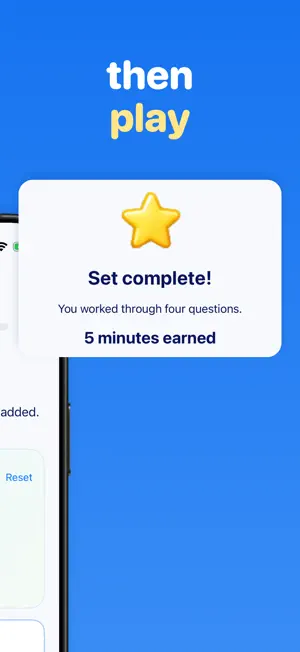
SteadyBounds helps parents set clear screen time rules on a child's iPhone and iPad, and lets your child earn a little extra time by learning. Screen Time controls are always free. WHAT YOU NEED • Apple Family Sharing, with your child's own Apple Account in your family group • SteadyBounds on your device and your child's own iPhone or iPad • iOS or iPadOS 17.4 or later No computer needed. FREE SCREEN TIME CONTROLS • Daily limits, shared across a child's iPhone and iPad • Bedtime, app-free times such as school hours, and regular breaks • Choose which apps and websites have rules; apps you leave out, like Phone, keep working • Pause apps from your phone. Rules stay on when SteadyBounds is closed, and a change shows as applied only after your child's device confirms it. • A lock screen that names the rule holding an app, with no "one more minute" button • A 5-minute heads-up before the limit or bedtime (when notifications are on) • A parent PIN protects SteadyBounds settings on your child's device FREE REQUESTS, REWARDS AND REPORTS • Your child can ask for more time even when apps are locked. You answer from your phone. • Extra time in a few taps, and a Time Bank for earned minutes • Your child earns time from lessons, the daily challenge and chores you approve, up to a daily cap you choose. Each lesson earns time once a day, and earned time never moves bedtime. • Screen time reports for today and the last 7 days • Alerts when a device stops updating or Screen Time permission is off; you choose which alerts you get • All children, devices and parents are included. One-off chores, avatars, profile photos and chat safety tools. • Location sharing (the latest point), optional and off until you turn it on LEARNING 136 short lessons in coding, math, science, engineering, data, logic and STEM trivia, across four levels, with hints and read-aloud support. Every lesson is done in the app. 80 starter lessons, the daily challenge and each day's Fresh Math set are free. STEADYBOUNDS PREMIUM (OPTIONAL) One subscription covers your whole family. Premium adds: • Full lesson library and extra practice: all 136 lessons, plus extra Fresh Math practice • Learn first: a lesson comes before games and videos, with a reminder or a lock • Family chat and groups for parents and children in your family (children can't message each other) • Chore routines, and chore photos your child can add for you to check • Bedtime activity alerts if a device is used after bedtime (bedtime itself stays free) • Places & arrival alerts when your child's device arrives at or leaves places you save (needs Always location on your child's device) • Widgets with time left and waiting requests; time left on your child's iPhone Lock Screen • Animated Home scenes (Forest stays free) • Learning progress reports and practice suggestions for each child If Premium ends, Learn first turns off and place and bedtime activity alerts pause. Daily limits, bedtime, earned time, location sharing and the Time Bank keep working. SUBSCRIPTIONS Premium offers monthly and yearly auto-renewing subscriptions. Prices and any eligible free trial are shown before purchase. Payment is charged to your Apple Account. Any free trial converts to paid unless canceled. Cancel at least 24 hours before the trial ends or renewal in Settings > [your name] > Subscriptions. Deleting the app or your SteadyBounds account does not cancel a subscription. Only the parent who created the family can subscribe or restore. No ads, no ad tracking, and we don't sell your family's information. SteadyBounds can't read texts or iMessage. It helps you set limits; it doesn't replace a grown-up's guidance. Terms of Use: https://steadybounds.com/terms/ Privacy Policy: https://steadybounds.com/privacy/ Support: https://steadybounds.com/support/
What’s new
Version 1.1 · Updated November 9, 2026
• New setup for your family • Shorter, clearer family consent screen • Notifications now name your child • New alert when saved time is used • Bedtime alerts only after actual device use • Improved iPad layouts and bug fixes
App privacy
The developer, Vantaryn Labs LLC, reported these privacy practices to Apple.
Data Linked to You
The following data, which may be collected and linked to your identity, may be used for the following purposes:
- Purchases: Purchase History
- Identifiers: Device ID, User ID
- Usage Data: Product Interaction
- Location: Precise Location, Coarse Location
- Contact Info: Email Address, Name
- User Content: Emails or Text Messages, Photos or Videos, Other User Content
- Other Data: Other Data Types
Used for: Analytics, App Functionality
Alternatives to SteadyBounds: Parental Control
Looking for apps like SteadyBounds: Parental Control? Here are 6 similar apps on the App Store. The highest rated is Chore Lock Earn Screen Time (5.0/5), and all 6 are free to download.
-
 PapaTime: Screen Time Budget
-
 PearGuard
-
 Chore Lock Earn Screen Time
5.0
-
 Parental Control App - BeeKid
3.7
-
 KlusQuest: Parental Control
1.0
-
 Journey Church Orlando
4.9
| App | Rating | Price | Last updated | Compare |
|---|---|---|---|---|
| SteadyBounds: Parental Control | 5.0 / 5 (2 ratings) | Free | November 9, 2026 | |
| PapaTime: Screen Time Budget | – | Free | Aug 25, 2026 | Compare |
| PearGuard | – | Free | Oct 31, 2026 | Compare |
| Chore Lock Earn Screen Time | 5.0 / 5 (12) | Free | Nov 20, 2026 | Compare |
| Parental Control App - BeeKid | 3.7 / 5 (3) | Free | Nov 24, 2026 | Compare |
| KlusQuest: Parental Control | 1.0 / 5 (1) | Free | Nov 17, 2026 | Compare |
| Journey Church Orlando | 4.9 / 5 (42) | Free | Nov 18, 2026 | Compare |