

OmoSafe
Vericortex Lifestyle iPhoneiPadiPod touchApple Watch
OmoSafe is a free Lifestyle app for iPhone and iPad by Vericortex. Rated 5.0/5 from 1 ratings. Requires iOS 15.0. Updated October 7, 2026.
- Rating
- 5.0
- 1 ratings
- Price
- Free
- on the App Store
- Size
- 46 MB
- Age 4+
- Updated
- Oct 7
- 2026 · v2.0.6
Screenshots


About OmoSafe
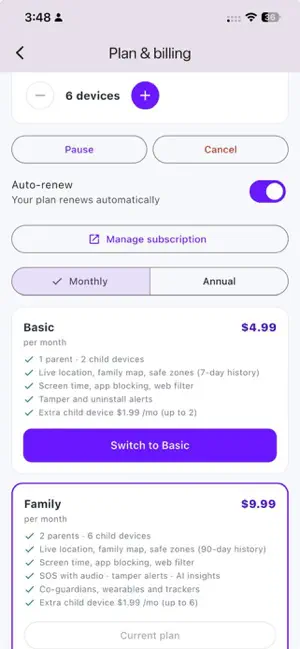
Screen time, safe browsing, location, safe zones, SOS. One family safety app. OmoSafe is one family safety app for parents and children. Install it on your iPhone and on your child's iPhone, choose Parent / Guardian or Child device, and link them with a one-time code. OmoSafe runs openly on your child's phone, and your child can see exactly what you can see. HEALTHY SCREEN TIME (uses Apple's Screen Time) • Daily limits, app and category limits, and a bedtime that locks apps overnight • Your child can ask for more time, and you approve or decline from your phone • Lock now for dinner, homework and family time • You choose the apps on your child's iPhone with Apple's own picker. Apple keeps the exact minutes per app private, so OmoSafe shows approximate usage on iPhone. A SAFER INTERNET • Block adult websites with Apple's Screen Time web filter, plus single websites you choose • SafeSearch for Google, Bing and DuckDuckGo, and YouTube Restricted Mode, through a family-safe DNS setting that your child switches on once on their iPhone (OmoSafe shows how) LOCATION AND SAFE ZONES • Live family map with each phone's battery and last update • Safe zones for home, school and practice, with arrival and departure alerts • Scheduled zones, such as school hours on weekdays • Location history, so you can see where your child has been today SOS ON EVERY PLAN • Your child taps Get help now and every guardian gets an urgent alert with their location • Trusted adults who confirm their email also get an SOS email with the location • OmoSafe is not an emergency service and never calls emergency services. In an emergency, call your local emergency number. APPLE WATCH • A big SOS button on your child's Apple Watch • Fall alerts while the OmoSafe watch app is open • Apple Watch has no screen time controls FAMILY FIRST • Private family chat between children and guardians • Invite a co-parent by email with the role you choose • Optional weekly insight, only if you turn it on • 13 languages in the app • Parent web portal at app.omosafe.com, so you can check in from any computer HOW OMOSAFE LOOKS AFTER A CHILD'S PHONE OmoSafe is made for parents and guardians to look after their own children, with the child's knowledge. It shares the phone's location with the family (including in the background, for the family map, safe zone alerts and SOS). It never reads messages, calls or anything typed, and it must not be used to monitor another adult. PLANS • Basic: 1 parent and 2 child devices, with the family map, safe zones, SOS, screen time, app blocking and safe browsing • Family: 2 parents and 6 child devices, plus unlimited safe zones, 90 days of history and the optional weekly insight Subscriptions are charged to your Apple Account and renew automatically unless you turn off auto-renew at least 24 hours before the end of the current period. Manage or cancel in Settings, your name, Subscriptions. Your family's data is encrypted in transit, never sold and never used for ads. You can delete your account in the app. Support: [email protected] Privacy Policy: https://www.omosafe.com/legal/privacy-policy/ Terms of Use (EULA): https://www.omosafe.com/legal/eula/ OmoSafe is made by VeriCortex LLC, USA. Terms of Use (EULA): https://www.omosafe.com/legal/eula/ Privacy Policy: https://www.omosafe.com/legal/privacy-policy/
What’s new
Version 2.0.6 · Updated October 7, 2026
SOS is now included on every plan, Basic and Family. Tap an SOS or possible emergency alert to open a map showing where it happened and where your child is now, with a button to open it in Apple Maps. Maps in OmoSafe now use Apple Maps. Get help now on your child's iPhone sends at once, confirms with a vibration and a "Help is on the way" screen, and keeps trying when there is no signal. Shake to send SOS: parents can turn it on for each child. On iPhone and Apple Watch it works while OmoSafe is open, and a short countdown with "I'm OK" prevents false alarms. New SOS settings for parents: how a countdown alerts your child (vibrate, vibrate and sound, or off), the fall countdown, and the Apple Watch button countdown. "I'm responding" and "Mark resolved" on a live SOS, so the whole family knows someone is on it. SOS alerts on your iPhone are Time Sensitive, so they can show through Focus when you allow it. Apple Watch: countdowns follow your SOS settings, and an SOS uses the last known location when a fresh one is slow to arrive. Change between Basic and Family in the app, with a clear summary of what changes before you agree. Partner and promo codes are checked in the app before you subscribe, and the app shows how to use them. Co-parent invites now arrive by email, with a resend button. A co-parent can delete their own account from the app. Invite another family and Rate OmoSafe from the Account screen. Prices are shown in your local currency. If a parent removes a child's iPhone, it can now be used as a parent's phone, linked to a family again, or OmoSafe can be removed. OmoSafe now shows all 13 of its languages on the App Store. Clearer, more accurate wording throughout, and bug fixes.
App privacy
The developer, Vericortex, reported these privacy practices to Apple.
Data Linked to You
The following data, which may be collected and linked to your identity, may be used for the following purposes:
- Contact Info: Email Address
- Identifiers: User ID
Used for: App Functionality
Data Not Linked to You
The following data, which may be collected but is not linked to your identity, may be used for the following purposes:
- Location: Precise Location
- Contact Info: Physical Address, Name, Phone Number
- Identifiers: Device ID
- Usage Data: Other Usage Data
- Diagnostics: Performance Data
Used for: App Functionality
Alternatives to OmoSafe
Looking for apps like OmoSafe? Here are 6 similar apps on the App Store. The highest rated is Zentime: Parental Control App (5.0/5), and all 6 are free to download.
-
 Jiayin Family
-
 PearGuard
-
 Zentime: Parental Control App
5.0
Zentime: Parental Control App
5.0
-
 OneLimit: My Screen Time
-
 Parental Control · OffLimits
-
 OneLimit: Parental Controls
1.0
OneLimit: Parental Controls
1.0
| App | Rating | Price | Last updated | Compare |
|---|---|---|---|---|
| OmoSafe | 5.0 / 5 (1 rating) | Free | October 7, 2026 | |
| Jiayin Family | – | Free | May 26, 2026 | Compare |
| PearGuard | – | Free | Oct 9, 2026 | Compare |
| Zentime: Parental Control App | 5.0 / 5 (3) | Free | Jan 15, 2026 | Compare |
| OneLimit: My Screen Time | – | Free | Oct 6, 2026 | Compare |
| Parental Control · OffLimits | – | Free | Sep 25, 2026 | Compare |
| OneLimit: Parental Controls | 1.0 / 5 (1) | Free | Oct 5, 2026 | Compare |
Compare OmoSafe with the top alternatives: ratings, updates, ASO score and keyword gaps →