

Stamp Maker - PDF Signer
Hashim Sultan Abbasi Productivity iPhoneiPadiPod touchMac
Stamp Maker - PDF Signer is a free Productivity app for iPhone and iPad by Hashim Sultan Abbasi. Rated 5.0/5 from 2 ratings. Requires iOS 16.
- Rating
- 5.0
- 2 ratings
- Price
- Free
- on the App Store
- Size
- 61 MB
- Age 4+
- Updated
- Oct 10
- 2026 · v4.1.0
Screenshots


About Stamp Maker - PDF Signer
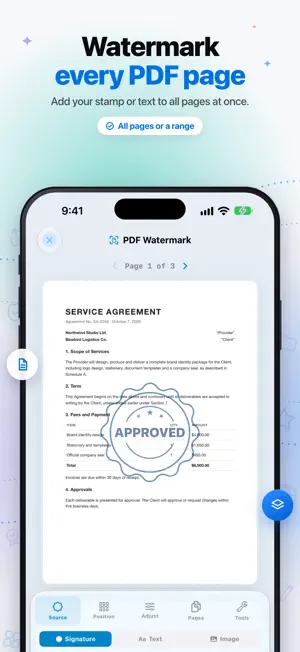
Turn your iPhone into a professional stamp studio. Design custom stamps, watermark photos & documents, and sign PDFs — all in one app. Tired of ordering expensive rubber stamps, waiting days for delivery, or juggling multiple apps just to mark up a document? Stamp Maker gives you everything you need to create, customize, and apply professional stamps in minutes — right from your pocket. Whether you're a business owner approving invoices, a notary authenticating documents, a teacher grading papers, or a photographer protecting your work, this is the only tool you'll need. WHAT YOU CAN CREATE: - CUSTOM STAMP DESIGNER - Build stamps from scratch using 13 element types — shapes, text, icons, QR codes, barcodes, and more. Full control over colors, gradients, shadows, glow effects, and blend modes. - CURVED TEXT & TYPOGRAPHY - Add professional curved lettering, choose from hundreds of fonts, adjust kerning, and apply text outlines for that authentic seal look. - ADVANCED DESIGN TOOLS - Snap-to-grid, smart alignment guides, Bezier pen tool, freehand drawing, and boolean shape operations (union, subtract, intersect) for precision designs. - 50+ READY-MADE TEMPLATES - Professionally designed templates across 11 categories — Official, Business, Legal, Education, Personal, Holiday, Security, and more. Every template is fully editable. - PHOTO WATERMARKING - Protect your images with stamp watermarks. Choose from 9 placement positions or tile across the entire photo. Adjust opacity, scale, and rotation in real time. - PDF WATERMARKING - Apply stamps to multi-page PDFs with custom page range selection. Watermark all pages, specific pages, or custom ranges like "1,3,5-8." - PDF SIGNING - Draw freehand signatures, type text signatures, or use your saved stamps. Place multiple signatures per page, resize and reposition freely, and apply across all pages instantly. - PDF EDITING - Annotate documents with text, highlights, shapes, drawings, and stamp overlays. Full page-by-page control with real-time preview. - QR CODES & BARCODES - Generate and embed QR codes or barcodes directly into your stamp designs for document tracking and verification. - PRECISION CONTROLS - 50-step undo/redo, layer management, element locking, rulers, and zoom — everything you need for pixel-perfect results. - HIGH-QUALITY EXPORT - Save stamps as transparent PNGs at up to 600 DPI. Share directly or save watermarked photos and signed PDFs in professional quality. WHY PROFESSIONALS CHOOSE STAMP MAKER PRO: • All-in-one solution — no need to switch between stamp, watermark, and signing apps • Works completely offline — everything processes on your device • Available in 20 languages including Arabic, Urdu, Spanish, French, German, Chinese, Japanese, Korean, Hindi, and Turkish • Intuitive interface designed for both iPhone and iPad • No account required — start creating immediately FROM STAMPS TO SIGNED DOCUMENTS IN MINUTES: 1. Pick a template or start from scratch 2. Customize every detail — colors, effects, text, shapes 3. Save your stamp and apply it anywhere — photos, PDFs, documents 4. Export and share in high resolution Create your first professional stamp in under 5 minutes. Download Stamp Maker now and take control of your documents. Privacy Policy: https://stampmaker.myportfoliodata.com/privacy-policy Terms of Use: https://stampmaker.myportfoliodata.com/terms
What’s new
Version 4.1.0 · Updated October 10, 2026
What's new in 4.1 • Refreshed design for iOS 26 with a new floating tab bar • Smoother pinch-to-zoom in the stamp editor — zooming no longer selects elements by accident • New Lock / Unlock and Deselect buttons in the editor toolbar • The reset-zoom button now stays visible at any zoom level • Search your gallery right from the tab bar • New Manage Subscription screen and a compact PRO badge on Home • Pro members are no longer shown the upgrade screen at launch • Bug fixes and performance improvements
App privacy
The developer, Hashim Sultan Abbasi, reported these privacy practices to Apple.
Data Used to Track You
The following data may be used to track you across apps and websites owned by other companies:
- Usage Data: Advertising Data
Data Not Linked to You
The following data, which may be collected but is not linked to your identity, may be used for the following purposes:
- Identifiers: Device ID
- Usage Data: Advertising Data
- Diagnostics: Crash Data, Performance Data
Used for: Third-Party Advertising, Analytics
Alternatives to Stamp Maker - PDF Signer
Looking for apps like Stamp Maker - PDF Signer? Here are 6 similar apps on the App Store. The highest rated is SparkPDF: Scan, Sign & Fill (5.0/5), and all 6 are free to download.
-
 SparkPDF: Scan, Sign & Fill
5.0
-
 Verbatim: AI Note Taker
2.3
-
 Stream Me By On Station
-
 SaveIt - Save Links & Notes
5.0
-
 PDF Extractor: Image & OCR
-
 Callvent – Calls to Calendar
1.0
| App | Rating | Price | Last updated | Compare |
|---|---|---|---|---|
| Stamp Maker - PDF Signer | 5.0 / 5 (2 ratings) | Free | October 10, 2026 | |
| SparkPDF: Scan, Sign & Fill | 5.0 / 5 (2) | Free | Oct 28, 2026 | Compare |
| Verbatim: AI Note Taker | 2.3 / 5 (3) | Free | Aug 11, 2026 | Compare |
| Stream Me By On Station | – | Free | Sep 26, 2026 | Compare |
| SaveIt - Save Links & Notes | 5.0 / 5 (3) | Free | Oct 19, 2026 | Compare |
| PDF Extractor: Image & OCR | – | Free | Sep 7, 2026 | Compare |
| Callvent – Calls to Calendar | 1.0 / 5 (1) | Free | Oct 27, 2026 | Compare |