

SaveIt - Save Links & Notes
Seokwoo Hong Productivity iPhoneiPadiPod touchMacApple Watch
SaveIt - Save Links & Notes is a free Productivity app for iPhone and iPad by Seokwoo Hong. Rated 5.0/5 from 3 ratings. Requires iOS 26.1.
- Rating
- 5.0
- 3 ratings
- Price
- Free
- on the App Store
- Size
- 124 MB
- Age 4+
- Updated
- Oct 13
- 2026 · v3.5.0
Screenshots



About SaveIt - Save Links & Notes
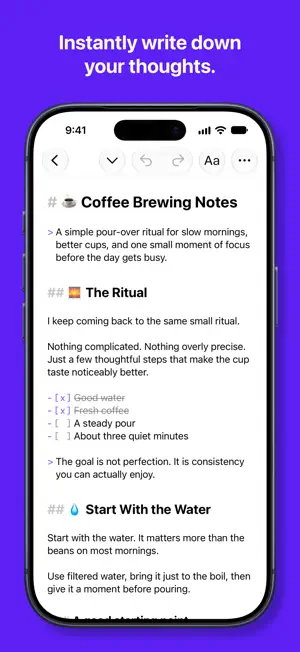
SaveIt keeps everything you want to save in one place. Add a link, write a note, or capture what's in front of you, and it's there on every device, ready when you need it. Saving links and notes is free, with no limits. So are tags, search, Archive, Hidden Mode, and iCloud sync. FREE, ALWAYS • Save unlimited links, with a title, icon, and preview added automatically when available • Write notes in Markdown, styled as you type and drawn right on your cards • Save from any app with the Share sheet, or scan a QR code to save where it points • Organize with tags, and narrow any list by kind, date, or the words inside • Archive what you're done with: out of your lists, but never deleted • Hidden Mode locks private items behind Face ID, Touch ID, or Optic ID • Find anything with fast search, or with Spotlight from the Home Screen, the Lock Screen, and Finder • A widget, Control Center, the Lock Screen, and the Action button put a new note, link, or search one tap away • Ask Siri to save a link or a note, and on iOS 27, to find and open what you saved • Sync across iPhone, iPad, Mac, and Apple Vision Pro with your own iCloud, with your notes on Apple Watch • Export notes as text, Markdown, or PDF, links as QR codes, and whole selections to a folder as real files • Your items stay private: on your device and in your own iCloud, never on our servers SAVEIT PRO When you want to keep more than links and notes, Pro unlocks the rest. Save anything • Images, videos, audio, and files of any kind, kept in your own iCloud • Take a photo or video, record a voice memo, or start from a blank image, right in the app • Search inside your media on device, so the text in a photo or a PDF can be found Stay organized • Feeds keep the views you use most in the sidebar, sorted and styled the same on every device • Reminders on any saved item, so nothing slips away • Detailed stats on when you save and what you come back to Make it yours • Accent colors and custom app icons • Premium note fonts, for all your notes or just one • Icons and colors for your tags, and your own thumbnails for any link or media item SaveIt Pro is a yearly subscription, with a free trial for new subscribers, or a one-time Lifetime purchase. Either way, it covers all your devices. Links and notes are the heart of SaveIt, and they're yours for free, along with Hidden Mode and sync across your devices. Pro is there for the day you want to save everything else. -- Questions or ideas? Email [email protected] Terms of Use (EULA): https://www.apple.com/legal/internet-services/itunes/dev/stdeula/ Privacy Policy: https://saveitbydave.com/privacy
What’s new
Version 3.5.0 · Updated October 13, 2026
SaveIt Cocos 3.5.0 is here! This update includes: • Import Links. Bring all your browser bookmarks, or your reading list from another read-it-later app, into SaveIt at once. A bookmarks file and a CSV both work. In Settings, choose Import Links, pick the file, and check what was found before you import. • Folders become tags, links you already have are skipped, and favorites and archived links stay that way. Everything you bring in gets the tag Imported, so it's easy to find. • Just have a list of links? Copy it from anywhere, then tap Paste Links. • Export Links. Save every link as a bookmarks file for a browser or a CSV for a spreadsheet, with its tags, note, and date. Your links are always yours. • On Mac, Import Links and Export Links are in the File menu as well. • A new guide in your library shows how to bring your links in and take them elsewhere, notes and files included. • In Hidden Mode, Quick Exit no longer appears twice on iPad, Mac, and Apple Vision Pro. • Fixed a crash when opening a saved link that isn't a web page, such as an email address or an app's link. Also Recently Added: • A Filter button on every list. Kinds, favorites, tags, text filters, a date range, and more are all on one page, and a filtered list shows how many items it holds out of the total. • A new Dark Mode color for the note editor on iPhone and iPad, and code in your notes stands out more clearly. • New languages: Japanese, Spanish, and Portuguese (Brazil). • Feeds. Keep any view of your library in the sidebar, with its own name, icon, and color: narrowed by kind, favorites, tags, words, or dates, and sorted and styled the way you like. Everything in Edit Feed syncs, so a feed looks the same on all your devices. (Pro) • Archive. Done with something, but not ready to delete it? Archive it, right next to Delete in any item's menu. It leaves your lists and Spotlight and waits in Archive until you bring it back. • Text Filters. Keep only the items that contain a word or phrase, or hide the ones that do, and choose where each one looks. Find them in a list's ... menu. • Tag icons and colors. Give each tag an icon and a color, shown in the sidebar, on your items, and when you pick tags. (Pro) • Custom thumbnails. Give a link or media item a picture of your own, from Photos, Files, or an image already in SaveIt. (Pro) • A font for each note. Give any note a font of its own, in the editor, on its card, and in its PDF. (Pro) • More Stats. See when you save, your streaks, what you come back to, and how much you have written. (Pro) • Blank images. Start from a canvas of any size, ready to draw on in Markup on iPhone, iPad, and Apple Vision Pro. (Pro) • VoiceOver can now Favorite, Pin, and Archive any item, and reads headings as headings. • SaveIt Pro Lifetime. Pay once and keep every Pro feature for good. Yearly subscribers can upgrade at a reduced price. • Ask Siri to find, open, or search what you have saved. (iOS 27, iPadOS 27, macOS 27) • Capture without leaving the app. Take a photo or video, or record a voice memo. (Pro) • Save images, videos, files, and audio, and search inside them on device. (Pro) • Set reminders on any saved item so nothing slips away. (Pro) * Links and notes are still free, with no limits. Thank you for using SaveIt. * If you encounter any bugs or translation errors, please tap on 'Report a bug' in the settings and provide me with details about the issue. * New feature suggestions are also welcome!
App privacy
The developer, Seokwoo Hong, reported these privacy practices to Apple.
Data Not Collected
The developer does not collect any data from this app.
Alternatives to SaveIt - Save Links & Notes
Looking for apps like SaveIt - Save Links & Notes? Here are 6 similar apps on the App Store. The highest rated is Bookmark Read Later - Linkjoy (5.0/5), and all 6 are free to download.
-
 Bookmark Read Later - Linkjoy
5.0
-
 Bookmark Manager - Markfully
4.5
-
 Notelane - Markdown Editor
5.0
-
 Rewind - Never miss a moment
5.0
-
 Ki-note
5.0
-
 Hansson Vault
| App | Rating | Price | Last updated | Compare |
|---|---|---|---|---|
| SaveIt - Save Links & Notes | 5.0 / 5 (3 ratings) | Free | October 13, 2026 | |
| Bookmark Read Later - Linkjoy | 5.0 / 5 (2) | Free | Oct 2, 2026 | Compare |
| Bookmark Manager - Markfully | 4.5 / 5 (2) | Free | Jan 5, 2026 | Compare |
| Notelane - Markdown Editor | 5.0 / 5 (5) | Free | Jul 1, 2026 | Compare |
| Rewind - Never miss a moment | 5.0 / 5 (4) | Free | Sep 15, 2026 | Compare |
| Ki-note | 5.0 / 5 (2) | Free | May 14, 2026 | Compare |
| Hansson Vault | – | Free | Jun 2, 2026 | Compare |