

Oaklet Notes
Oceanoax LLC Productivity iPhoneiPadiPod touchMac
Oaklet Notes is a free Productivity app for iPhone and iPad by Oceanoax LLC. Rated 5.0/5 from 1 ratings. Requires iOS 15.0. Updated October 19, 2026.
- Rating
- 5.0
- 1 ratings
- Price
- Free
- on the App Store
- Size
- 103 MB
- Age 4+
- Updated
- Oct 19
- 2026 · v1.1.5
Screenshots

About Oaklet Notes
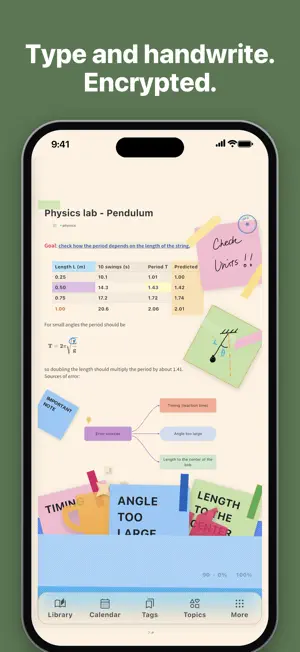
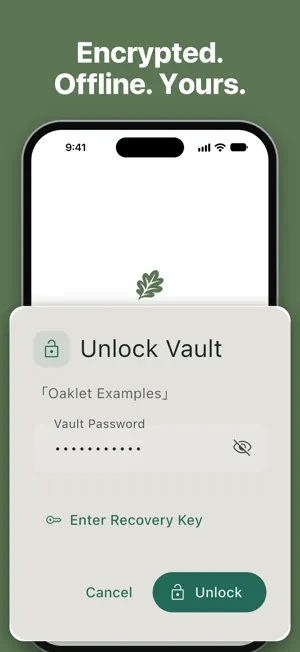
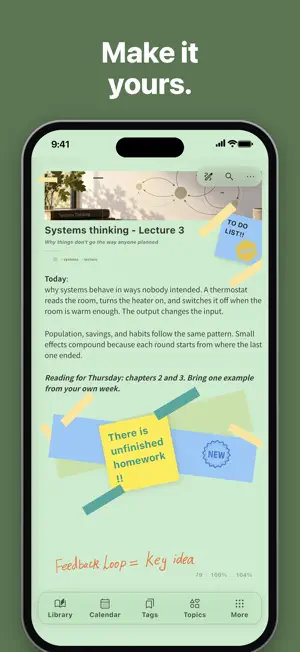
Type and handwrite in the same note. Oaklet Notes puts your writing, Apple Pencil handwriting, whiteboards, tables, and math on one page, and recognizes your handwriting on your device, so search finds what you wrote by hand. Everything stays in an encrypted vault on your device. No account needed, and it works fully offline. ONE NOTE, EVERY WAY YOU THINK • Type with a block editor, then write over it with Apple Pencil — your ink moves with the line it's next to • Handwriting is recognized on your device: search your handwriting, or turn it into typed text • Whiteboards for mind maps and flowcharts, drawing with layers, tables with formulas, LaTeX math, task lists • Lay out blocks side by side, or freely as cards connected with lines • Decorations — stickers, sticky notes, tape, and stamps LOCKED TO YOU • AES-256-GCM encryption protects every note • Vault password, plus an optional Note Password for sensitive notes • Unlock with Face ID or Touch ID • Auto-lock when you step away • Works fully offline, and your notes never pass through our servers • Sign in with Apple is optional and only used to carry a subscription to your other devices. Your notes are never sent to us CONNECT YOUR NOTES • [[WikiLinks]] and ![[embeds]] link notes together, with a backlinks panel • Interactive knowledge graph that shows how your notes connect • Hierarchical tags and full-text search • Calendar view and reminders — browse notes by date, and set a reminder on a note or on its own. By default, notifications show only a generic alert, never your note's title or text AI IF YOU WANT IT — YOUR MODEL, YOUR KEY • AI is optional. Connect a local model running on your own computer, or your own cloud provider's key — the app connects to your provider rather than hosting one • Semantic search with your own model; drafting and rewriting, questions about your notes, and plain-language tool calling ON MAC, IPAD, IPHONE, WINDOWS, AND LINUX • Direct Share — send a note straight to a nearby device. Pair once with a code; transfers are encrypted end to end and go straight from one device to the other • Sync through one of your own computers or your own WebDAV server — the server only ever holds encrypted files • Notes on your own disk, not a vendor's database. Import and export Markdown anytime; export to PDF, HTML, and Word Oaklet Notes is free to use. An optional Pro subscription adds sync, the knowledge graph, AI writing tools, PDF, HTML, and Word export, Face ID unlock, and more — try it free for 30 days in the app. Subscriptions are billed through your Apple ID and can be managed in Settings. Privacy Policy: https://oakletnotes.com/en/privacy Terms of Use (EULA): https://www.apple.com/legal/internet-services/itunes/dev/stdeula/
What’s new
Version 1.1.5 · Updated October 19, 2026
This update includes stability improvements and bug fixes. • Select whole blocks. Tap a whiteboard, drawing, diagram, equation, or image to select it, and drag a selection of several blocks to move them together or into a section. • Handwriting and decorations stay where you put them on every device. A note written on iPad keeps its layout on iPhone and scales to fit. • Dark paper in dark mode: notes on light paper can show on a matching dark paper when the app is dark. Your notes themselves don't change. • Fixed erased handwriting coming back on iPad, and highlighter and pencil strokes changing after you finish writing. • Fixed resting your palm on the iPad screen triggering undo or redo. • Fixed nested tags turning into top-level tags after syncing. • Other fixes and improvements.
App privacy
The developer, Oceanoax LLC, reported these privacy practices to Apple.
Data Linked to You
The following data, which may be collected and linked to your identity, may be used for the following purposes:
- Contact Info: Email Address
- Identifiers: User ID
Used for: App Functionality
Data Not Linked to You
The following data, which may be collected but is not linked to your identity, may be used for the following purposes:
- Purchases: Purchase History
Used for: App Functionality
Alternatives to Oaklet Notes
Looking for apps like Oaklet Notes? Here are 6 similar apps on the App Store. The highest rated is Calclin (2.0/5), and all 6 are free to download.
-
 Memex: Memory Notes
-
 Brenda's Note
1.0
-
 Emily's Notes
-
 Linkdown - Link to Markdown
-
 Calclin
2.0
-
 Scribbl: Notes & PDF Markup
| App | Rating | Price | Last updated | Compare |
|---|---|---|---|---|
| Oaklet Notes | 5.0 / 5 (1 rating) | Free | October 19, 2026 | |
| Memex: Memory Notes | – | Free | Jul 14, 2026 | Compare |
| Brenda's Note | 1.0 / 5 (1) | Free | Apr 28, 2026 | Compare |
| Emily's Notes | – | Free | Apr 15, 2026 | Compare |
| Linkdown - Link to Markdown | – | Free | Jun 2, 2026 | Compare |
| Calclin | 2.0 / 5 (1) | Free | Oct 10, 2026 | Compare |
| Scribbl: Notes & PDF Markup | – | Free | Oct 14, 2026 | Compare |
Compare Oaklet Notes with the top alternatives: ratings, updates, ASO score and keyword gaps →