

Calclin
Azukid.com Productivity iPhoneiPadiPod touch
Calclin is a free Productivity app for iPhone and iPad by Azukid.com. Rated 2.0/5 from 1 ratings. Requires iOS 18.0. Updated October 10, 2026.
- Rating
- 2.0
- 1 ratings
- Price
- Free
- on the App Store
- Size
- 9 MB
- Age 4+
- Updated
- Oct 10
- 2026 · v2.4.0
Screenshots

About Calclin
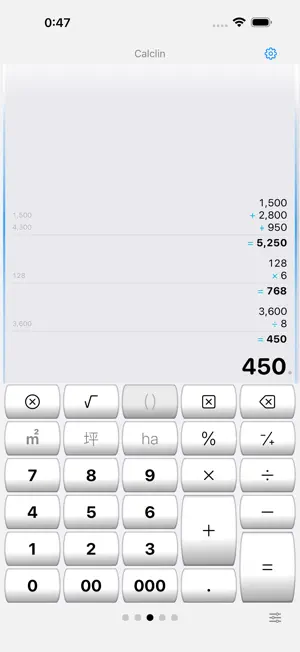
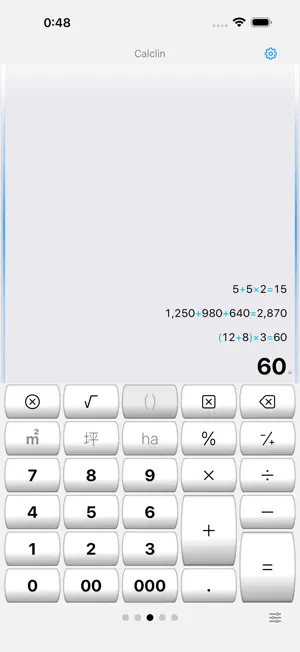
A calculator memo app with history that keeps your calculation process visible like a paper roll. Switch between calculator input and formula input to handle everything from everyday math to calculations you want to keep as records. ■ Calculator mode and Formula mode Calculator mode evaluates left to right (5+5×2=20). Formula mode respects operator precedence (5+5×2=15) and supports parentheses and roots. Switch anytime from the input row, changing the calculation style without leaving the active input area. ■ Paper-roll style history Expressions and answers stay on the roll from the top, so you can see the flow of your calculation at a glance. Subtle side lines and top shading keep each frame easy to distinguish, even with multiple rolls. In calculator mode, a running total can be shown while you type. ■ Edit rows and add notes In calculator mode, tap any roll row to edit and recalculate. Add a note to any history entry. Swipe left to delete; swipe right to add a memo, copy the expression, or copy the answer. ■ PDF export Export a calculation roll as a PDF whenever you want to keep it. ■ Use multiple calculators side by side Up to a triple deck. Add or remove panels with the [+][−] header buttons, swipe or tap to switch, and double-tap to toggle between 1-panel and 2-panel views. ■ Unit-aware calculations Calculate with units of length, area, volume, and weight. Press a different unit key to change only the unit, or press the same unit key again to convert the number. Tap an underlined unit to pick from the conversion list. ■ TAX+ and TAX− keys Add tax to, or remove tax from, the value you are entering or the answer you just calculated. Set up to three tax rates; each key shows its rate. ■ Customizable keyboard Long-press any key to define it, and merge keys vertically or horizontally to create larger keys. Switch between 5 layouts (30 keys each), and export or import your arrangement. ■ Flexible display settings Choose the decimal point and grouping symbols, the grouping style (every 3 or 4 digits, Indian style), the number of decimal digits, and the rounding mode (including round half to even). Answers are kept at full precision; rounded answers are marked with "≒", and tapping one shows every digit. Pick Auto, Light, or Dark appearance, and enlarge or reduce text size. Your settings are restored on next launch. ■ Beginner and Expert modes Beginner mode shows labels and tips for each button. Once you are comfortable, Expert mode unlocks advanced operations such as long-press key editing. The calculation engine uses C/C++ fixed-point decimal, stored internally in BCD arrays. Note: Data is not encrypted. Please do not store personal or confidential information.
What’s new
Version 2.4.0 · Updated October 10, 2026
■ Answers kept at full precision - Answers, not just intermediate results, are now kept at full precision - The display is rounded to your chosen number of digits. Rounded answers are marked with "≒"; tap one to see every digit ■ Clearer unit handling - Pressing a different unit key changes only the unit and keeps the number e.g. 60m², press [坪] once: 60坪 - Pressing the same unit key again converts the number e.g. 60m², press [坪] twice: 18.15坪 - Tap an underlined unit to open the conversion list and convert to the unit you choose ■ New TAX+ and TAX− keys - Set up to three tax rates in "Key settings"; each key shows its rate - Works on the value you are entering and on the answer you just calculated ■ Usability improvements - Moving between Formula and Calculator modes feels more natural - Redesigned the Formula / Calculator switch - In Expert mode, switching between the roll and the keyboard is twice as fast - Redesigned how options are chosen in Settings
App privacy
The developer, Azukid.com, reported these privacy practices to Apple.
Data Not Collected
The developer does not collect any data from this app.