

Scribbl: Notes & PDF Markup
Zade Nassoura Productivity iPad
Scribbl: Notes & PDF Markup is a free Productivity app for iPad by Zade Nassoura. Requires iOS 18.0. Updated October 26, 2026.
- Price
- Free
- on the App Store
- Size
- 61 MB
- Age 4+
- Updated
- Oct 26
- 2026 · v1.6.0
Screenshots

About Scribbl: Notes & PDF Markup
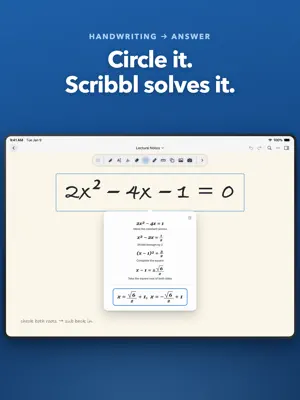
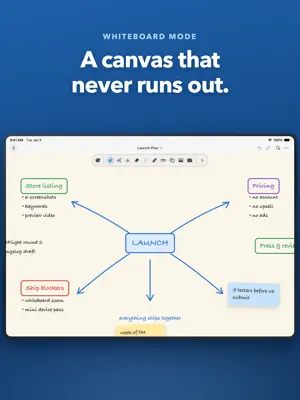
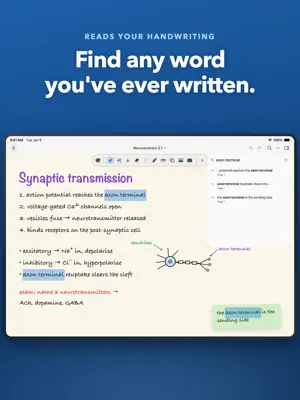
Scribbl: handwriting, math, and markup in one free notebook. Take handwritten notes, mark up PDFs, solve equations, and record lectures - then watch your handwriting turn into typed text as you write, with no mode to switch into and nothing to convert by hand. WRITE, AND KEEP THE TEXT • Your handwriting becomes typed text in place, automatically, as you write. • No text box to tap into first. No lasso-then-convert. Just write. • Handwritten equations become properly typeset math the same way. • Your original writing stays underneath, so every conversion is reversible. • Recognition runs on your iPad in 10+ languages - offline, after a one-time setup. FOR STUDENTS: KEEP UP IN CLASS • Take handwritten notes and annotate lecture slides or textbook PDFs. • Record the lecture while you write - playback follows the page. • Search your handwriting to find anything you wrote all semester. • Solve handwritten equations and see the working, step by step. • Cover answers with tape, then tap to reveal - active recall, built in. • Organize everything into folders, favorites and tags. FOR PROFESSIONALS: MARK UP ANYTHING • Import any PDF and write on it with every tool in the app. • Export back to PDF with your annotations, or as an image. • Present full screen with a laser pointer to guide attention. • Brainstorm on a true infinite canvas that grows with your ideas. • Capture meetings with synced audio and handwritten notes together. BUILT FOR APPLE PENCIL • 3 custom-built pens: ballpoint, fountain pen and watercolor brush. • A fountain pen that thins and swells with the speed of your hand. • 30+ paper templates: ruled, dotted, grid, Cornell, isometric, music staves, storyboard, planner and more. • Choose any page size, portrait or landscape, and rotate or lock any page. • Highlighter, washi tape, ruler, and shapes that snap into place. EDIT WITH YOUR PEN • A precise eraser that takes a clean bite out of a single stroke. • Lasso to move, resize, restyle, duplicate or convert a selection. • Add photos and stickers, layered above or below your writing. • Save any drawing to a reusable sticker library. • Unlimited undo and redo. WORK YOUR WAY • Rearrange or hide any of the 16 tools in the toolbar. • Build pen presets and switch between them instantly. • Choose paper colors, line colors, a theme and an accent color. • Save a whole setup as a profile and export it to share. FREE, AND PRIVATE Scribbl is completely free. No subscription, no in-app purchases, no locked features, and no account to create. Your notes stay on your iPad. There is no server holding your work and no AI service reading it - handwriting recognition and math run entirely on-device. Backing up to your own iCloud is optional and off until you turn it on. Privacy Policy: https://typhoon-dew-06f.notion.site/Privacy-Policy-3c051befa8a5802b94ecc3bf40015023?pvs=74
What’s new
Version 1.6.0 · Updated October 26, 2026
- Rebuilt the pen to feel better while writing. - More accurate arrow recognition. - More precise eraser. - Less lag on busy pages and whiteboards. - Bug fixes and performance improvements.
App privacy
The developer, Zade Nassoura, reported these privacy practices to Apple.
Data Not Linked to You
The following data, which may be collected but is not linked to your identity, may be used for the following purposes:
- Identifiers: Device ID
- Usage Data: Product Interaction
- Diagnostics: Performance Data, Other Diagnostic Data
- Other Data: Other Data Types
Used for: Analytics, App Functionality
Alternatives to Scribbl: Notes & PDF Markup
Looking for apps like Scribbl: Notes & PDF Markup? Here are 6 similar apps on the App Store. The highest rated is Noteora - Notes & Handwriting (5.0/5), and all 6 are free to download.
-
 Noteora - Notes & Handwriting
5.0
-
 Notely - Notes & PDF app
4.3
-
 ScribblePad: Notes & PDF
5.0
-
 AINotes: Note Taking & PDF
4.6
-
 OpenNotes: Notes & PDF Markup
4.4
-
 UltraNotes - Note Taking & PDF
4.6
| App | Rating | Price | Last updated | Compare |
|---|---|---|---|---|
| Scribbl: Notes & PDF Markup | – | Free | October 26, 2026 | |
| Noteora - Notes & Handwriting | 5.0 / 5 (4) | Free | Nov 10, 2026 | Compare |
| Notely - Notes & PDF app | 4.3 / 5 (9) | Free | Oct 27, 2026 | Compare |
| ScribblePad: Notes & PDF | 5.0 / 5 (3) | Free | Sep 7, 2026 | Compare |
| AINotes: Note Taking & PDF | 4.6 / 5 (16) | Free | Oct 29, 2026 | Compare |
| OpenNotes: Notes & PDF Markup | 4.4 / 5 (39) | Free | Nov 3, 2026 | Compare |
| UltraNotes - Note Taking & PDF | 4.6 / 5 (190) | Free | Nov 9, 2026 | Compare |