

Notely - Notes & PDF app
JUSTIN WEI SUN Productivity iPhoneiPadiPod touch
Notely - Notes & PDF app is a free Productivity app for iPhone and iPad by JUSTIN WEI SUN. Rated 4.4/5 from 10 ratings. Requires iOS 17.0.
- Rating
- 4.4
- 10 ratings
- Price
- Free
- on the App Store
- Size
- 22 MB
- Age 4+
- Updated
- Oct 27
- 2026 · v1.4.3
Screenshots
Save to Pinterest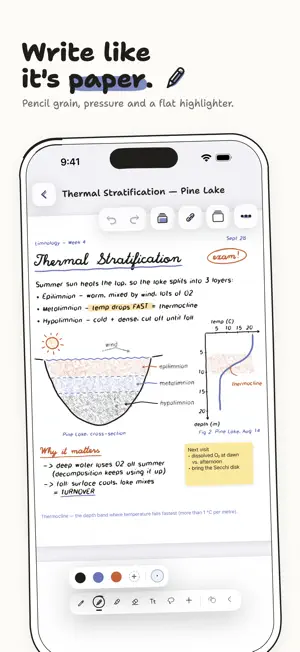


About Notely - Notes & PDF app
Notely is a notebook for iPad and iPhone that feels like paper and keeps everything on your device. Write by hand, mark up PDFs, record a lecture while you take notes, then study from what you wrote. There's no account and no cloud. Your notes stay where you wrote them. New in 1.4 Notely has a hand-drawn look now, with drawn icons and handwritten headings. I also rebuilt the pencil from scratch. It picks up the grain of the paper and responds to pressure, and if you tilt Apple Pencil on its side it shades like a real one. Record the lecture with your notes Press record and keep writing. Notely transcribes on your device as you go and remembers when each stroke was written. Later, tap a line of ink and the audio jumps to what was being said at that moment. Tapping a line in the transcript works too. Transcription depends on on-device speech support for your language and device. If it isn't available, Notely still saves the audio. Study from your own notes Make flashcards yourself, or lay tape over part of a page and quiz yourself on what's underneath. Cards come back on a spaced review schedule, and you can turn on reminders for when they're due. On devices with Apple Intelligence, Notely can also draft cards from a note and answer questions about it, with a link back to the page each answer came from. You review every draft before it's saved. Handwriting that turns into text Tap the handwriting button and Notely turns your writing into typed text, on the device. Anything it can't read confidently stays as ink. Search also looks inside your handwriting, typed text and PDFs. Pages or open space Use Letter or A4 pages, or switch a note to an infinite canvas when you need room to think. There's always a blank page waiting at the end, and if you don't use it, it's left out when you export. Templates include Cornell notes, dot grid, lab reports, math and physics pages, and music staff. Import PDFs and write on them, or scan paper pages with the camera. Private by default Notely works offline, with no analytics and no ads. Lock any note with Face ID or a password. Locked notes are kept out of Spotlight search and the widget. A few more things - Export pages as PDF or PNG - Back up notes to a .vectora archive and restore them without overwriting anything - Bring notebooks over from Goodnotes or Notability (PDF exports work best; native import is experimental) - A home screen widget with recent notes and a New note button - Shortcuts actions to create a quick note or open recent notes - Folders, tags and smart collections Notely is made by one person. If something bugs you, the support page reaches me directly.
Ratings & reviews
4.4
10 ratings
What’s new
Version 1.4.3 · Updated October 27, 2026
Faster everywhere • Your notes appear almost instantly when you open the app • Opening and closing big notes is much quicker • Exporting a long note as a PDF now takes seconds instead of minutes • Notes take up about half the space on your iPad, with every stroke kept exactly as you wrote it • Much less work while you write, so your iPad stays cooler and the battery lasts longer • Photos keep their original quality and take up less space Apple Pencil • Squeeze or double-tap your Apple Pencil (set to "Show Tool Palette") to open a ring of tools, colours and sizes right at the tip • Strokes now end exactly where you lift the Pencil, with no extra tail Fixes • Ink stays sharp at every zoom level • No more white streaks while erasing • Double-tap now opens the tool ring reliably • Fixed slow loading on launch
App privacy
The developer, JUSTIN WEI SUN, reported these privacy practices to Apple.
Data Not Collected
The developer does not collect any data from this app.
Alternatives to Notely - Notes & PDF app
Looking for apps like Notely - Notes & PDF app? Here are 6 similar apps on the App Store. The highest rated is Simplify Notes: PDF Notebook (5.0/5), and all 6 are free to download.
-
 Simplify Notes: PDF Notebook
5.0
-
 ScribblePad: Notes & PDF
5.0
-
 JustNotes - Notetaking/Markup
5.0
-
 Noteara: Notes, AI, Whiteboard
4.3
-
 Better Notes: Handwriting
-
 NoteApp, Mindmap, PDF: InkNode
4.3
| App | Rating | Price | Last updated | Compare |
|---|---|---|---|---|
| Notely - Notes & PDF app | 4.4 / 5 (10 ratings) | Free | October 27, 2026 | |
| Simplify Notes: PDF Notebook | 5.0 / 5 (3) | Free | Nov 9, 2026 | Compare |
| ScribblePad: Notes & PDF | 5.0 / 5 (3) | Free | Sep 7, 2026 | Compare |
| JustNotes - Notetaking/Markup | 5.0 / 5 (1) | Free | Oct 18, 2026 | Compare |
| Noteara: Notes, AI, Whiteboard | 4.3 / 5 (3) | Free | Sep 11, 2026 | Compare |
| Better Notes: Handwriting | – | Free | Aug 18, 2026 | Compare |
| NoteApp, Mindmap, PDF: InkNode | 4.3 / 5 (7) | Free | Aug 10, 2026 | Compare |