

Brenda's Note
Witdono Witdono Productivity iPad
Brenda's Note is a free Productivity app for iPad by Witdono Witdono. Rated 1.0/5 from 1 ratings. Requires iOS 17.0. Updated April 28, 2026.
- Rating
- 1.0
- 1 ratings
- Price
- Free
- on the App Store
- Size
- 2 MB
- Age 4+
- Updated
- Apr 28
- 2026 · v1.1
Screenshots
About Brenda's Note
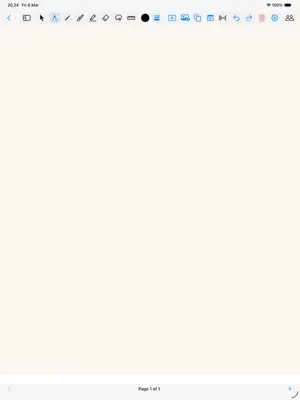
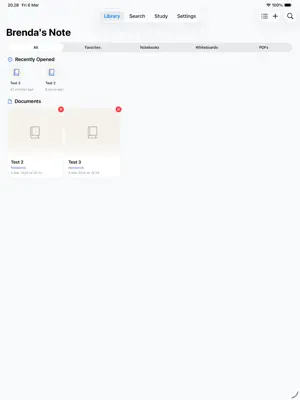
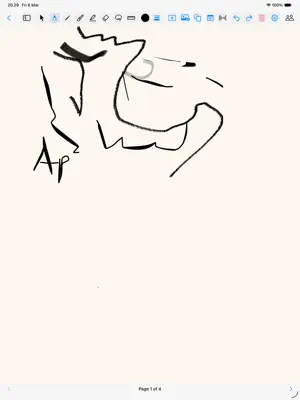
Brenda's Note — Your Digital Notebook for iPad Turn your iPad into the ultimate note-taking companion. Whether you're jotting down lecture notes, sketching ideas on a whiteboard, or annotating PDF documents, Brenda's Note gives you the tools to capture your thoughts naturally with Apple Pencil. NOTEBOOKS & WHITEBOARDS Create multi-page notebooks with various paper templates — lined, grid, dotted, or blank. Switch to whiteboard mode for unlimited creative space. PDF ANNOTATION Import PDF documents and annotate them directly. Highlight key passages, add handwritten notes in the margins, and navigate with ease using the built-in outline viewer. HANDWRITING RECOGNITION Search across all your notes using handwriting recognition powered by Apple's Vision framework. Find what you wrote, even in your own handwriting. SMART ORGANIZATION Keep everything tidy with folders and subfolders. Mark your most-used notes as favorites for quick access. All your notes are sorted by recent activity so you always pick up where you left off. BUILT FOR iPAD & APPLE PENCIL Designed from the ground up for iPad with full Apple Pencil support — pressure sensitivity, tilt, and all the drawing tools you need: pen, pencil, marker, eraser, ruler, and lasso.
What’s new
Version 1.1 · Updated April 28, 2026
Goodnotes-style upgrades for typed objects + smarter collaboration. NEW • Tap-to-place text — boxes drop where you tap (no more re-positioning) • Inline format toolbar appears below the text you're editing (color, size, B/I, alignment) • Auto-grow text width as you type • Universal object selection — tap any text/sticky/image to select with any tool active • Lasso multi-select — wrap items, then drag/delete the whole group together • Pinch-to-zoom on the notebook canvas (0.5×–4×) • Long-press Undo to Redo (frees toolbar space) • Hover tooltips on every toolbar button (Magic Keyboard pointer) TOOL UPGRADES • Eraser: Stroke (whole-line) and Pixel modes • Highlighter: Straight Lines toggle that snaps to the ruler • Pen: Pressure Sensitivity toggle • Color: Opacity slider applies to every ink tool COLLABORATION • New Wi-Fi mode option alongside Bluetooth — pick the right transport for your network • Connection stability rebuilt: 45-second heartbeat, transient-blip grace period, exponential-backoff reconnect, foreground re-trigger when iPad wakes POLISH • Sticky notes: bigger drag border, less keyboard interference • New Document sheet auto-expands so the keyboard never covers the form • Done button on the keyboard accessory bar for both text and sticky elements • Canvas backgr
App privacy
The developer, Witdono Witdono, reported these privacy practices to Apple.
Data Not Collected
The developer does not collect any data from this app.
Alternatives to Brenda's Note
Looking for apps like Brenda's Note? Here are 6 similar apps on the App Store. The highest rated is Libreto (5.0/5), and all 6 are free to download.
-
 Libreto
5.0
Libreto
5.0
-
 Sorcerer's Note
-
 Xen Note - PDF Markup & Notes
-
 Scribbl: Notes & PDF Markup
-
 Nib - Handwritten Diary
-
 Pensieve Note
5.0
Pensieve Note
5.0
| App | Rating | Price | Last updated | Compare |
|---|---|---|---|---|
| Brenda's Note | 1.0 / 5 (1 rating) | Free | April 28, 2026 | |
| Libreto | 5.0 / 5 (1) | Free | Oct 5, 2026 | Compare |
| Sorcerer's Note | – | Free | Aug 18, 2026 | Compare |
| Xen Note - PDF Markup & Notes | – | Free | Aug 23, 2026 | Compare |
| Scribbl: Notes & PDF Markup | – | Free | Oct 5, 2026 | Compare |
| Nib - Handwritten Diary | – | Free | Sep 28, 2026 | Compare |
| Pensieve Note | 5.0 / 5 (5) | Free | Feb 27, 2026 | Compare |
Compare Brenda's Note with the top alternatives: ratings, updates, ASO score and keyword gaps →