

Keystone: Project Tracker
Ionut Mocanu Productivity iPhoneiPadiPod touch
Keystone: Project Tracker is a free Productivity app for iPhone and iPad by Ionut Mocanu. Requires iOS 17.0. Updated October 9, 2026.
- Price
- Free
- on the App Store
- Size
- 6 MB
- Age 4+
- Updated
- Oct 9
- 2026 · v3.0.0
Screenshots


About Keystone: Project Tracker
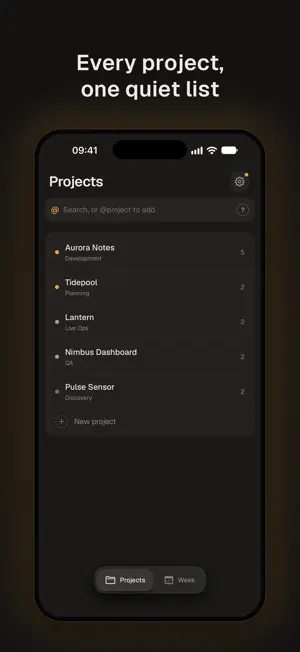
Keystone is a calm home for your projects and the work inside them. Plan the week on your iPhone, and when a task is code, hand it to the coding agent on your Mac and review what it did from wherever you are. EVERY PROJECT IN ONE LIST Scan your active projects at a glance, each marked by its priority. Tap a project to see its open tasks, fold completed work away, and archive the project when it's done. HAND TASKS TO YOUR CODING AGENT Connect a project to Claude Code, Codex or another coding agent with one copied setup prompt. Open a task and turn on Send to Claude Code: the Keystone Listener on your Mac picks it up and runs the agent in your own repository, with your own account. Keystone shows each task's progress (Shared, Working, Ready to review) and tells you when the agent needs permission. REVIEW BEFORE ANYTHING SHIPS When the agent finishes, read its summary, the checks it ran and the branch it used. Review & push lists every changed file and the unpushed commits; open any file for a line-by-line diff. Nothing is committed until you approve it. Keystone then commits to a new branch, pushes it and opens a pull request. Only you mark a task complete. PLAN THE WEEK Week opens on today. Plan projects for each day, schedule tasks, and see what's coming. Swipe up on the tabs to see everything that needs you. A Home Screen widget keeps today's tasks nearby. CAPTURE WORK QUICKLY Type into the command bar to add a task: @project picks the project (or creates it), ?today, ?tomorrow or ?mon schedules it, and !high sets the priority. Copy open tasks or share them as a Markdown file. YOUR DATA STAYS YOURS Your projects sync through your private iCloud. Export a full backup or save one to iCloud from Settings. Coding-agent features are optional: only the tasks you choose to send leave your iPhone, and your code never leaves your Mac. No ads, no tracking. Built for iPhone. The coding-agent features need a Mac with Claude Code or Codex installed and the free Keystone Listener.
What’s new
Version 3.0.0 · Updated October 9, 2026
Keystone 3.0 brings your coding agent into your plan. - Send any task to Claude Code or Codex on your Mac and follow its progress. - Read the agent's report, then review every changed file and diff before you commit and open a pull request from your iPhone. - A new, quieter design: Projects and Week, priority dots, and a swipe-up tray for everything that needs you.
App privacy
The developer, Ionut Mocanu, reported these privacy practices to Apple.
Data Not Collected
The developer does not collect any data from this app.
Alternatives to Keystone: Project Tracker
Looking for apps like Keystone: Project Tracker? Here are 6 similar apps on the App Store. The highest rated is Ganttly: Project Planner (5.0/5), and all 6 are free to download.
-
 Tutoriuss
-
 Ganttly: Project Planner
5.0
-
 SimpleTime – Time Tracker
5.0
-
 Class Planner: Calendar, Tasks
3.0
-
 Daily Planner: Planelle
4.7
-
 AnyTranslator: AI Translate
4.4
| App | Rating | Price | Last updated | Compare |
|---|---|---|---|---|
| Keystone: Project Tracker | – | Free | October 9, 2026 | |
| Tutoriuss | – | Free | Dec 20, 2024 | Compare |
| Ganttly: Project Planner | 5.0 / 5 (5) | Free | Oct 27, 2026 | Compare |
| SimpleTime – Time Tracker | 5.0 / 5 (5) | Free | Oct 19, 2026 | Compare |
| Class Planner: Calendar, Tasks | 3.0 / 5 (1) | Free | Aug 14, 2025 | Compare |
| Daily Planner: Planelle | 4.7 / 5 (107) | Free | Oct 15, 2026 | Compare |
| AnyTranslator: AI Translate | 4.4 / 5 (5) | Free | Oct 20, 2026 | Compare |