

SimpleTime – Time Tracker
Luca Efinger Productivity iPhoneiPadiPod touchMacApple Watch
SimpleTime – Time Tracker is a free Productivity app for iPhone and iPad by Luca Efinger. Rated 5.0/5 from 5 ratings. Requires iOS 26.0.
- Rating
- 5.0
- 5 ratings
- Price
- Free
- on the App Store
- Size
- 20 MB
- Age 4+
- Updated
- Oct 19
- 2026 · v4.7
Screenshots


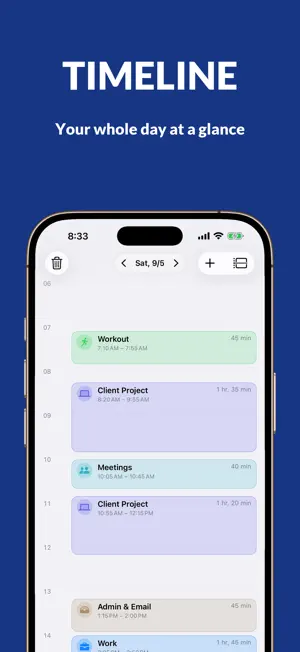

About SimpleTime – Time Tracker
SimpleTime tracks where your time goes. One tap starts it, one tap stops it. No account, no sign-up, no ads. Your hours stay on your device and in your iCloud. TRACKING • One tap starts and stops – in the app, from the Home Screen, from Control Center, from iPhone search, or with Siri • Tasks with subtasks, nested as deeply as your work is • Forgot to start? Add time afterwards and edit it whenever you like • Colour, symbol, favourites, and an order you set yourself YOUR DAY • A list or a timeline from 0 to 24, with a marker for the current time • Notes on any entry • How today compares to yesterday, right at the top INSIGHTS • Pie charts by task and by productivity • Day, week, month, year • Statistics: comparison with the previous period, trend, spread across the day, longest and shortest entry • Every task with its own numbers – first entry, longest, this week, this year • Share any chart as an image REPORTS AND EXPORT • A PDF report whose sections you choose and arrange yourself • CSV for Excel and Numbers • Backups in iCloud Drive, automatic and password-encrypted if you want WIDGETS AND SIRI • Today, running task, and week on your Home Screen • The running time on the Lock Screen and in the Dynamic Island • A switch in Control Center that starts and stops tracking • Siri and Shortcuts: start, stop, or ask what’s running ON EVERY DEVICE • iPhone, iPad, and Mac, kept in sync through iCloud • 41 languages, independent of your device language • VoiceOver and Dynamic Type throughout YOUR DATA • App lock with Face ID, Touch ID, or a code of your own • Privacy on one page: every permission and all your data at a glance • No accounts, no servers of ours, no ads, no tracking • Erase everything at once – on the device, in iCloud, and in the backups SIMPLETIME PRO Everything above stays free. Pro adds: • Apple Watch: start and stop from your wrist, start earlier, keep an eye on your day, week and goals – with the running time on your watch face • Reviews: your week, month and year as cards – to page through and share • Places: tasks start on their own when you arrive – after a waiting time, if you like • Year at a glance: every day of the year as one picture, with your streaks • Goals per task – for the day, the week, or the month • Focus filter: your work focus turns on, the list shows only work, the clock is already running • A quick-start widget you fill yourself • Seven accent colours or one of your own, plus sixteen app icons • Extra sections in the PDF report: trend, daily spread, comparison, goals Pro comes monthly, yearly, or once and for good. New subscribers get a free week, and with Family Sharing up to six people can use Pro. Prices are shown in the app. Monthly and yearly renew automatically until you cancel, which you can do at any time in your App Store settings. Whatever comes later is included. Terms of Use: https://www.apple.com/legal/internet-services/itunes/dev/stdeula/ Privacy Policy: https://simple-time.app/privacy/ Made for anyone who wants to know where their time actually goes – at work, at university, in training, or for themselves.
Ratings & reviews
5.0
5 ratings
What’s new
Version 4.7 · Updated October 19, 2026
Safer, more complete, more accurate: SimpleTime 4.7 is a thorough overhaul. • App lock: it now works reliably – also after a launch in the background and in every window on iPad and Mac – and Siri doesn’t name any tasks while the app is locked. With your own code and an emergency password, it locks completely after ten wrong attempts. New: you choose whether notifications and widgets then show names or stay neutral. • New: if you like, entries appear in the time zone where you recorded them – handy when travelling. • Backups now also include your goals and all reminder settings, and restoring is safer. Automatic backups no longer hold up the app. • More accurate numbers: goals and comparison in the current month, timesheet totals, the week around New Year and days when the clocks change. The Day view now keeps counting while tracking runs. • Times on the timeline and in the PDF use the 12- or 24-hour format of your region. • Closing unsaved changes now asks first. Charts and widgets work better with VoiceOver and large text. Plus many small fixes, including for widgets and the Mac. Please update SimpleTime on all your devices so they sync tasks and entries by the same rules.
App privacy
The developer, Luca Efinger, reported these privacy practices to Apple.
Data Not Collected
The developer does not collect any data from this app.
Alternatives to SimpleTime – Time Tracker
Looking for apps like SimpleTime – Time Tracker? Here are 6 similar apps on the App Store. The highest rated is Timelines Time Tracking (4.8/5), and all 6 are free to download.
-
 Timetrack mini @ Homescreen
4.4
Timetrack mini @ Homescreen
4.4
-
 Timery: Time Tracker Stopwatch
-
 aTimeLogger - Personal Tracker
4.7
aTimeLogger - Personal Tracker
4.7
-
 Timelines Time Tracking
4.8
Timelines Time Tracking
4.8
-
 Timery: Time Tracker
4.8
Timery: Time Tracker
4.8
-
 ATracker Time Tracker
4.7
ATracker Time Tracker
4.7
| App | Rating | Price | Last updated | Compare |
|---|---|---|---|---|
| SimpleTime – Time Tracker | 5.0 / 5 (5 ratings) | Free | October 19, 2026 | |
| Timetrack mini @ Homescreen | 4.4 / 5 (11) | Free | Aug 26, 2026 | Compare |
| Timery: Time Tracker Stopwatch | – | Free | Aug 6, 2026 | Compare |
| aTimeLogger - Personal Tracker | 4.7 / 5 (313) | Free | Oct 21, 2026 | Compare |
| Timelines Time Tracking | 4.8 / 5 (1,563) | Free | Oct 14, 2026 | Compare |
| Timery: Time Tracker | 4.8 / 5 (1,134) | Free | Sep 17, 2026 | Compare |
| ATracker Time Tracker | 4.7 / 5 (3,197) | Free | Oct 19, 2026 | Compare |