

aTimeLogger - Personal Tracker
BGCI Productivity iPhoneiPadiPod touchApple Watch
aTimeLogger - Personal Tracker is a free Productivity app for iPhone and iPad by BGCI. Rated 4.7/5 from 313 ratings. Requires iOS 17.0.
- Rating
- 4.7
- 313 ratings
- Price
- Free
- on the App Store
- Size
- 127 MB
- Age 4+
- Updated
- Oct 21
- 2026 · v1.7.0
Screenshots
About aTimeLogger - Personal Tracker
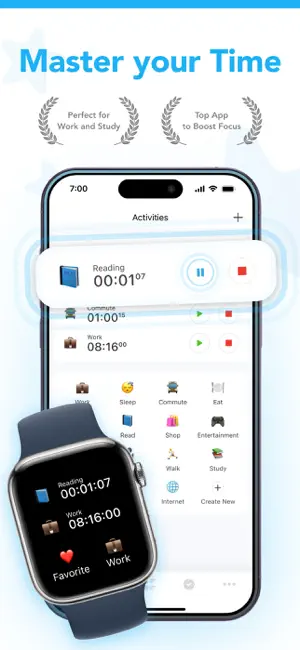
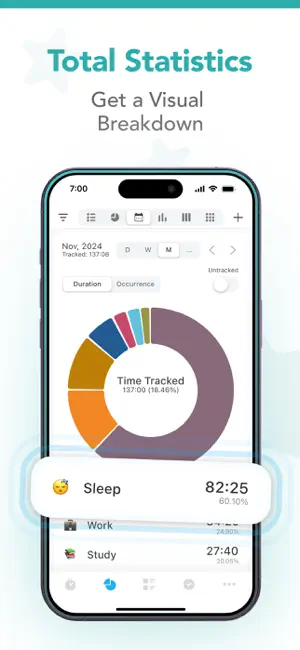
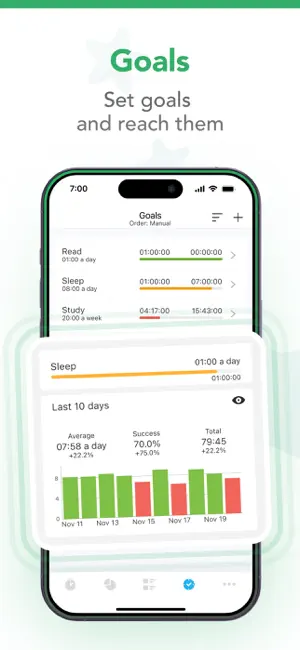
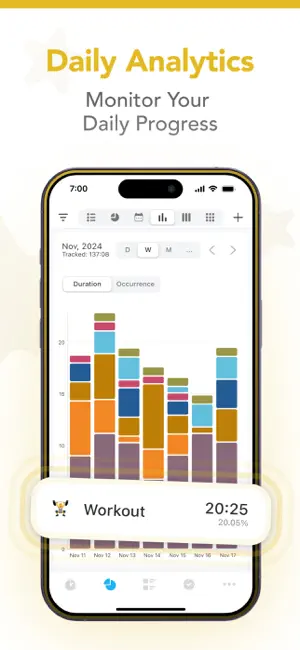
Track your time with single touch in aTimeLogger Pro! Spending only a few minutes a day on this app you will get daily, weekly and monthly statistics in the form of diagrams and graphs. Using this data you'll be able to control and manage your time. aTimeLogger Pro is the right solution for everyone: - business people with an intensive daily routine; - sportsmen who value every minute of their day; - freelancers; - everyone who is interested in what activities they spend their day on and those who want to control and optimize their time. Application features: - easy and intuitive interface - goals - pause/resume activities - groups - pomodoro - simultaneous activities (enable them in Settings) - many statistics available in form of graphs and pie charts - reports in different formats (CSV and HTML) - a huge number of icons for activity types and ability to upload custom icons - Today Extension for quick start/stop - Apple Watch integration - Siri Shortcuts - Widgets for watching statistics and for fast start and stop - the best support :-) STANDARD FEATURES Standard features include: - Unlimited activity types - Total Pie charts - Duration statistics - Reports in CSV - Backup and Restore PREMIUM FEATURES The optional Premium gives access to the following features: - Pomodoro - Daily bar charts - Custom fields - Occurrence goals - Occurrence statistics - Calendar integration - Geo notifications - Countdown timer SUBSCRIPTION Subscription plan provides all features above + sync across multiple devices. You also get access to web application. - aTimeLogger subscriptions purchased in-app renew monthly or yearly depending on your plan. Plan pricing may vary by country - Payment will be charged to App Store account at confirmation of purchase - Subscription automatically renews unless auto-renew is turned off at least 24-hours before the end of the current period - Account will be charged for renewal within 24-hours prior to the end of the current period, and identify the cost of the renewal - Subscriptions may be managed by the user and auto-renewal may be turned off by going to the user's Account Settings after purchase Support: mail us at [email protected] Privacy policy: http://timetrack.io/privacy.html Terms of use: http://timetrack.io/terms.html
Ratings & reviews
4.7
313 ratings
What’s new
Version 1.7.0 · Updated October 21, 2026
CUSTOM FIELDS • New field type, List of values: set up the values in advance, then pick one for each record • All statistics by field are on the Statistics screen — pick the field in its settings • History rows show their field values; turn off "Show in history" in a field's editor to hide one • History search also finds records by the value picked from a field's list • New "Set field value" action for Siri and Shortcuts sets a field on the running activity, even one started from a widget or an automation HISTORY AND STATISTICS • A period still under way is compared with the same stretch of the previous one: Monday to Wednesday against last Monday to Wednesday, not the whole of last week • A record made at a place shows the place after its type, and history search finds records by place name APPLE HEALTH • A workout's temperature and humidity from Apple Health appear in its summary and in the export • "All workouts" logs every workout as one type; a sport with a type of its own still goes to that type • Track your day yourself? Turn off "Offer updates to logged activities", and Health only offers what is missing from your log Statistics by field, field values in history, the period comparison and Apple Health are in the new design — turn it on in Settings. Statistics by field and Apple Health are Premium features. Questions or ideas? [email protected]
App privacy
The developer, BGCI, reported these privacy practices to Apple.
Data Used to Track You
The following data may be used to track you across apps and websites owned by other companies:
- Identifiers: Device ID
Data Not Linked to You
The following data, which may be collected but is not linked to your identity, may be used for the following purposes:
- Identifiers: Device ID
- Usage Data: Product Interaction
- Location: Precise Location
- Contact Info: Email Address
- User Content: Customer Support
- Diagnostics: Crash Data
Used for: Analytics, App Functionality
Alternatives to aTimeLogger - Personal Tracker
Looking for apps like aTimeLogger - Personal Tracker? Here are 6 similar apps on the App Store. The highest rated is iHour - Focus Time Tracker (4.8/5), and all 6 are free to download.
-
 iHour - Focus Time Tracker
4.8
iHour - Focus Time Tracker
4.8
-
 Timelines Time Tracking
4.8
Timelines Time Tracking
4.8
-
 ATracker Time Tracker
4.7
ATracker Time Tracker
4.7
-
 BlockyTime Lite - Time Tracker
4.8
BlockyTime Lite - Time Tracker
4.8
-
 Timery: Time Tracker
4.8
Timery: Time Tracker
4.8
-
 Tyme | Time Tracking
4.5
Tyme | Time Tracking
4.5
| App | Rating | Price | Last updated | Compare |
|---|---|---|---|---|
| aTimeLogger - Personal Tracker | 4.7 / 5 (313 ratings) | Free | October 21, 2026 | |
| iHour - Focus Time Tracker | 4.8 / 5 (815) | Free | Oct 19, 2026 | Compare |
| Timelines Time Tracking | 4.8 / 5 (1,562) | Free | Oct 14, 2026 | Compare |
| ATracker Time Tracker | 4.7 / 5 (3,196) | Free | Oct 19, 2026 | Compare |
| BlockyTime Lite - Time Tracker | 4.8 / 5 (373) | Free | Apr 24, 2026 | Compare |
| Timery: Time Tracker | 4.8 / 5 (1,133) | Free | Sep 17, 2026 | Compare |
| Tyme | Time Tracking | 4.5 / 5 (54) | Free | Oct 15, 2026 | Compare |