

Ganttly: Project Planner
Dao Nguyen Productivity iPhoneiPadiPod touch
Ganttly: Project Planner is a free Productivity app for iPhone and iPad by Dao Nguyen. Rated 5.0/5 from 5 ratings. Requires iOS 18.5.
- Rating
- 5.0
- 5 ratings
- Price
- Free
- on the App Store
- Size
- 7 MB
- Age 4+
- Updated
- Oct 27
- 2026 · v3.1.1
Screenshots



About Ganttly: Project Planner
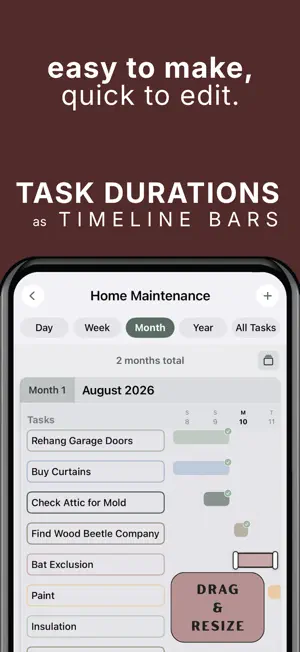
Simple, personal project management. A minimalist project planner for your personal plans, projects, and goals. Ganttly turns projects and to-do lists into clear, beautiful task-duration timelines. See what’s happening now, what comes next, and how everything fits together across days, weeks, months, or years. No Sign-Up Required No Ads No Tracking or Analytics Private by Design Traditional project management software is often complicated, cluttered, and built for corporate teams. Planning your own projects (from a weekend DIY to your dream wedding) should feel inspiring, not intimidating. Ganttly trades complexity for clarity, giving you powerful visual planning tools without the corporate-software feel. TASK DURATIONS VISUALIZED Turn ordinary tasks into horizontal duration bars to stay on track when plans and schedules inevitably become too complex. See when each task starts, how long it lasts, where tasks overlap, and what’s coming next. EDIT DIRECTLY ON THE TIMELINE Plans change. Ganttly makes adjusting them easy. Select a task bar, drag it to a new date or time, or resize its duration directly on the timeline. Your plan stays flexible without forcing you through complicated menus. PLAN ACROSS DAYS, WEEKS, MONTHS & YEARS Zoom in for detailed daily planning or step back to see the bigger picture. Day, Week, Month, Year, and All Tasks views help you understand both short-term details and long-term progress. SUBTASKS & PROGRESS Break larger tasks into manageable subtasks and track completion as you go. Progress percentages and clear completion indicators make it easy to see what’s finished and what still needs attention. RECURRING PROJECTS Some plans happen more than once. Restart completed recurring projects while preserving the structure and spacing of your original timeline. COLLABORATE TOGETHER Share projects with other people and choose whether they can view or edit. Changes stay synced through Apple iCloud so everyone can keep working from the same project timeline. HOME SCREEN WIDGETS Keep your projects visible without opening the app. See what’s next, track progress, view mini Gantt timelines, and complete tasks directly from interactive Home Screen widgets. CURATED COLOR THEMES Not a designer? No problem. Choose from thoughtfully curated color palettes to give your projects a beautiful, cohesive look. Use color to group related tasks and make complex plans easier to understand in an instant. NEVER MISS A START DATE Optional notifications can remind you when it’s time to begin a task, helping you stay on schedule and keep your projects moving forward. PRIVATE BY DESIGN Your local project data is stored on your device. Ganttly does not use advertising, third-party analytics, or cross-app tracking. When you choose to collaborate, the information required to share and sync that project is handled through Apple iCloud and CloudKit. PERFECT FOR PLANNING PERSONAL PROJECTS: • DIY home renovations and garden projects • Weddings, parties, and big events • Theses, dissertations, and academic research • Side hustles and small-business launches • Fitness goals and training schedules • Travel itineraries • Creative projects • Any goal that benefits from seeing tasks across time PLANNING SHOULD BE A PLEASURE, NOT A CHORE. Skip the spreadsheets and clunky business software. Ganttly gives visual planners a calmer way to organize projects, understand task durations, adjust plans quickly, and see the big picture. Terms of Use (EULA): https://www.apple.com/legal/internet-services/itunes/dev/stdeula/
Ratings & reviews
5.0
5 ratings
What’s new
Version 3.1.1 · Updated October 27, 2026
Adjust task name widths by expanding or minimizing the name column, with smoother and more responsive resizing. See how tasks fit together more easily, with smoother zooming for a closer look. Your zoom levels and scroll positions are now remembered when switching between views. View subtasks directly beneath their parent tasks in Day, Week, Month, and Year views. Expand or collapse them to see what's complete and what still needs to be done, without leaving your timeline. Week View now features a miniature calendar that shows where each week falls within the month, making it easier to follow your project schedule. All Tasks View has been redesigned into a cleaner, easier-to-read list. View task progress, see how many tasks you've completed, and quickly add new tasks using the last task's date. A new press-and-hold Undo button lets you reverse your most recent task change while preventing accidental undos. Also included: improved dark mode readability, refined timeline spacing and alignment, and bug fixes.
App privacy
The developer, Dao Nguyen, reported these privacy practices to Apple.
Data Not Collected
The developer does not collect any data from this app.
Alternatives to Ganttly: Project Planner
Looking for apps like Ganttly: Project Planner? Here are 6 similar apps on the App Store. The highest rated is Goals Timeline (5.0/5), and all 6 are free to download.
-
 Deadliner – Time Management
3.0
Deadliner – Time Management
3.0
-
 Project RoadMap
-
 MyGantt
-
 Goals Timeline
5.0
Goals Timeline
5.0
-
 Projectholic: Project Planner
4.9
Projectholic: Project Planner
4.9
-
 Truly Simple Timeline
4.2
Truly Simple Timeline
4.2
| App | Rating | Price | Last updated | Compare |
|---|---|---|---|---|
| Ganttly: Project Planner | 5.0 / 5 (5 ratings) | Free | October 27, 2026 | |
| Deadliner – Time Management | 3.0 / 5 (2) | Free | Oct 30, 2026 | Compare |
| Project RoadMap | – | Free | Sep 3, 2026 | Compare |
| MyGantt | – | Free | Oct 4, 2026 | Compare |
| Goals Timeline | 5.0 / 5 (1) | Free | Mar 4, 2026 | Compare |
| Projectholic: Project Planner | 4.9 / 5 (23) | Free | Oct 15, 2026 | Compare |
| Truly Simple Timeline | 4.3 / 5 (4) | Free | Oct 7, 2026 | Compare |