

Projectholic: Project Planner
Feiou Su Productivity iPhoneiPadiPod touchMac
Projectholic: Project Planner is a free Productivity app for iPhone and iPad by Feiou Su. Rated 4.9/5 from 21 ratings. Requires iOS 16.6.
- Rating
- 4.9
- 21 ratings
- Price
- Free
- on the App Store
- Size
- 99 MB
- Age 4+
- Updated
- Sep 20
- 2026 · v1.2.1
Screenshots


About Projectholic: Project Planner
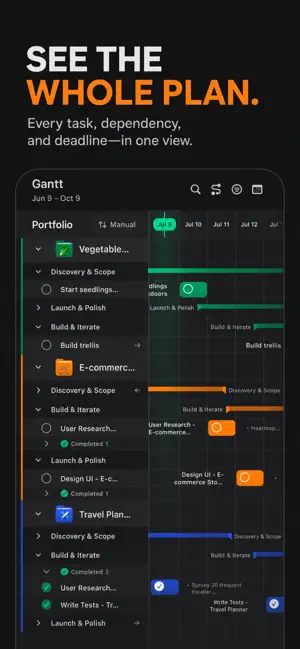
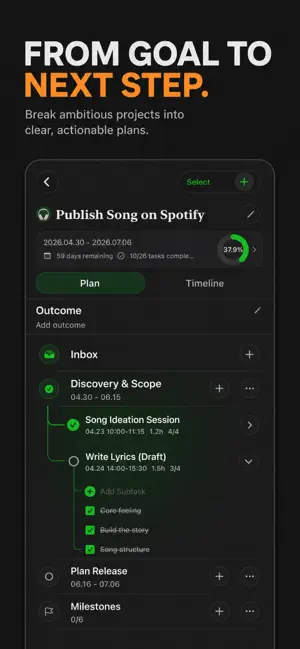
Projectholic — Project Planner, Gantt & Focus Timer The all-in-one project management app for creators, founders, and solo operators. Plan projects on a visual timeline, drag tasks across a Kanban board, run focus sessions, and see exactly where your week went — on iPhone, iPad, and Mac. Stop juggling Notion, Things, and a stopwatch. Projectholic gives you one place to define a goal, break it into tasks, schedule it, and actually finish it. WHY CREATORS CHOOSE PROJECTHOLIC ◆ Kanban Board with Drag & Drop (NEW) A frictionless inbox → today → follow-up flow. Drop a half-baked idea into Inbox, drag it onto a time block, done. Built for the way solo operators actually think. ◆ Focus Timer & Time Visuals (NEW) Start a focus session on any task and watch the time bar fill in real time. See exactly where your day went — by project, by category, by hour. ◆ Stats Dashboard (NEW) A weekly debrief in one screen: planned vs. actual hours, focus time per project, completion rate, and where your effort leaks. ◆ Project Outcomes & Milestones (NEW) Define the outcome that matters before you start. Track milestones, see momentum at a glance, and end every project with a clear "did I ship it" answer. ◆ Gantt Chart for iPad & Mac Plan multi-week projects on a true visual timeline. Pinch to zoom, drag to resize phases, edit subtasks inline, and re-anchor your schedule the moment scope shifts. ◆ Smart Recurring & Multi-Day Tasks Skip weekends, repeat weekly, spill long tasks across days automatically. Designed for real working rhythms — not rigid calendar grids. ◆ Time = Budget Compare planned hours against time actually spent on every task and project. Reveal where your effort goes — and where it's wasted. ◆ iCloud Sync, Built-In Plan on iPhone, schedule on iPad, review on Mac. Everything syncs instantly via your private iCloud — no extra account, no extra subscription. MADE FOR • Indie hackers and solopreneurs running multiple bets • Designers, writers, and creators with project-shaped work • PhD students, researchers, and consultants tracking deep work • ADHD brains who need structure that bends, not breaks TURN GOALS INTO RESULTS Hit focus. Boost productivity. Own your schedule. Projectholic Terms of Use: https://feiou.github.io/ProjectholicApp/terms-of-use.html Projectholic Privacy Policy: https://feiou.github.io/ProjectholicApp/privacy-policy.html
Ratings & reviews
4.9
21 ratings
What’s new
Version 1.2.1 · Updated September 20, 2026
What's New in Projectholic 1.2.1 See your effort. Make room for what’s next. • See where your focus time went with the new Focus History. • Refine inbox ideas, then turn them into tasks or projects. • Quickly edit task titles, notes, and subtasks. • Clear the clutter: star or archive multiple projects together. • Move through busy calendars and timelines faster. Plus more reliable syncing and task updates.
App privacy
The developer, Feiou Su, reported these privacy practices to Apple.
Data Not Collected
The developer does not collect any data from this app.
Alternatives to Projectholic: Project Planner
Looking for apps like Projectholic: Project Planner? Here are 6 similar apps on the App Store. The highest rated is Ganttly: Gantt Chart Planner (5.0/5), and all 6 are free to download.
-
 执务 - 工作分区助手
-
 UDO List 待办清单、日历、专注番茄、游戏化、目标管理
-
 Ganttly: Gantt Chart Planner
5.0
Ganttly: Gantt Chart Planner
5.0
-
 Supamail - AI Email Manager
-
 Space Tasks: ToDo List Game
4.8
Space Tasks: ToDo List Game
4.8
-
 Project Planner: Milestones
4.9
Project Planner: Milestones
4.9
| App | Rating | Price | Last updated | Compare |
|---|---|---|---|---|
| Projectholic: Project Planner | 4.9 / 5 (21 ratings) | Free | September 20, 2026 | |
| 执务 - 工作分区助手 | – | Free | Jun 3, 2026 | Compare |
| UDO List 待办清单、日历、专注番茄、游戏化、目标管理 | – | Free | Nov 19, 2025 | Compare |
| Ganttly: Gantt Chart Planner | 5.0 / 5 (4) | Free | Aug 22, 2026 | Compare |
| Supamail - AI Email Manager | – | Free | Apr 6, 2026 | Compare |
| Space Tasks: ToDo List Game | 4.8 / 5 (13) | Free | Dec 10, 2025 | Compare |
| Project Planner: Milestones | 4.9 / 5 (17) | Free | Sep 19, 2026 | Compare |