

Project Planner: Milestones
Yassine Zeriouh Productivity iPhoneiPadiPod touchMacApple Watch
Project Planner: Milestones is a free Productivity app for iPhone and iPad by Yassine Zeriouh. Rated 4.9/5 from 18 ratings. Requires iOS 17.0.
- Rating
- 4.9
- 18 ratings
- Price
- Free
- on the App Store
- Size
- 72 MB
- Age 4+
- Updated
- Sep 19
- 2026 · v1.13.1
Screenshots


About Project Planner: Milestones
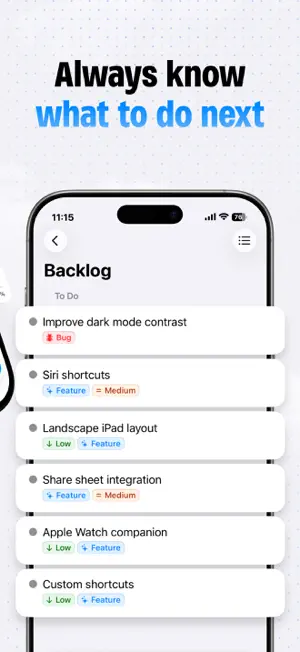
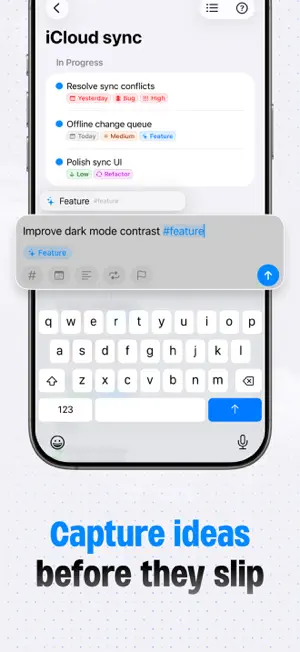
Most projects stall not because you lack motivation — but because "finish the project" is too vague to ever act on. You open a blank to-do list, dump in a dozen tasks, and within a week it's either abandoned or buried under newer ones. Milestones is built around a different idea: every project deserves structure, and structure is what makes finishing possible. A smarter way to plan Milestones introduces a three-tier hierarchy — Projects, Milestones, and Tasks — that mirrors how real work actually happens. A project isn't one thing; it's a series of phases. Each phase has its own focus, its own deadline, its own definition of done. Milestones makes that structure explicit so you always know where you are and what's next. Break goals into phases Every project is divided into named milestones — the chapters of your work. Whether you're building an app, writing a thesis, planning an event, or launching a side project, milestones give you a natural way to chunk the journey into stages you can actually complete one at a time. Track progress visually Each milestone has its own live progress bar showing task counts and completion percentage. At a glance, you can see how much you've done, how much is left, and which phases are moving. No more guessing whether you're close or far. Focus on what matters right now Mark one milestone as Active. It pins to the top of your project, pulses with a live indicator, and becomes your single point of focus. Everything else stays visible but secondary — giving you clarity without losing context. Organized from every angle Milestone statuses — Draft, Planning, In Progress, In Review, Released — give each phase a clear stage in the lifecycle. Tasks are sorted into To Do, In Progress, and Done sections automatically. Tag tasks to group related work across a project. Store unscheduled ideas in the project backlog so nothing falls through the cracks. Designed to look as good as it works Give every project its own icon — choose from a curated set of symbols or use your own photo — paired with a custom color. Your project list becomes a visual dashboard that's satisfying to open every day. Manage projects with AI Milestones includes a built-in MCP server — connect Claude and other AI agents on your Mac to create projects, add tasks and move milestones forward just by asking. Your project planner, now AI-native. Built for iPhone, iPad, Mac & Apple Vision Pro On iPad, Mac and Vision Pro, Milestones expands into a full three-column layout: your project list, milestone list, and task list all visible at once. On iPhone, everything is one tap away. Sync seamlessly across both with iCloud. Whether you're a developer shipping a product, a student finishing a dissertation, a designer managing client work, or anyone with a goal worth finishing — Milestones gives your projects the structure they've always needed.
Ratings & reviews
4.9
18 ratings
What’s new
Version 1.13.1 · Updated September 19, 2026
■ New: - Workspace accent: the app now takes on the color of the active workspace. Buttons, progress bars, highlights, and the composer switch to it, and everything returns to blue in the Default workspace. - Prefer the classic blue everywhere? Turn off "Use Workspace Color as Accent" under Settings > Workspaces. The sidebar keeps showing your workspace color either way. ■ Improvements & Fixes - Mac: the workspace color in the sidebar is now a soft glow from the top instead of a vertical band. - Mac: fixed the app failing to launch on macOS 15. - Mac: editing a task in the composer no longer reverts a due date, priority, or repeat you set from the task's context menu in the meantime. - Mac: removed the empty space under New Project, New List, and New Workspace in the New menu on macOS 26 and earlier. - Workspaces, the app icon badge, and the text size setting are now translated into every supported language.
App privacy
The developer, Yassine Zeriouh, reported these privacy practices to Apple.
Data Not Linked to You
The following data, which may be collected but is not linked to your identity, may be used for the following purposes:
- Purchases: Purchase History
- Identifiers: Device ID, User ID
- Usage Data: Product Interaction
- Diagnostics: Crash Data, Performance Data
Used for: Analytics, App Functionality
Alternatives to Project Planner: Milestones
Looking for apps like Project Planner: Milestones? Here are 6 similar apps on the App Store. The highest rated is Glint: Journal for Memories (5.0/5), and all 6 are free to download.
-
 TODO:To-Do List & Planner
4.2
TODO:To-Do List & Planner
4.2
-
 Glint: Journal for Memories
5.0
Glint: Journal for Memories
5.0
-
 Pomodoro Time Tracker: Balance
4.6
Pomodoro Time Tracker: Balance
4.6
-
 ClipyBoard AutoPaste Clipboard
4.9
ClipyBoard AutoPaste Clipboard
4.9
-
 Document Signer: SimpleSign
4.7
Document Signer: SimpleSign
4.7
-
 vCalc: Hidden & Secure Folder
4.5
vCalc: Hidden & Secure Folder
4.5
| App | Rating | Price | Last updated | Compare |
|---|---|---|---|---|
| Project Planner: Milestones | 4.9 / 5 (18 ratings) | Free | September 19, 2026 | |
| TODO:To-Do List & Planner | 4.3 / 5 (20) | Free | Jun 26, 2026 | Compare |
| Glint: Journal for Memories | 5.0 / 5 (11) | Free | Feb 7, 2025 | Compare |
| Pomodoro Time Tracker: Balance | 4.6 / 5 (37) | Free | Oct 25, 2026 | Compare |
| ClipyBoard AutoPaste Clipboard | 4.9 / 5 (93) | Free | Mar 31, 2026 | Compare |
| Document Signer: SimpleSign | 4.7 / 5 (26) | Free | Feb 7, 2026 | Compare |
| vCalc: Hidden & Secure Folder | 4.5 / 5 (55) | Free | May 5, 2026 | Compare |