

BossPDF: PDF Editor & Scanner
ZingyBear Technologies LLP Productivity iPhoneiPadiPod touch
BossPDF: PDF Editor & Scanner is a free Productivity app for iPhone and iPad by ZingyBear Technologies LLP. Requires iOS 26.2. Updated May 22, 2026.
- Price
- Free
- on the App Store
- Size
- 13 MB
- Age 4+
- Updated
- May 22
- 2026 · v1.3.1
Screenshots



About BossPDF: PDF Editor & Scanner
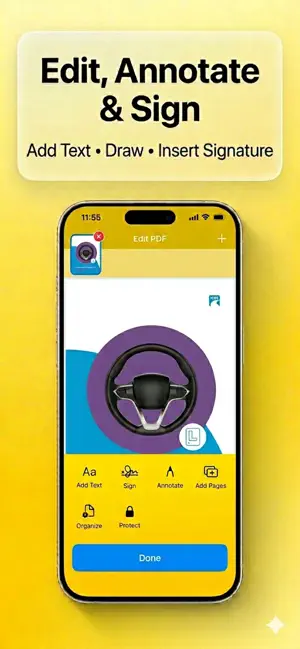
All-in-One PDF Editor, Scanner & Converter for iPhone BossPDF is a powerful yet simple PDF editor and scanner that lets you scan documents, merge PDF files, compress PDFs, sign contracts, and organize pages — all in one place. Whether you need to convert photos to PDF, split large files, or protect documents with a password, BossPDF makes managing PDFs fast and effortless. 1. Scan & Convert to PDF - Scan documents with your camera - Convert photos to PDF instantly - Image to PDF in seconds - Docs to PDF from files - Export PDF to images • Open PDF from other apps using “Open With” Perfect for receipts, contracts, notes, schoolwork, and business documents. 2. Edit, Annotate & Sign PDFs - Add text to PDF - Highlight, draw and annotate - Insert signature and sign PDF - Save and reuse signatures - Add pages to PDF - Edit documents anytime, anywhere Everything you need in a reliable PDF editor for iPhone. 3. Merge, Split & Organize Pages - Merge multiple PDF files - Split PDF by page range - Reorder pages with drag and drop - Organize PDF pages easily - Extract selected pages - Duplicate or rotate pages Built for people who need full control over their documents. 4. Bulk PDF Processing (Pro Feature) Save time with powerful bulk mode: - Merge multiple PDFs at once - Batch compress PDF files - Convert multiple documents in one go - Secure multiple files together Designed for professionals, students, and business users handling many files daily. 5. Compress & Protect - Reduce PDF file size - Compress PDF without losing quality - Protect PDF with password • Secure sensitive documents - Manage file permissions Share smaller files faster and keep private data safe. 6. Sync & Access Anywhere - iCloud sync support - Access documents across devices - Seamless file management - Works with Files app Your PDFs stay organized and available when you need them. 7. Why Choose BossPDF? - Clean, fast and easy to use - Powerful PDF editor and scanner in one app - Bulk PDF tools for advanced users - No complicated menus - Built for productivity 8. Subscription - Plans: Annual $19.99 Plan and Weekly $1.99 Plan - Payment will be charged to your Apple ID account at confirmation of purchase. - Subscription automatically renews unless canceled at least 24 hours before the end of the current period. - Your account will be charged for renewal within 24 hours prior to the end of the current period. - You can manage or cancel your subscriptions in your App Store account settings after purchase. - Any unused portion of a free trial period (if offered) will be forfeited when you purchase a subscription. Terms of Use (EULA): https://www.apple.com/legal/internet-services/itunes/appstore/dev/stdeula/ Privacy Policy: https://zingybear.com/privacy BossPDF replaces multiple apps with one simple solution for scanning, editing, merging, compressing and managing PDF files. Download BossPDF today and take full control of your PDFs.
What’s new
Version 1.3.1 · Updated May 22, 2026
Fixed few bugs
App privacy
The developer, ZingyBear Technologies LLP, reported these privacy practices to Apple.
Data Linked to You
The following data, which may be collected and linked to your identity, may be used for the following purposes:
- Purchases: Purchase History
- Usage Data: Product Interaction
- Diagnostics: Crash Data, Performance Data
Used for: Analytics, App Functionality
Alternatives to BossPDF: PDF Editor & Scanner
Looking for apps like BossPDF: PDF Editor & Scanner? Here are 6 similar apps on the App Store. The highest rated is 3 thing (5.0/5), and all 6 are free to download.
-
 GuardianScan Pro: PDF Scanner
-
 3 thing
5.0
3 thing
5.0
-
 Photo to PDF: LyoPDF
-
 Metir: AI Powered Productivity
-
 PDF Scan - Sign, Edit Document
-
 Docsmith: Edit PDF Text
| App | Rating | Price | Last updated | Compare |
|---|---|---|---|---|
| BossPDF: PDF Editor & Scanner | – | Free | May 22, 2026 | |
| GuardianScan Pro: PDF Scanner | – | Free | Mar 19, 2026 | Compare |
| 3 thing | 5.0 / 5 (4) | Free | Jan 12, 2026 | Compare |
| Photo to PDF: LyoPDF | – | Free | Jul 24, 2026 | Compare |
| Metir: AI Powered Productivity | – | Free | Sep 13, 2026 | Compare |
| PDF Scan - Sign, Edit Document | – | Free | Mar 19, 2026 | Compare |
| Docsmith: Edit PDF Text | – | Free | Sep 11, 2026 | Compare |