

Photo to PDF: LyoPDF
Quang Nguyen Productivity iPhoneiPadiPod touch
Photo to PDF: LyoPDF is a free Productivity app for iPhone and iPad by Quang Nguyen. Requires iOS 16.0. Updated July 24, 2026.
- Price
- Free
- on the App Store
- Size
- 12 MB
- Age 4+
- Updated
- Jul 24
- 2026 · v1.1
Screenshots


About Photo to PDF: LyoPDF
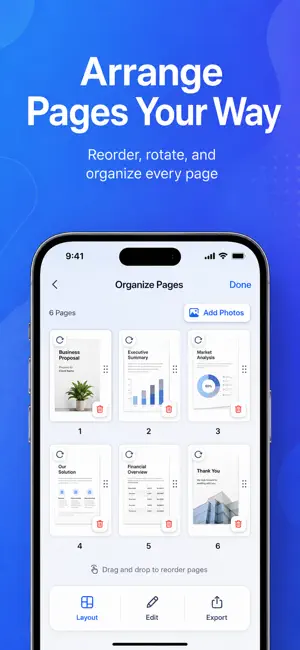
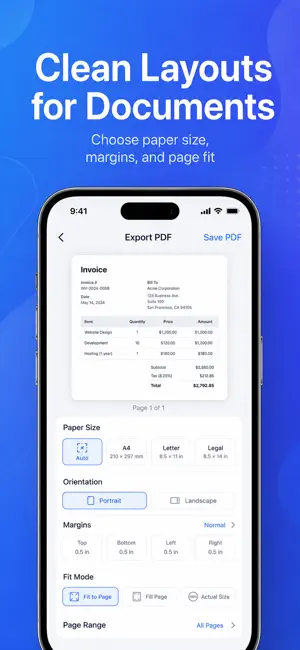
LyoPDF helps you turn photos, scans, and imported files into clean, organized, shareable PDFs right on your device. Create PDFs from your photo library, scan documents with your camera, or import files from the Files app. Add multiple images at once, arrange pages with drag and drop, edit each page, preview the final layout, then export a polished PDF in seconds. Whether you need to save receipts, scan documents, combine photos, organize notes, prepare forms, or share files for work, school, or daily tasks, LyoPDF gives you a simple and fast way to create PDFs without needing an account. CREATE PDFs FROM PHOTOS AND SCANS Turn your images into PDF documents with a smooth, focused workflow. Select photos from your library, capture new pages with the camera, or import supported files from Files. LyoPDF makes it easy to build multi-page PDFs and keep everything in the right order. EDIT AND ORGANIZE PAGES After adding your photos or scans, you can quickly adjust each page before exporting. Key editing tools include: • Drag and drop to reorder pages • Rotate pages • Crop images • Detect document edges • Straighten scanned pages • Duplicate pages • Delete unwanted pages • Preview pages before export You can also apply filters to make documents easier to read, save, or print, including Original, Enhance, Grayscale, and Black & White. CUSTOMIZE YOUR PDF LAYOUT LyoPDF gives you control over how your final document looks. Choose the paper size, page orientation, margins, and image placement style before exporting. PDF layout options include: • Auto, A4, Letter, and Legal paper sizes • Portrait and Landscape orientation • Custom margins • Fit to Page • Fill Page • Actual Size • Full document, current page, or custom page range export Preview your PDF before saving so you can make sure the final file looks clean and professional. COMPRESS, SHARE, AND PRINT Create PDFs that are easy to send and store. Choose the compression level that fits your needs: • Small Size • Balanced • High Quality After exporting, you can rename your PDF, preview it, share it with the iOS Share Sheet, save it, or print it directly from your device. MANAGE RECENT PDFs LyoPDF keeps your created documents available locally in Recent PDFs. Open previous files, edit them again, rename them, share them, or delete them whenever you need. PRIVATE, LOCAL, AND ACCOUNT-FREE LyoPDF is designed for a simple, private workflow. Your documents are processed on your device, and you do not need to create an account to use the app. For extra protection, you can enable Face ID Lock to help secure access to your locally saved PDFs. LYOPDF IS GREAT FOR: • Converting photos to PDF • Scanning documents to PDF • Creating PDFs from receipts • Saving notes and forms • Combining multiple images into one PDF • Preparing files for email, printing, or sharing • Organizing local PDF documents Create clean PDFs from photos, scans, and imported files with LyoPDF — fast, simple, and right on your device.
What’s new
Version 1.1 · Updated July 24, 2026
We fixed an issue where pages captured with the camera might not appear in the export preview, so you can review every page before creating your PDF.
App privacy
The developer, Quang Nguyen, reported these privacy practices to Apple.
Data Used to Track You
The following data may be used to track you across apps and websites owned by other companies:
- Identifiers: Device ID
Data Not Linked to You
The following data, which may be collected but is not linked to your identity, may be used for the following purposes:
- Identifiers: Device ID
Used for: Third-Party Advertising
Alternatives to Photo to PDF: LyoPDF
Looking for apps like Photo to PDF: LyoPDF? Here are 6 similar apps on the App Store. The highest rated is ProDoc: PDF Editor & Scanner (5.0/5), and all 6 are free to download.
-
 PDFKit — PDF Editor & Tools
-
 BossPDF: PDF Editor & Scanner
-
 ProDoc: PDF Editor & Scanner
5.0
ProDoc: PDF Editor & Scanner
5.0
-
 每记
3.5
每记
3.5
-
 Open MSG to PDF · Email Viewer
-
 SnapPDF: Photo to PDF
| App | Rating | Price | Last updated | Compare |
|---|---|---|---|---|
| Photo to PDF: LyoPDF | – | Free | July 24, 2026 | |
| PDFKit — PDF Editor & Tools | – | Free | Oct 2, 2026 | Compare |
| BossPDF: PDF Editor & Scanner | – | Free | May 22, 2026 | Compare |
| ProDoc: PDF Editor & Scanner | 5.0 / 5 (2) | Free | Sep 3, 2026 | Compare |
| 每记 | 3.5 / 5 (4) | Free | Jun 4, 2026 | Compare |
| Open MSG to PDF · Email Viewer | – | Free | Sep 11, 2026 | Compare |
| SnapPDF: Photo to PDF | – | Free | Sep 1, 2026 | Compare |