

PDF Opus: Scanner & Editor
Eduard Bruch Productivity iPhoneiPadiPod touch
PDF Opus: Scanner & Editor is a free Productivity app for iPhone and iPad by Eduard Bruch. Requires iOS 17.0. Updated November 18, 2026.
- Price
- Free
- on the App Store
- Size
- 34 MB
- Age 4+
- Updated
- Nov 18
- 2026 · v4.0.0
Screenshots
Save to Pinterest


About PDF Opus: Scanner & Editor
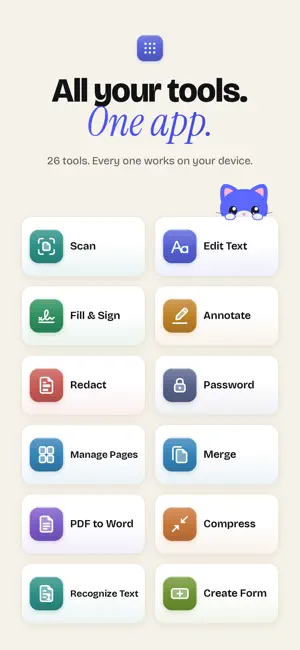
PDF Opus is the PDF app for everything you do with documents: scan, read, edit, sign, fill, redact, convert and organize. On iPhone and iPad. SCAN • Scan paper with the camera: edges are found, pages straightened and cleaned up • Text recognition (OCR) makes scans searchable and lets you copy the text • Many pages into one PDF EDIT • Change text right in the PDF, in the original font • Move, resize, replace or delete images • Add and edit links FILL & SIGN • Fill in any form, with or without form fields • Sign with your finger or Apple Pencil and reuse your signature • Build your own fillable forms: text fields, checkboxes, lists, signature fields ANNOTATE • Highlight, underline and strike through • Notes, pen and shapes REDACT AND PROTECT • Redact text, images and signatures. The content is removed from the file, not just covered • Protect a PDF with a password (AES-256) • Remove a password you know • Remove hidden data before you share: metadata, comments, attachments, scripts CONVERT • PDF to Word, Excel, HTML or images • Word, Excel, CSV, Markdown and images to PDF • Save as PDF/A for long-term archiving ORGANIZE • Merge several PDFs into one, or split one into several • Reorder, rotate, delete and extract pages • Compress a PDF to make it smaller to send • Add page numbers, headers and footers, Bates numbers and watermarks • Insert blank pages and QR codes COMPARE AND MEASURE • Compare two versions of a PDF and see what was added, changed or removed • Measure distances, perimeters and areas on plans and drawings, to scale MADE FOR IPHONE AND IPAD • A layout built for each, with Apple Pencil support on iPad • Works with the Files app and the share sheet • Right-to-left languages including Arabic and Hebrew YOUR DOCUMENTS STAY WITH YOU Scanning, editing, converting and text recognition run on your device. Your files are not uploaded to our servers. PDF OPUS PREMIUM Some features need PDF Opus Premium, available as a subscription or a one-time purchase. Subscriptions renew automatically unless cancelled at least 24 hours before the end of the current period; you can manage or cancel them in your App Store account settings. Terms of Use: https://pdfopus.com/legal/terms Privacy Policy: https://pdfopus.com/legal/privacy
What’s new
Version 4.0.0 · Updated November 18, 2026
PDF Scan is now PDF Opus, rebuilt from the ground up. • Edit text, images and links right in the PDF, in the original font • Fill & Sign, plus a form builder for your own fillable PDFs • Annotate with highlights, notes, pen and shapes • Redact: content is removed from the file, not just covered • Convert PDF to Word, Excel, HTML or images, and back • Compress, merge, split and reorder pages • Protect with a password, or remove one you know • Watermarks, page numbers, Bates numbers, PDF/A, compare two versions, measure to scale • A new scanner with text recognition, and a design made for iPad too Your existing scans, documents and subscription are carried over.
App privacy
The developer, Eduard Bruch, reported these privacy practices to Apple.
Data Not Linked to You
The following data, which may be collected but is not linked to your identity, may be used for the following purposes:
- Purchases: Purchase History
Used for: App Functionality
Alternatives to PDF Opus: Scanner & Editor
Looking for apps like PDF Opus: Scanner & Editor? Here are 6 similar apps on the App Store. The highest rated is Documents Editor - Read & Edit (5.0/5), and all 6 are free to download.
-
 Simple Text to PDF: SlateAI
-
 Documents Editor - Read & Edit
5.0
-
 PDF Easy Tools
-
 GeniePDF
-
 Wright: AI Text Assistant
-
 Just Scan!
| App | Rating | Price | Last updated | Compare |
|---|---|---|---|---|
| PDF Opus: Scanner & Editor | – | Free | November 18, 2026 | |
| Simple Text to PDF: SlateAI | – | Free | Feb 9, 2026 | Compare |
| Documents Editor - Read & Edit | 5.0 / 5 (5) | Free | Aug 13, 2026 | Compare |
| PDF Easy Tools | – | Free | Feb 4, 2026 | Compare |
| GeniePDF | – | Free | May 15, 2026 | Compare |
| Wright: AI Text Assistant | – | Free | Jul 19, 2026 | Compare |
| Just Scan! | – | Free | Apr 9, 2026 | Compare |