

Pinwheel Screenshot Organizer
Pinwheel Labs Ltd Productivity iPhoneiPadiPod touch
Pinwheel Screenshot Organizer is a free Productivity app for iPhone and iPad by Pinwheel Labs Ltd. Rated 5.0/5 from 1 ratings. Requires iOS 18.6.
- Rating
- 5.0
- 1 ratings
- Price
- Free
- on the App Store
- Size
- 26 MB
- Age 17+
- Updated
- Oct 1
- 2026 · v0.3
Screenshots

About Pinwheel Screenshot Organizer
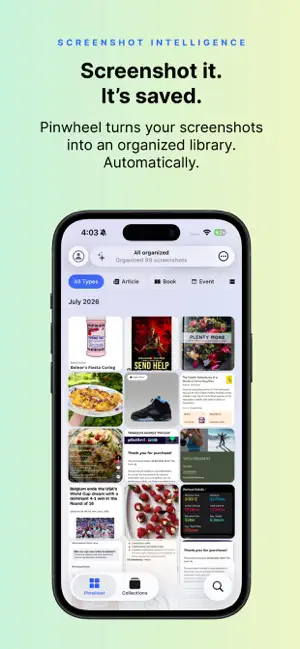
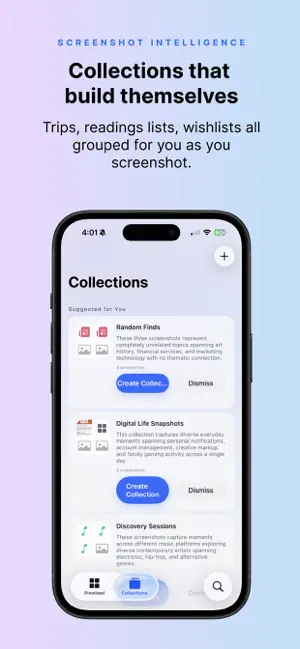
Your screenshots are full of things you meant to come back to - recipes, products, places, plans - but they pile up in your camera roll and you never find them again. Pinwheel brings them to life. Pinwheel's AI reads every screenshot, understands what's in it, and turns it into an organized card you can search, act on, and actually use. What Pinwheel does: Understands every screenshot. AI turns each one into an organized card - recipe, product, place, book, event, contact, song, or link. No folders, no tags. Finds anything instantly. Search by what's inside - a dish, a price, a street, a name. The screenshot you took months ago, back in seconds. Does the research for you. Pinwheel fills in the details behind a screenshot: a TikTok recipe becomes full ingredients and a shopping list, a product gets its price and where to buy, a place gets its address and hours. One tap to act. Copy a shopping list, save a contact, open a place in Maps, add an event to Calendar - straight from the card. Frees up space. Pinwheel keeps your screenshots safe, so you can delete the originals from Photos and reclaim storage. Your personal taste library. Everything you save, gathered into collections - places, recipes, products, ideas - you'll actually revisit. Private to your account. Search it, act on it, delete anything anytime. See our Privacy Policy. Free to start. Screenshot a recipe, a product, or a place - and watch Pinwheel fill in the rest.
What’s new
Version 0.3 · Updated October 1, 2026
Pinwheel now organizes your whole photo library, not just the screenshots you take from here on. New - MCP: Connect ChatGPT, Claude or your favorite agent over MCP to get access to your library and integrate with your workflows. - FULL BACKLOG IMPORT: screenshots from before you installed Pinwheel get organized too. Open Your Backlog anytime to see what's left, uploading, or waiting its turn. - SMART AUTO COLLECTIONS: collections stay current on their own, adding matching screenshots as your library grows. - SUGGESTED COLLECTIONS: collection ideas based on what's already in your library. Accept one and it keeps growing by itself. - SPACE CLEANER: free up space on your phone by removing the original from your camera roll once Pinwheel has it safely, automatically or with one tap. - SHARED COLLECTIONS: invite someone to a collection with a link so you can both add to it. - BACKGROUND SHARING: Sharing a screenshot from Photos now uploads in the background, even with Pinwheel closed, and catches up automatically the next time you open the app. Improved - Huge upgrade to search! - One notification when a big import finishes organizing, instead of one for every few screenshots. - An interrupted upload (lost signal, app closed, phone restarted) picks back up on its own, or asks first when it should. - Screenshots show up in your library the moment they're ready, no refresh needed. - Clearer, consistent counts: your backlog, your library, and what's left to organize now always agree. - Screenshots taken while Pinwheel wasn't running are caught and organized the next time you open the app. Fixed - Fixed a crash that could happen while a backlog upload was running in the background. - Screenshots no longer get stuck showing "in progress" indefinitely.
App privacy
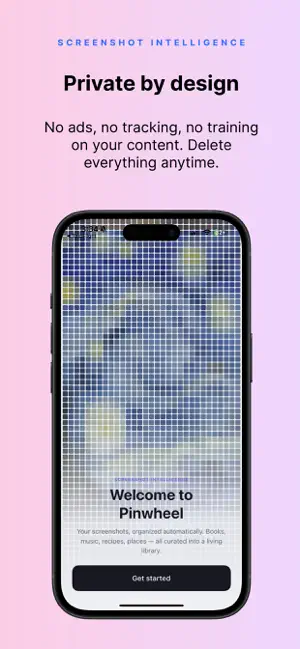
The developer, Pinwheel Labs Ltd, reported these privacy practices to Apple.
Data Linked to You
The following data, which may be collected and linked to your identity, may be used for the following purposes:
- Location: Precise Location, Coarse Location
- Contact Info: Email Address, Name
- Identifiers: User ID, Device ID
- Usage Data: Product Interaction
- User Content: Photos or Videos
Used for: Analytics, Product Personalization, App Functionality
Data Not Linked to You
The following data, which may be collected but is not linked to your identity, may be used for the following purposes:
- Usage Data: Other Usage Data
- Diagnostics: Crash Data, Performance Data, Other Diagnostic Data
Used for: Analytics, App Functionality
Alternatives to Pinwheel Screenshot Organizer
Looking for apps like Pinwheel Screenshot Organizer? Here are 6 similar apps on the App Store. The highest rated is Stash: AI Screenshot Organizer (5.0/5), and all 6 are free to download.
-
 Tuck: Screenshot Organizer
-
 Pizazoo: Screenshot Organizer
-
 FastPaste - Clipboard Sync
-
 Stash: AI Screenshot Organizer
5.0
Stash: AI Screenshot Organizer
5.0
-
 Filex AI: File Manager
5.0
Filex AI: File Manager
5.0
-
 DOQIT - Life Admin, Organised
| App | Rating | Price | Last updated | Compare |
|---|---|---|---|---|
| Pinwheel Screenshot Organizer | 5.0 / 5 (1 rating) | Free | October 1, 2026 | |
| Tuck: Screenshot Organizer | – | Free | Oct 15, 2026 | Compare |
| Pizazoo: Screenshot Organizer | – | Free | Oct 12, 2026 | Compare |
| FastPaste - Clipboard Sync | – | Free | Jan 13, 2026 | Compare |
| Stash: AI Screenshot Organizer | 5.0 / 5 (6) | Free | Sep 12, 2026 | Compare |
| Filex AI: File Manager | 5.0 / 5 (4) | Free | Oct 13, 2026 | Compare |
| DOQIT - Life Admin, Organised | – | Free | Oct 5, 2026 | Compare |