

Filex AI: File Manager
Lokesh Choubisa Productivity iPhoneiPadiPod touch
Filex AI: File Manager is a free Productivity app for iPhone and iPad by Lokesh Choubisa. Rated 5.0/5 from 4 ratings. Requires iOS 15.1.
- Rating
- 5.0
- 4 ratings
- Price
- Free
- on the App Store
- Size
- 43 MB
- Age 4+
- Updated
- Sep 7
- 2026 · v1.0.19
Screenshots
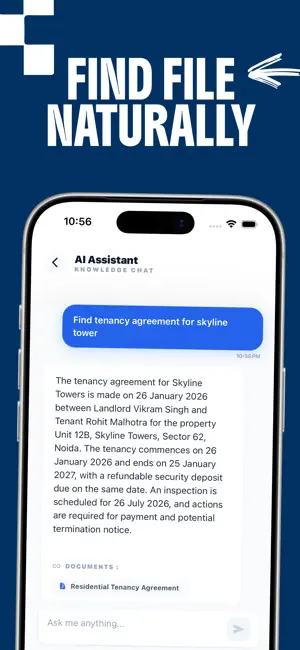


About Filex AI: File Manager
Find any file instantly. Just describe it. You have hundreds of files on your phone — PDFs, screenshots, invoices, contracts, photos of documents — scattered everywhere with names like "document(17).pdf" and "IMG_20240315.jpg". Finding anything takes forever. Manual organization never lasts. Filex AI is the AI file organizer that does the work for you. It reads every file you import, understands what's inside, automatically organizes everything into smart folders, renames files clearly, and lets you find anything by typing what you remember in plain English. No manual filing. No folder hunting. No renaming. HOW IT WORKS Import any file PDF documents, screenshots, Excel sheets, images, Word docs and Filex AI reads the actual content. It then auto rename file and generates a smart folder structure for your files, gives every file a clear descriptive name, applies intelligent tags, and makes everything instantly searchable. Need a file? Just type: "contract from last month", "invoice from Amazon", or "screenshot of the hotel booking". Filex AI finds it in seconds no folders to browse, no file names to remember. ORGANIZE BY PEOPLE, LOCATIONS & ORGANIZATIONS : - Every file gets automatically linked to the people, organizations, and locations mentioned inside it. A contract PDF links to the client's name. An invoice links to the company. A screenshot of a message links to the sender's name. Now tap any person's name and instantly see every document, receipt, PDF, and screenshot that mentions them. Browse files by organization. Browse by location. Your files, finally in context not just in folders. WHAT FILEX AI READS & ORGANIZES PDF files — contracts, invoices, reports, ebooks, forms Screenshots — receipts, booking confirmations, tickets, notes Images — photos of documents, handwritten notes, whiteboards Excel and spreadsheet files Word documents and text files Built in OCR means Filex AI reads and indexes text inside images and screenshots too not just typed documents. FEATURES AI auto organization — smart folders generated from your file content automatically Natural language search — describe any file in plain English and find it instantly OCR document scanner — reads text inside images, photos, and screenshots Smart auto rename — every file gets a clear, meaningful name automatically People & organization linking — browse all files by person or company mentioned Location tagging — files grouped by places mentioned inside them Chat with documents — ask questions to your files and get instant answers Auto tagging — AI assigns relevant tags to every file for fast filtering Works with PDF, images, screenshots, Excel, Word, and more WHO FILEX AI IS FOR Freelancers and consultants managing client contracts, invoices, and proposals who need to find the right document fast. Professionals drowning in downloaded PDFs and email attachments. Small business owners tracking receipts, vendor documents, and financial records. Students organizing research papers, lecture notes, and study materials. Anyone whose Downloads folder is a mess of unnamed files they can never find again. WHY FILEX AI IS DIFFERENT Most file manager apps give you folders and a search bar. They don't read your files. They don't understand the content. They make you do the organizing. Filex AI reads the content, builds the folder structure, renames the files, links everything to people and places, and lets you find anything by describing it. GET STARTED FREE Try Filex AI free. Organize your first files with no commitment. Upgrade to Premium for unlimited file processing, advanced natural language search, full people and organization linking, and unlimited AI credits. Stop searching. Start finding. By using Filex AI, you agree to Apple's Standard License Agreement (EULA): https://www.apple.com/legal/internet-services/itunes/dev/stdeula Privacy policy : https://filexai.com/privacy
What’s new
Version 1.0.19 · Updated September 7, 2026
* Added support for sharing files directly from other apps (such as Notes) into Filex AI for seamless organisation and management * AI-powered file management directly from chat * Introducing Lenses: automatically group and organise documents using natural language * Added Dark Mode support for a more comfortable viewing experience * Improved iPad UI for a smoother and more intuitive experience * Added success and failure indicators so you can clearly track file organisation progress * Faster performance and more reliable file processing * Expanded file support: organise CSV, Excel, PDF, DOC/DOCX, TXT, images, and more * Enhanced AI organisation for smarter sorting, tagging, and search * Improved natural language search across your documents * Optimised for better productivity and a more seamless workflow * Added Multi-Language Support * Added Refer & Earn and Support
App privacy
The developer, Lokesh Choubisa, reported these privacy practices to Apple.
Data Linked to You
The following data, which may be collected and linked to your identity, may be used for the following purposes:
- Contact Info: Email Address, Name
- Identifiers: Device ID
- Usage Data: Product Interaction
Used for: Developer’s Advertising or Marketing, Analytics, App Functionality
Alternatives to Filex AI: File Manager
Looking for apps like Filex AI: File Manager? Here are 6 similar apps on the App Store. The highest rated is Bookmark Read Later - Linkjoy (5.0/5), and all 6 are free to download.
-
 The Drive AI - File Manager
3.7
The Drive AI - File Manager
3.7
-
 Spanarc - Calendar At a Glance
4.8
Spanarc - Calendar At a Glance
4.8
-
 FileButler: AI File Organizer
-
 Smart Rename: Photos & Files
-
 Planifai: AI Calendar & Tasks
4.8
Planifai: AI Calendar & Tasks
4.8
-
 Bookmark Read Later - Linkjoy
5.0
Bookmark Read Later - Linkjoy
5.0
| App | Rating | Price | Last updated | Compare |
|---|---|---|---|---|
| Filex AI: File Manager | 5.0 / 5 (4 ratings) | Free | September 7, 2026 | |
| The Drive AI - File Manager | 3.7 / 5 (6) | Free | Sep 24, 2026 | Compare |
| Spanarc - Calendar At a Glance | 4.8 / 5 (17) | Free | Aug 4, 2026 | Compare |
| FileButler: AI File Organizer | – | Free | Sep 7, 2026 | Compare |
| Smart Rename: Photos & Files | – | Free | Aug 26, 2026 | Compare |
| Planifai: AI Calendar & Tasks | 4.8 / 5 (4) | Free | May 6, 2026 | Compare |
| Bookmark Read Later - Linkjoy | 5.0 / 5 (2) | Free | Sep 21, 2026 | Compare |