

Afterthought: Voice Notes
Paul Lancashire Productivity iPhoneiPadiPod touchApple Watch
Afterthought: Voice Notes is a free Productivity app for iPhone and iPad by Paul Lancashire. Rated 5.0/5 from 1 ratings. Requires iOS 17.6.
- Rating
- 5.0
- 1 ratings
- Price
- Free
- on the App Store
- Size
- 98 MB
- Age 4+
- Updated
- Oct 19
- 2026 · v2.7
Screenshots


About Afterthought: Voice Notes
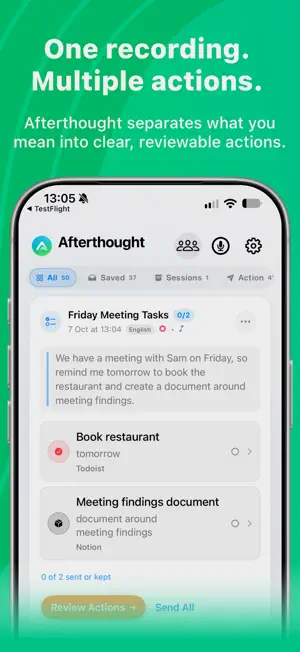
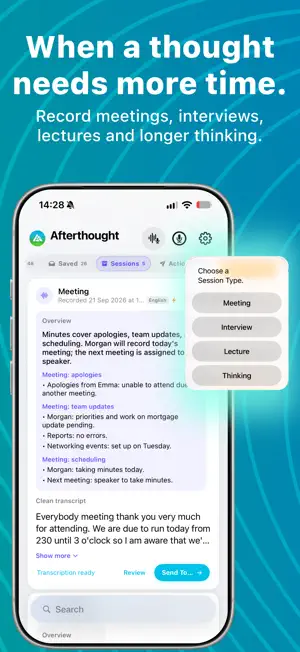
Afterthought turns spoken thoughts into prepared actions for the apps you already use, and longer recordings into Sessions you can review. Capture from iPhone, Apple Watch or Action Button. Afterthought transcribes your voice, understands what you meant and prepares notes, reminders, tasks, calendar events, messages and other actions while keeping you in control of what happens next. NEW IN 2.7 — SEARCH, COLLECTIONS & RECORDING Find saved thoughts by voice or text straight from Home. Bring related notes and actions together in collections, with optional summaries to help make sense of them. • Search by voice or text straight from Home • Organise related notes and actions into collections • Pause and resume Quick Capture and Session recordings • Smoother recording visuals on iPhone and Apple Watch, clearer controls and accessibility improvements SESSIONS Sessions are a deliberate workflow for longer recordings. Choose Meeting, Interview, Lecture or Thinking and keep the original audio, final transcript and useful overview together. • Record meetings, interviews, lectures and longer thinking • Follow a provisional on-device transcript while recording • Keep the original audio and final transcript • Review an Apple Intelligence summary on supported devices • Recover interrupted recordings • Share Overview + transcript, Overview only, or Transcript only QUICK CAPTURE • Capture from iPhone, Apple Watch or Action Button • Capture on Apple Watch even when your iPhone is away, then transfer later • Choose Transcribe Only, Classify & Review or Classify & Send • Turn speech into notes, reminders, tasks, calendar events, messages and more • With Pro, split one natural recording into several ordered, reviewable actions • Review and edit content, dates, fields and destinations before sending • Correct prepared actions by typing or speaking YOUR APPS, YOUR WORKFLOW Prepare content for Apple Notes, Reminders, Apple Calendar, Apple Journal, Todoist, Notion, Slack, Things 3, Bear, Obsidian, TickTick, Day One, Evernote, Messages, Email, Shortcuts and other supported workflows. Afterthought does not replace your notes app, task manager, calendar or journal. It makes voice an easier way into them. PRIVATE, CONTROLLED INTELLIGENCE Capture and transcription are local-first. Apple Intelligence, Classic and downloaded Local AI Models process on device. Optional Cloud AI sends transcript text only to the provider you configure. External destinations receive content only when you use them. Free includes unlimited capture and transcription, review, supported Apple workflows and a monthly classification allowance. Pro adds unlimited classification, multi-action splitting, writing actions, third-party destinations, extra Nature Mode options, Local AI Models and optional Cloud AI. Speak once. Make it happen. Terms of Use: https://www.apple.com/legal/internet-services/itunes/dev/stdeula/
What’s new
Version 2.7 · Updated October 19, 2026
A smoother way to capture, organise and rediscover your thoughts. • Search by voice or text straight from Home. • Bring related notes and actions together in collections, with optional summaries. • Pause and resume Quick Capture and Session recordings. • Enjoy more responsive recording visuals on iPhone and Apple Watch. • Clearer controls, tidier screens and improvements to accessibility and reliability.
App privacy
The developer, Paul Lancashire, reported these privacy practices to Apple.
Data Not Collected
The developer does not collect any data from this app.
Alternatives to Afterthought: Voice Notes
Looking for apps like Afterthought: Voice Notes? Here are 6 similar apps on the App Store. The highest rated is Timmio: Visual Day Planner (4.9/5), and all 6 are free to download.
-
 Spanarc - Calendar At a Glance
4.8
Spanarc - Calendar At a Glance
4.8
-
 VekilAI: AI Life Manager
1.0
VekilAI: AI Life Manager
1.0
-
 ShotMark : Screenshot Memory
4.7
ShotMark : Screenshot Memory
4.7
-
 Tally - Daily Time Tracker
4.8
Tally - Daily Time Tracker
4.8
-
 Timmio: Visual Day Planner
4.9
Timmio: Visual Day Planner
4.9
-
 Planifai: AI Calendar & Tasks
4.8
Planifai: AI Calendar & Tasks
4.8
| App | Rating | Price | Last updated | Compare |
|---|---|---|---|---|
| Afterthought: Voice Notes | 5.0 / 5 (1 rating) | Free | October 19, 2026 | |
| Spanarc - Calendar At a Glance | 4.8 / 5 (17) | Free | Aug 4, 2026 | Compare |
| VekilAI: AI Life Manager | 1.0 / 5 (1) | Free | May 9, 2026 | Compare |
| ShotMark : Screenshot Memory | 4.7 / 5 (7) | Free | Oct 19, 2026 | Compare |
| Tally - Daily Time Tracker | 4.8 / 5 (5) | Free | May 14, 2026 | Compare |
| Timmio: Visual Day Planner | 4.9 / 5 (11) | Free | Sep 15, 2026 | Compare |
| Planifai: AI Calendar & Tasks | 4.8 / 5 (5) | Free | Oct 4, 2026 | Compare |