

FileButler: AI File Organizer
Grodevate OU Productivity iPhoneiPadiPod touch
FileButler: AI File Organizer is a free Productivity app for iPhone and iPad by Grodevate OU. Requires iOS 15.5. Updated September 7, 2026.
- Price
- Free
- on the App Store
- Size
- 57 MB
- Age 4+
- Updated
- Sep 7
- 2026 · v1.0.2
Screenshots

About FileButler: AI File Organizer
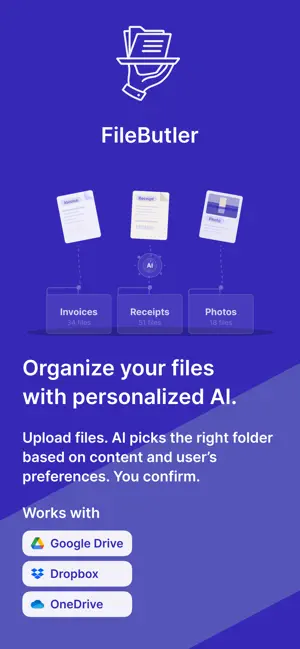
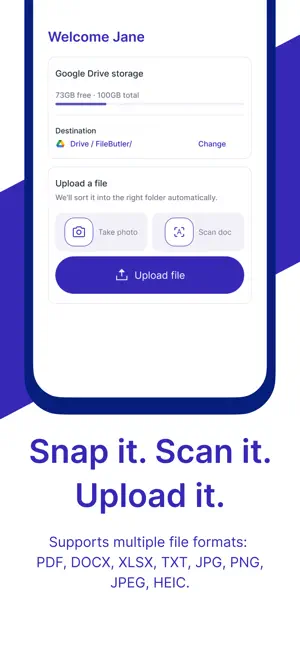
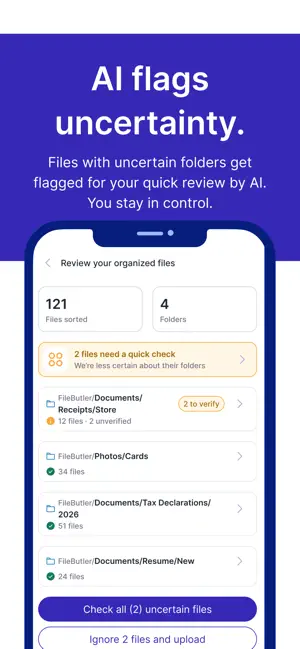
Still playing hide-and-seek with your own files? FileButler is an AI file organizer that sorts, renames, and files your documents directly inside Google Drive, Dropbox, and OneDrive — the cloud storage you already use. No new app to migrate into. No second inbox to maintain. HOW IT WORKS Connect your Google Drive, Dropbox, or OneDrive account. Upload a file — snap a photo, pick one from your phone, or scan a paper document with the built-in OCR scanner. FileButler's AI reads the content, suggests a folder path (like Documents/Banks/Statements), and renames it based on what's inside — not "IMG_4721.jpg" anymore. You review, confirm, done. AI THAT LEARNS YOUR SYSTEM Every file you approve or re-path trains a personal AI model built just for you. Correct it once, and FileButler remembers — next time a similar receipt, invoice, or contract comes in, it goes straight to the right folder automatically. BUILT FOR PEOPLE WHO LIVE IN DOCUMENTS Freelancers, accountants, lawyers, real estate agents, and researchers use FileButler to keep client files, receipts, contracts, and case documents organized without lifting a finger. Custom instructions let you set your own rules in plain language — "file all invoices under Finance" — and FileButler follows them. KEY FEATURES - Works inside Google Drive, Dropbox, and OneDrive — no migration - AI document scanner with OCR for paper documents - Smart file renaming based on content, not generic camera names - Automatic folder creation and matching to existing subfolders - Personalized AI that improves with every file you review - Confidence-based Verify tags — only review what the AI is unsure about - Custom classification rules in plain language - Full review before anything uploads — nothing moves without your confirmation Supports Word, Excel, PowerPoint, PDF, JPG, PNG, HEIC, and text files — everything a busy inbox collects. PRIVACY FIRST FileButler requests access to your cloud storage because that access is what lets it rename and organize your files into folders. You can revoke access anytime from your cloud provider's settings. FileButler never stores the content of your files on its own servers — documents are processed by AI just long enough to classify them, then sent straight to your cloud storage. No one at FileButler can view your file contents, and no files are stored anywhere other than your own cloud storage. Only file names and folder paths are retained — never file content. The app is verified by all major cloud storage providers through the OAuth 2.0 authentication process. Your data is encrypted in transit, and the app is GDPR and CCPA compliant by design. Stop hunting through "Documents (3) final_v2.pdf." FileButler is the AI-powered file organizer, document scanner, and cloud storage assistant in one app. Terms of Use (EULA): https://www.apple.com/legal/internet-services/itunes/dev/stdeula/ Privacy Policy: https://filebutler.xyz/privacy/
What’s new
Version 1.0.2 · Updated September 7, 2026
• Rename your way — pick a naming format: date + description, description only, description + document date, category + description, or build your own from tags. The file extension is always kept. • English, Greek and French — the app now follows your device language. • Auto folders — choose the folders to watch, and new files get backed up and organised on their own. • Steadier background syncing, plus fixes throughout.
App privacy
The developer, Grodevate OU, reported these privacy practices to Apple.
Data Linked to You
The following data, which may be collected and linked to your identity, may be used for the following purposes:
- Usage Data: Product Interaction
- Identifiers: User ID
- Other Data: Other Data Types
- Contact Info: Email Address, Name
Used for: Analytics, Product Personalization, App Functionality
Data Not Linked to You
The following data, which may be collected but is not linked to your identity, may be used for the following purposes:
- Diagnostics: Crash Data
- User Content: Photos or Videos
- Identifiers: Device ID
Used for: Analytics, App Functionality
Alternatives to FileButler: AI File Organizer
Looking for apps like FileButler: AI File Organizer? Here are 6 similar apps on the App Store. The highest rated is PocketLab for GitLab (5.0/5), and 5 of the 6 are free to download.
-
 Numly: PDF Page Numbers
-
 Docvera File Viewer
-
 Mein Briefkasten
-
 Casework: Cabinet Design
-
 PocketLab for GitLab
5.0
PocketLab for GitLab
5.0
-
 DropMate: File Manager
5.0
DropMate: File Manager
5.0
| App | Rating | Price | Last updated | Compare |
|---|---|---|---|---|
| FileButler: AI File Organizer | – | Free | September 7, 2026 | |
| Numly: PDF Page Numbers | – | Free | Sep 28, 2026 | Compare |
| Docvera File Viewer | – | Free | Sep 15, 2026 | Compare |
| Mein Briefkasten | – | Free | Mar 11, 2026 | Compare |
| Casework: Cabinet Design | – | Free | Oct 23, 2026 | Compare |
| PocketLab for GitLab | 5.0 / 5 (1) | 0.99 USD | Sep 12, 2026 | Compare |
| DropMate: File Manager | 5.0 / 5 (1) | Free | Oct 13, 2026 | Compare |