

Casework: Cabinet Design
Christopher Mancliere Productivity iPad
Casework: Cabinet Design is a free Productivity app for iPad by Christopher Mancliere. Requires iOS 17.0. Updated October 18, 2026.
- Price
- Free
- on the App Store
- Size
- 378 MB
- Age 4+
- Updated
- Oct 18
- 2026 · v1.2.2
Screenshots


About Casework: Cabinet Design
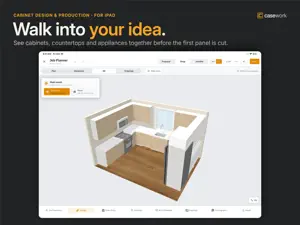
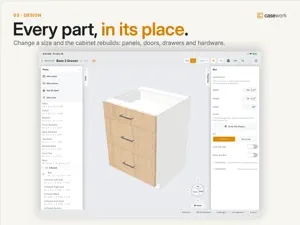
From a single cabinet to the whole room. Design it, work out the details, and take it to the shop. Casework is a cabinetmaking app for iPad. Open a cabinet from the included library, change its dimensions, construction, materials and hardware, then save it as your own and use it on every job. DESIGN THE CABINET • Carcasses, panels, doors, drawers, shelves and moldings • Materials, edge banding, hardware, joints and machining operations • Parts driven by dimensions, so the cabinet rebuilds when a size changes • A starter library of cabinets to copy, adapt and make your own • Range hoods, straight and curved, built part by part like the cabinets PLAN THE ROOM • Walls, openings, cabinets, countertops and appliances • Move between the floor plan, wall elevations and 3D • Countertops that follow the cabinets underneath, with returns and waterfalls • Backsplashes drawn on any wall, in tile, stone and other finishes • Customers, order quantities and job details in one place TAKE IT TO THE SHOP • Cut lists and bills of materials • Cutting diagrams nested across your own sheet sizes • PDF shop drawings and elevations • Machine-ready DXF, as one file or a file per part, on your own layer names • Estimates built from your material prices and labor rates DESIGN IS FREE. PRO TAKES YOUR WORK INTO PRODUCTION. Design unlimited items with every modeling tool, and keep complete cut lists, nesting diagrams and estimate figures on screen. Two jobs at a time, with the room planner, elevations, 3D views and order entry all working. Casework item and job files, and backup and restore, are always free. CASEWORK PRO Production exports, estimate and job-plan PDFs, as many jobs as your shop runs, batch output, and optional sync through your own iCloud account. Monthly or annual subscription, with a 7-day free trial for eligible subscribers. The price and renewal terms are shown before you buy. A subscription renews automatically unless it is turned off at least 24 hours before the current period ends, and you can manage it in your Apple Account settings. If a subscription ends, your work stays with you: every item and job remains readable and exportable as a Casework file. Your work stays on your iPad. There is no Casework account, no advertising and no tracking. Sync is optional and uses your own private iCloud. Check dimensions, specifications, prices and machine output before you quote or cut. Privacy Policy: https://www.casework.work/privacy Terms of Use: https://www.apple.com/legal/internet-services/itunes/dev/stdeula/
What’s new
Version 1.2.2 · Updated October 18, 2026
Faster wall elevations, and drawings your installer can build straight from. WHAT'S NEW • Add doors and windows right from Elevations. Pick one and it goes into the wall you're looking at; drag it into place, where it snaps to cabinets, the sink and other openings, or tap it to adjust its size and position, duplicate it or delete it. • Fridges, ranges, dishwashers, range hoods, washers and dryers now get their own dimensions on the plan and on elevations, so every space along the wall is measured. • Door and window settings now start with the size, and position reads From left and From right, just like your cabinets. • Casework reopens where you left off: on the Items or Jobs tab, and in your job on the tab you were using. • Elevations show every door exactly as it's hung, and appliances are drawn with their own doors, handles and controls. • Backsplashes snap to the wall, cabinets, countertop, doors and windows as you draw them. • Sinks, cooktops and faucets center themselves on the cabinet below, and their countertop cutouts follow their size. • Resize a 3D object and it's drawn at its new size everywhere: in 3D, on elevations and in your PDFs. • Better 3D: views open in front of your cabinets, the lighting follows you as you turn the room, and 3D pictures in drawing PDFs are twice as sharp. • Corner cabinets now come hinged left and hinged right. • Pinch to zoom without nudging the cabinet under your finger. Plus new help for everything above.
App privacy
The developer, Christopher Mancliere, reported these privacy practices to Apple.
Data Not Collected
The developer does not collect any data from this app.
Alternatives to Casework: Cabinet Design
Looking for apps like Casework: Cabinet Design? Here are 6 similar apps on the App Store. The highest rated is OnePreview: File Viewer (5.0/5), and all 6 are free to download.
-
 Mein Briefkasten
-
 Draftly CAD
-
 FileButler: AI File Organizer
-
 Stringer: Stair Layout
4.4
Stringer: Stair Layout
4.4
-
 OnePreview: File Viewer
5.0
OnePreview: File Viewer
5.0
-
 MakerSolid CAD
4.5
MakerSolid CAD
4.5
| App | Rating | Price | Last updated | Compare |
|---|---|---|---|---|
| Casework: Cabinet Design | – | Free | October 18, 2026 | |
| Mein Briefkasten | – | Free | Mar 11, 2026 | Compare |
| Draftly CAD | – | Free | Sep 23, 2026 | Compare |
| FileButler: AI File Organizer | – | Free | Sep 7, 2026 | Compare |
| Stringer: Stair Layout | 4.4 / 5 (5) | Free | Jul 7, 2026 | Compare |
| OnePreview: File Viewer | 5.0 / 5 (1) | Free | Oct 22, 2026 | Compare |
| MakerSolid CAD | 4.5 / 5 (2) | Free | Oct 2, 2026 | Compare |