

Draftly CAD
Tyler Thompson Productivity iPhoneiPadiPod touch
Draftly CAD is a free Productivity app for iPhone and iPad by Tyler Thompson. Requires iOS 15.0. Updated September 23, 2026.
- Price
- Free
- on the App Store
- Size
- 42 MB
- Age 4+
- Updated
- Sep 23
- 2026 · v1.0.5
Screenshots
About Draftly CAD
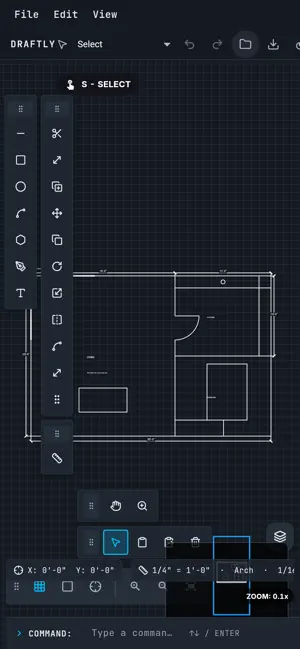
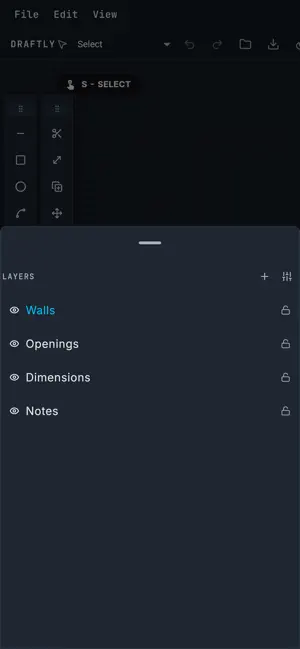
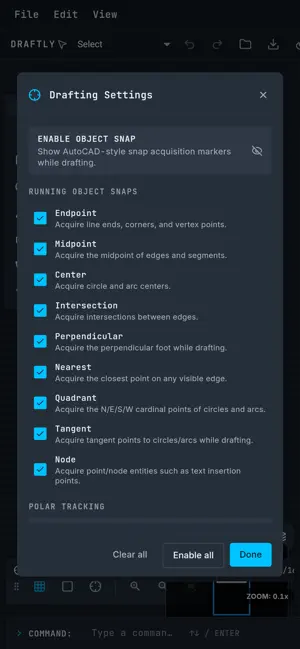
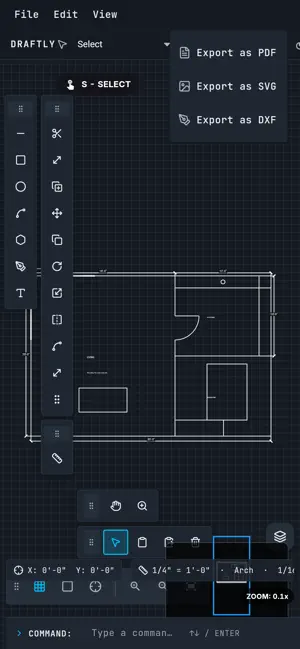
Draftly brings AutoCAD-inspired precision drafting to your iPad, iPhone, and Mac. Draw with pixel-perfect accuracy using nine running object snaps, polar tracking, dynamic input, and real architectural units — then export to PDF, SVG, or DXF for use in any professional CAD tool. Import DXF natively (DWG via the free ODA File Converter). FEATURES • Line, rectangle, circle, polygon, arc, bezier, dimension, and text tools • Nine running object snap families: endpoint, midpoint, center, intersection, perpendicular, nearest, quadrant, tangent, node • Polar tracking with configurable angle increments (5°, 10°, 15°, 18°, 22.5°, 30°, 45°, 90°) • Dynamic input HUD that floats with the cursor at every zoom level • Architectural unit input — type 8'-3 1/2" or 2500mm directly • Status-bar units chip — switch format / scale / precision in one tap • Command line with typed command aliases and suggestions • Relative polar coordinate input — type @ with a distance and angle • Transparent zoom and pan that preserve mid-tool draft state • 60 AutoCAD-style keyboard shortcuts on Mac • Apple Pencil pressure sensitivity — stroke width adjusts automatically • Ortho lock (horizontal/vertical constraint) with temporary Shift override • Configurable grid with real-world scale (imperial and metric) • Multi-layer support with visibility and lock controls • Full undo/redo (up to 100 steps, deep-snapshot history) • Copy, paste, cut, and delete elements • Export to PDF, SVG, and DXF • Import DXF (DWG via ODA File Converter) • Save/load .drft project files (schema v7 with units, layers, and rotation metadata) • Dark mode support • Customizable crosshair cursor (7 styles, 4 sizes, opacity control) PRO ($9 / month, $72 / year, or $179 lifetime founder seat) • Unlimited layers (free tier: 5 layers) • Watermark-free PDF and SVG export • DXF interop — export and import Terms of Use (EULA): https://www.apple.com/legal/internet-services/itunes/dev/stdeula/ Privacy Policy: https://draftlycad.com/privacy/
App privacy
The developer, Tyler Thompson, reported these privacy practices to Apple.
Data Linked to You
The following data, which may be collected and linked to your identity, may be used for the following purposes:
- Identifiers: User ID, Device ID
- Usage Data: Product Interaction
- Diagnostics: Crash Data
- Purchases: Purchase History
- Contact Info: Email Address, Name
- User Content: Other User Content
Used for: Analytics, App Functionality
Alternatives to Draftly CAD
Looking for apps like Draftly CAD? Here are 6 similar apps on the App Store. The highest rated is Simply Sketchy (5.0/5), and all 6 are free to download.
-
 Casework: Cabinet Design
-
 DWG CAD Viewer: DXF, STL
-
 Simply Sketchy
5.0
Simply Sketchy
5.0
-
 PlanTape: Blueprint Measure
-
 Kinetic: Push-Ups to Unlock
5.0
Kinetic: Push-Ups to Unlock
5.0
-
 CADFast - dwg viewer
| App | Rating | Price | Last updated | Compare |
|---|---|---|---|---|
| Draftly CAD | – | Free | September 23, 2026 | |
| Casework: Cabinet Design | – | Free | Oct 18, 2026 | Compare |
| DWG CAD Viewer: DXF, STL | – | Free | Oct 1, 2026 | Compare |
| Simply Sketchy | 5.0 / 5 (1) | Free | Jun 3, 2026 | Compare |
| PlanTape: Blueprint Measure | – | Free | Oct 22, 2026 | Compare |
| Kinetic: Push-Ups to Unlock | 5.0 / 5 (3) | Free | Sep 10, 2026 | Compare |
| CADFast - dwg viewer | – | Free | Oct 20, 2026 | Compare |
Compare Draftly CAD with the top alternatives: ratings, updates, ASO score and keyword gaps →