

Tuck: Screenshot Organizer
Kyrylo Holovchenko Productivity iPhoneiPadiPod touchMac
Tuck: Screenshot Organizer is a free Productivity app for iPhone and iPad by Kyrylo Holovchenko. Requires iOS 26.0. Updated October 15, 2026.
- Price
- Free
- on the App Store
- Size
- 26 MB
- Age 4+
- Updated
- Oct 15
- 2026 · v1.3.2
Screenshots


About Tuck: Screenshot Organizer
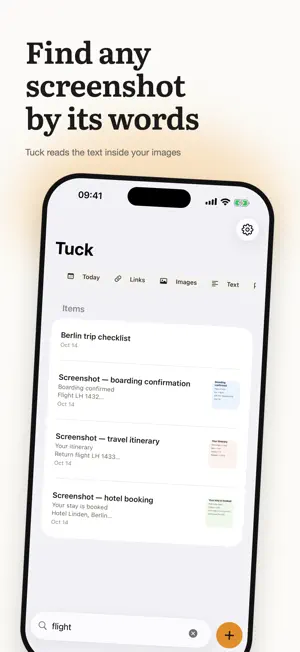
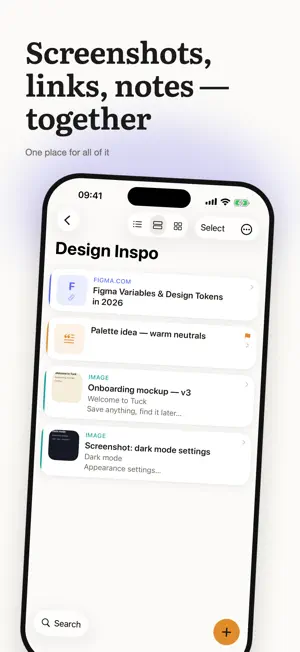
You know that screenshot you took last month — the one you'll never find again? Type a word that was in it. Tuck finds it. Tuck is a private home for everything you want to keep: screenshots, links, notes, and files. Two taps to save. Seconds to find. Free to start. Find it by what's inside On-device text recognition reads the text in your screenshots, so you can search for words you never typed. Full-text search covers your links, notes, and PDFs too, and returns results instantly. Save from anywhere Share anything to Tuck from any app on your iPhone, iPad, or Mac, or import screenshots straight from Photos. Links arrive with their title and preview. No forms, no tags, no decisions at save time. Moving from another bookmarks app? Import its HTML export, and its folders become collections. It organizes itself — by your rules (Pro) Set up a smart collection once ("anything with 'invoice' goes here") and Tuck files every new save automatically. Rules start from your own keywords, and the rule editor shows how many items they currently match. Always one step away Widgets on your iPhone and iPad Home Screen, results in Spotlight, and actions in Shortcuts and Siri. Never miss a date Add a PDF with a deadline and Tuck spots the date and offers a one-tap reminder. You can also set a reminder on any saved item. Make it yours Nest collections, give them covers, hide the private ones, and lock sensitive collections behind Face ID or your passcode (Pro) — locked items stay out of search, widgets, and Spotlight. On iPhone and iPad, saved articles can open in Safari Reader. Your data stays yours No accounts. No tracking. Your library syncs through your private iCloud — we never see it. Text recognition happens on your device. Private by architecture, not by promise. Take it with you Export items as web pages, copy items or whole collections as Markdown, or share a collection as a read-only iCloud link. On the Mac, Tuck Pro can also connect to your AI assistant through a built-in MCP server. Fully native on iPhone, iPad, and Mac. Fully bilingual in English and Ukrainian. Stop losing what you meant to keep. Tuck it away — and find it in seconds. Terms of Use (EULA): https://www.apple.com/legal/internet-services/itunes/dev/stdeula/
What’s new
Version 1.3.2 · Updated October 15, 2026
Photos, screenshots, notes and files no longer show a "Link" label on their detail page. Plus small fixes and polish.
App privacy
The developer, Kyrylo Holovchenko, reported these privacy practices to Apple.
Data Not Linked to You
The following data, which may be collected but is not linked to your identity, may be used for the following purposes:
- Purchases: Purchase History
- Identifiers: User ID, Device ID
Used for: App Functionality
Alternatives to Tuck: Screenshot Organizer
Looking for apps like Tuck: Screenshot Organizer? Here are 6 similar apps on the App Store. The highest rated is Pinwheel Screenshot Organizer (5.0/5), and all 6 are free to download.
-
 Shotbox: Text from Screenshots
-
 Council: AI Debate
-
 Halo: Pomodoro Focus Timer
-
 Pinwheel Screenshot Organizer
5.0
-
 PostPiny
-
 Matí - Calendar
3.5
| App | Rating | Price | Last updated | Compare |
|---|---|---|---|---|
| Tuck: Screenshot Organizer | – | Free | October 15, 2026 | |
| Shotbox: Text from Screenshots | – | Free | Oct 13, 2026 | Compare |
| Council: AI Debate | – | Free | Jul 13, 2026 | Compare |
| Halo: Pomodoro Focus Timer | – | Free | Jul 17, 2026 | Compare |
| Pinwheel Screenshot Organizer | 5.0 / 5 (1) | Free | Oct 1, 2026 | Compare |
| PostPiny | – | Free | Sep 21, 2025 | Compare |
| Matí - Calendar | 3.5 / 5 (2) | Free | Oct 9, 2026 | Compare |