

Pizazoo: Screenshot Organizer
Muhammed Basil E Productivity iPhoneiPadiPod touch
Pizazoo: Screenshot Organizer is a free Productivity app for iPhone and iPad by Muhammed Basil E. Requires iOS 17.0. Updated October 12, 2026.
- Price
- Free
- on the App Store
- Size
- 16 MB
- Age 4+
- Updated
- Oct 12
- 2026 · v1.0.6
Screenshots


About Pizazoo: Screenshot Organizer
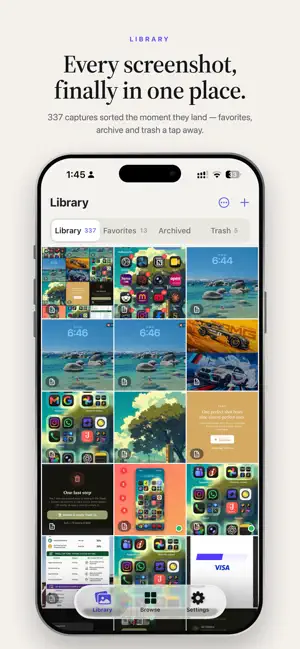
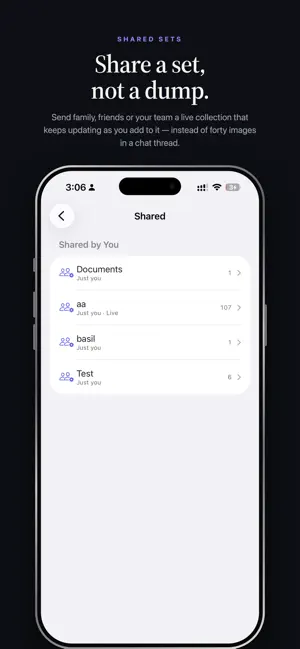
Pizazoo turns the chaos in your screenshot folder into something you can actually use. Every capture you take is read and filed on your iPhone, automatically. No manual albums, no tagging chores, no uploading your private screenshots to somebody else's server. SORTS ITSELF Take a screenshot and Pizazoo gets to work. It recognizes what the image contains and drops it into the right category, so your library is organized before you ever open the app. FINDS ANYTHING BY ITS TEXT Pizazoo reads the words inside every screenshot. Search for "invoice", a flight number, a street name or half a sentence you only half remember, and the right capture comes straight back. BUILT FOR THE WAY SCREENSHOTS ACTUALLY ARRIVE Save straight from the share sheet in any app. Sort a fresh capture from the notification without unlocking your phone. Keep the good ones, archive the rest, and let the trash clean itself up. MARK IT UP Pen, arrows, numbered steps, text, spotlight and magnify. Blur or black out anything private before you send it on. YOURS, PRIVATELY Analysis happens on your device. Your screenshots are not uploaded for processing and are never sold, mined or shared. FREE TO USE The library, automatic categories, full text search, markup and the share extension are all free, with no ads and no account required. PIZAZOO PRO A one-time purchase, never a subscription. Pro adds: - Color tags for your own filing system - Saved searches you can return to in a tap - Unlimited custom categories - iCloud sync, so your library follows you across devices - Shared sets, a live collection you can send to family, friends or your team One purchase covers your iPhone and your iPad on the same Apple Account, plus a Mac. Larger plans cover more devices. Already own Pizazoo for Mac? Your existing license unlocks Pro on iPhone as well. REQUIREMENTS iOS 17 or later. iPhone and iPad. Questions or feedback: [email protected]
What’s new
Version 1.0.6 · Updated October 12, 2026
• Pizazoo now speaks your language: German, French, Spanish, Italian, Portuguese, Dutch, Japanese, Korean, and Simplified and Traditional Chinese. It follows the language you pick for your iPhone or iPad. • One purchase covers your iPhone and your iPad: open Pizazoo on your other device, signed in to the same Apple Account, and Pro turns on by itself. • Counts read naturally everywhere ("1 screenshot", not "1 screenshots"). • Smaller fixes and polish.
App privacy
The developer, Muhammed Basil E, reported these privacy practices to Apple.
Data Not Collected
The developer does not collect any data from this app.
Alternatives to Pizazoo: Screenshot Organizer
Looking for apps like Pizazoo: Screenshot Organizer? Here are 6 similar apps on the App Store. The highest rated is Pinwheel Screenshot Organizer (5.0/5), and all 6 are free to download.
-
 ShotSave -Screenshot Organizer
-
 Pinwheel Screenshot Organizer
5.0
Pinwheel Screenshot Organizer
5.0
-
 Pocket Index: Sort Screenshots
-
 Refind: Read Later & Bookmarks
-
 Hubbit: AI Habit Tracker
-
 KeyFlow AI
5.0
KeyFlow AI
5.0
| App | Rating | Price | Last updated | Compare |
|---|---|---|---|---|
| Pizazoo: Screenshot Organizer | – | Free | October 12, 2026 | |
| ShotSave -Screenshot Organizer | – | Free | Jul 5, 2026 | Compare |
| Pinwheel Screenshot Organizer | 5.0 / 5 (1) | Free | Oct 1, 2026 | Compare |
| Pocket Index: Sort Screenshots | – | Free | Sep 2, 2026 | Compare |
| Refind: Read Later & Bookmarks | – | Free | Jul 20, 2026 | Compare |
| Hubbit: AI Habit Tracker | – | Free | Jun 22, 2026 | Compare |
| KeyFlow AI | 5.0 / 5 (1) | Free | Sep 19, 2026 | Compare |