

ExplainThisDoc – Document AI
Julian Heger Productivity iPhoneiPadiPod touch
ExplainThisDoc – Document AI is a free Productivity app for iPhone and iPad by Julian Heger. Requires iOS 26.0. Updated July 8, 2026.
- Price
- Free
- on the App Store
- Size
- 54 MB
- Age 17+
- Updated
- Jul 8
- 2026 · v3.2.1
Screenshots


About ExplainThisDoc – Document AI
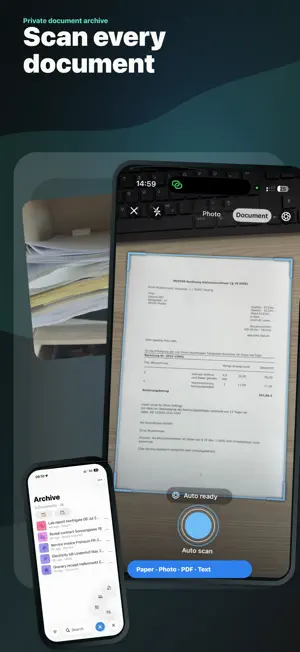
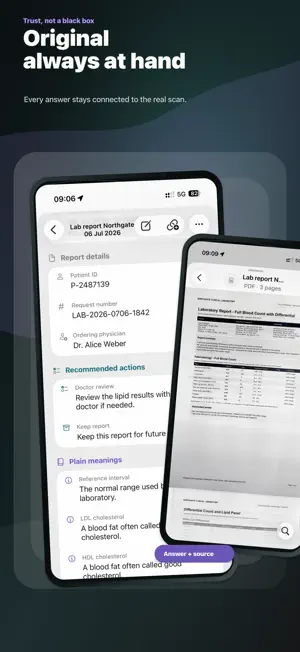
ExplainThisDoc brings order to your documents: scan, import, analyze, and archive letters, contracts, invoices, forms, official notices, tickets, travel documents, manuals, articles, and more in one place. Not just for reading, but for understanding and taking action. Many documents contain deadlines, appointments, risks, payment details, addresses, contacts, or next steps. ExplainThisDoc turns this information into something clear and useful, showing you what really matters: clearly structured, neatly presented, and easy to find again at any time. CAPTURE DOCUMENTS: Add new content in whatever form you have it: • Scan paper documents directly with the camera • Review and edit scans: check pages, add pages, retake them, or discard them • Paste text directly from the clipboard • Import images from your photo library • Import PDFs and documents from Files, Mail, Downloads, or other apps • Analyze content immediately and store it neatly in your archive ANALYSIS FOR EVERYDAY LIFE: ExplainThisDoc only looks at the text of your documents. With the help of AI, the app recognizes and explains their content. Long, complicated, or messy documents become clear, usable information. Depending on the document, the app can show: • Summaries in plain language • Important dates, amounts, time limits, and deadlines • Events you can reuse in your calendar • Addresses and places for routes and navigation • Risks, obligations, or potential cost traps • Sensible next steps • Contacts, case numbers, and references • Payment details and relevant terms • Signs of advertising, spam, or suspicious content • Key points, open questions, and important details The goal is not just to understand a document. You should know right away what needs to be done, what you need to keep an eye on, and which information you may need again later. ORIGINAL ALWAYS INCLUDED: Every analysis stays connected to the original document. The original is stored separately, searchable, and available at any time. You can use the overview first and switch to the actual document whenever you need the exact wording, a contract clause, an invoice, or a specific page. USE INFORMATION DIRECTLY: ExplainThisDoc does not treat documents as just files, but as structured information cards. Important content is prepared so you can use it directly in everyday life: for calendars, routes, follow-ups, payments, decisions, filing, or later research. LINKS BETWEEN DOCUMENTS: Many documents belong together: a contract and its invoice, an official notice and your objection, a travel booking and the ticket, a letter and the later reply. ExplainThisDoc helps you create and visualize connections between related documents. POWERFUL SEARCH AND FILTERS: Find what you need through contents, titles, recognized information, document types, time periods, and other filters. Instead of digging through folders or guessing file names, search for what is actually inside the document. BACK UP, EXPORT, IMPORT: Your archive should never be a dead end. ExplainThisDoc supports simple export and import, so you can back up, transfer, or restore your document collection. PRIVACY WITHOUT AN AD MODEL: ExplainThisDoc contains no ads and no trackers. Your original documents never leave your device. ExplainThisDoc extracts the text from your documents and analyzes it for you using AI. You decide whether Mistral from the EU or OpenAI from the USA should help ExplainThisDoc with the analysis. All your documents in one place. Clearly prepared. Important details always at hand. The original always included.
What’s new
Version 3.2.1 · Updated July 8, 2026
1) Several bugs in the note editor fixed 2) Improved translations
App privacy
The developer, Julian Heger, reported these privacy practices to Apple.
Data Linked to You
The following data, which may be collected and linked to your identity, may be used for the following purposes:
- Purchases: Purchase History
- User Content: Other User Content
- Identifiers: User ID, Device ID
- Usage Data: Product Interaction
Used for: App Functionality
Alternatives to ExplainThisDoc – Document AI
Looking for apps like ExplainThisDoc – Document AI? Here are 6 similar apps on the App Store. The highest rated is NY International Notary (5.0/5), and all 6 are free to download.
-
 PaperlessHero Scan Mail
-
 LegalDoc
-
 Msgly: MSG File Viewer
-
 NY International Notary
5.0
NY International Notary
5.0
-
 AI PDF Summarizer & Doc Chat
4.0
AI PDF Summarizer & Doc Chat
4.0
-
 Paperix - PDF Secure and Local
5.0
Paperix - PDF Secure and Local
5.0
| App | Rating | Price | Last updated | Compare |
|---|---|---|---|---|
| ExplainThisDoc – Document AI | – | Free | July 8, 2026 | |
| PaperlessHero Scan Mail | – | Free | May 29, 2026 | Compare |
| LegalDoc | – | Free | Jul 16, 2025 | Compare |
| Msgly: MSG File Viewer | – | Free | Sep 26, 2026 | Compare |
| NY International Notary | 5.0 / 5 (1) | Free | Sep 28, 2026 | Compare |
| AI PDF Summarizer & Doc Chat | 4.0 / 5 (1) | Free | Jul 1, 2026 | Compare |
| Paperix - PDF Secure and Local | 5.0 / 5 (4) | Free | Sep 15, 2026 | Compare |