

Driftto: Quick Capture
Jafa Media B.V. Productivity iPhoneiPadiPod touch
Driftto: Quick Capture is a free Productivity app for iPhone and iPad by Jafa Media B.V. Requires iOS 16.4. Updated October 12, 2026.
- Price
- Free
- on the App Store
- Size
- 44 MB
- Age 4+
- Updated
- Oct 12
- 2026 · v1.0.4
Screenshots


About Driftto: Quick Capture
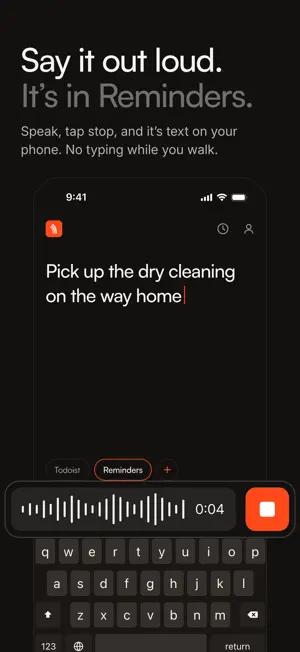
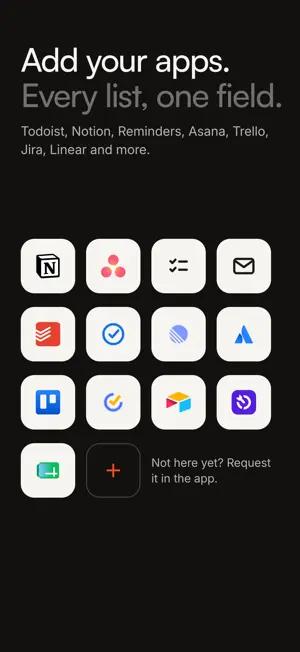
Type it, say it or snap it. It lands in Todoist, Notion, Reminders or another app you already use. The thought shows up between meetings, on the way to a client, halfway through something else. It belongs on your list, in the right project. Opening the right app and finding the right list takes too long, so you email yourself, or you forget it. And tonight you move those emails into the right apps, one by one. Driftto is the shorter route. Type it or say it once, pick where it goes, done. It is on your list straight away. Nothing to file tonight. Where it lands Notion Asana Apple Reminders Email Todoist Google Tasks Linear Jira Trello TickTick Airtable Wrike Dart Google Sheets Missing one? Request it in the app. Pick one destination or several at once. Driftto remembers your last choice. Type it, say it, snap it One field, keyboard already up. Speak and the transcription happens on your phone. Add a photo of the whiteboard and it travels with the note to Notion, Asana or email. Your list, or someone else's Most notes are for yourself. Some belong to a colleague. Send it to their project or inbox, or to your list and theirs at once. You can see where it went Every capture shows where it landed. No signal? It waits on your phone and sends itself when you are back. Hands full Say "Hey Siri, new capture in Driftto". Siri asks what the thought is and sends it. The app never opens. Subscription Driftto is a paid app. The yearly plan starts with a free week. Choose monthly, yearly, or pay once for lifetime access. Cancel any time in your Apple Account settings. Privacy: driftto.io/privacy Terms of Use: https://www.apple.com/legal/internet-services/itunes/dev/stdeula/
What’s new
Version 1.0.4 · Updated October 12, 2026
Small fixes and polish. Thank you for the feedback so far. Keep it coming through the Feedback chip at the end of your destinations: it goes straight to the person who builds Driftto.
App privacy
The developer, Jafa Media B.V., reported these privacy practices to Apple.
Data Linked to You
The following data, which may be collected and linked to your identity, may be used for the following purposes:
- Usage Data: Product Interaction
- Purchases: Purchase History
- Contact Info: Email Address
- User Content: Other User Content
- Identifiers: User ID, Device ID
Used for: Analytics, App Functionality
Alternatives to Driftto: Quick Capture
Looking for apps like Driftto: Quick Capture? Here are 6 similar apps on the App Store.
-
 Tillsa
-
 Tasklane
-
 Sumrize: Meeting Notes & ToDos
-
 Chronaya: Deadline Tracker
-
 Transcribe Audio to Text: ADRS
-
 Mement: Smart GTD Planner
| App | Rating | Price | Last updated | Compare |
|---|---|---|---|---|
| Driftto: Quick Capture | – | Free | October 12, 2026 | |
| Tillsa | – | Free | Oct 11, 2026 | Compare |
| Tasklane | – | Free | Oct 11, 2026 | Compare |
| Sumrize: Meeting Notes & ToDos | – | Free | Nov 11, 2025 | Compare |
| Chronaya: Deadline Tracker | – | Free | Oct 5, 2026 | Compare |
| Transcribe Audio to Text: ADRS | – | Free | Oct 21, 2025 | Compare |
| Mement: Smart GTD Planner | – | Free | Oct 1, 2026 | Compare |