

Mement: Smart Planner
Maksym Havrosh Productivity iPhoneiPadiPod touchMac
Mement: Smart Planner is a free Productivity app for iPhone and iPad by Maksym Havrosh. Requires iOS 18.5. Updated October 29, 2026.
- Price
- Free
- on the App Store
- Size
- 179 MB
- Age 4+
- Updated
- Oct 29
- 2026 · v2.1.0
Screenshots


About Mement: Smart Planner
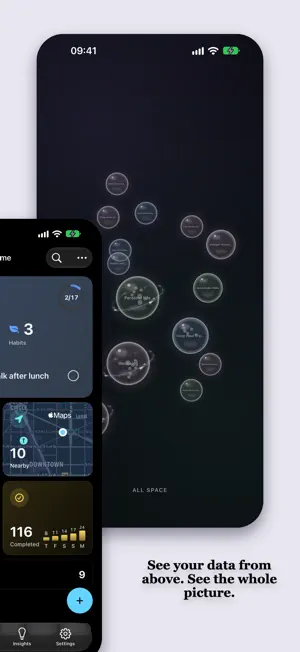
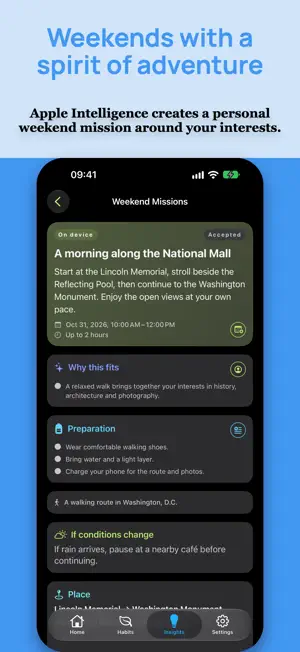
Mement helps you organize Tasks, Projects, and Habits and make time for yourself. Plan your day, follow your progress, and discover ideas for your weekends. Key features - Add Tasks in natural language, with dates, times, tags, and priorities. On compatible devices, Apple Intelligence creates Lists, splits ideas into Tasks, and summarizes your planning data on device. - Twin runs on device to show how you work: it assesses Focus, Consistency, Reliability, Clarity, and Momentum, warns of burnout risk, and suggests what to improve. - See your whole system in Big View, a spatial view where Tasks, Lists, Projects, and Areas become interactive spheres. Big View also has a dedicated Apple TV experience. Weekend Missions - Discover adventures created with Apple Intelligence around your interests, wishes, location, and weather. - View its location on a map, save preparation as a Task, and add the mission to Calendar. - Rate completed missions to help shape future recommendations. Choose on-device generation or Private Cloud Compute for missions. With your consent, PCC receives prepared generation context, including preferences, wishes, location, forecasts, and relevant feedback. Organize everything in one system - Add notes, tags, priorities, dates, and recurrences. Search by title, notes, tags, location, or context. - With Mement Pro, create Spaces for work, personal life, or study so you see only the context you need and switch it together with iOS Focus modes. Habits and Sessions - Build helpful Habits or limit unwanted ones. Track check-ins, counts, duration, or custom units; set daily, weekly, or monthly goals; and add ordered checklists, files, photos, and links. - Start a Session as a timer or stopwatch for a Task, List, Project, Area, or Habit. Pause and continue it across devices through iCloud; on supported devices, control it from widgets, Live Activities, and Dynamic Island. Plan errands nearby - In Nearby, see Tasks with locations on a map, arrange stops, and open the route in Apple Maps. After you open it, Mement keeps the remaining route active and lets you mark stops complete. With Mement Pro, receive arrival notifications on supported devices when permissions allow. Never miss what matters - Configure morning briefings, evening planning, weekly reviews, and streak reminders. - Import Tasks from Apple Reminders and keep later changes in two-way sync. Understand your progress - Review completed Tasks, streaks, goals, Habit activity, and Session time. Mement Pro adds extended time ranges, charts, heatmaps, and personalized AI summaries. - Add Today, Focus List, Next Reminder, Daily Summary, Habits, and Session widgets. Work across the Apple ecosystem - On supported OS versions, open Mement search from system search, and use Siri and Shortcuts to create, update, complete, and delete Tasks. - Build automations and share Task cards in Messages. - Planning data is stored on your device and, if you enable sync, syncs privately between your devices through iCloud. No separate Mement account is required. - Biometric lock and privacy settings help protect your data. Mement Pro - Mement Pro unlocks Weekend Missions, AI drafts and summaries, Spaces, advanced Insights, location reminders, custom recurrence rules, and protected notifications. Terms of Use (EULA): https://www.apple.com/legal/internet-services/itunes/dev/stdeula/
What’s new
Version 2.1.0 · Updated October 29, 2026
What's new in Mement 2.1 Turn your weekend into a little adventure. • Weekend Missions: discover adventures created with Apple Intelligence around your interests, wishes, location, and weather. • Planning your adventure: view its location on a map, save preparation as a Task, and add the mission to Calendar. • Learn from your adventures: rate completed missions to help shape future recommendations. • Updated Insights: switch between Overview and Missions, and revisit the details of past adventures. • Fewer distractions: in Focus Mode, reminders for items outside the active Space can arrive silently. Weekend Missions requires Mement Pro and an available Apple Intelligence model. Generation languages depend on model support.
App privacy
The developer, Maksym Havrosh, reported these privacy practices to Apple.
Data Not Linked to You
The following data, which may be collected but is not linked to your identity, may be used for the following purposes:
- Identifiers: User ID, Device ID
- Diagnostics: Crash Data, Performance Data, Other Diagnostic Data
- Location: Precise Location, Coarse Location
Used for: Analytics, App Functionality
Alternatives to Mement: Smart Planner
Looking for apps like Mement: Smart Planner? Here are 6 similar apps on the App Store. The highest rated is NextThing: GTD To-Do List (5.0/5), and all 6 are free to download.
-
 Clareo: GTD Task Manager
-
 Artemis for GTD
4.3
Artemis for GTD
4.3
-
 NextThing: GTD To-Do List
5.0
NextThing: GTD To-Do List
5.0
-
 TimeTiles
5.0
TimeTiles
5.0
-
 FocusTask: To-Do List
5.0
FocusTask: To-Do List
5.0
-
 Calmshift
| App | Rating | Price | Last updated | Compare |
|---|---|---|---|---|
| Mement: Smart Planner | – | Free | October 29, 2026 | |
| Clareo: GTD Task Manager | – | Free | Oct 24, 2026 | Compare |
| Artemis for GTD | 4.3 / 5 (6) | Free | Mar 26, 2026 | Compare |
| NextThing: GTD To-Do List | 5.0 / 5 (2) | Free | Oct 8, 2026 | Compare |
| TimeTiles | 5.0 / 5 (1) | Free | Jul 9, 2026 | Compare |
| FocusTask: To-Do List | 5.0 / 5 (2) | Free | Jul 13, 2026 | Compare |
| Calmshift | – | Free | Oct 14, 2026 | Compare |