

Calmshift
Rafal Denkiewicz Productivity iPhoneiPadiPod touch
Calmshift is a free Productivity app for iPhone and iPad by Rafal Denkiewicz. Requires iOS 17.0. Updated October 14, 2026.
- Price
- Free
- on the App Store
- Size
- 23 MB
- Age 4+
- Updated
- Oct 14
- 2026 · v1.7
Screenshots


About Calmshift
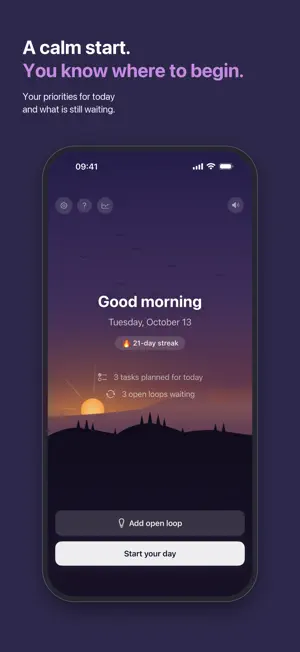
Get your evening back. Calmshift helps you finish work in your head, not just on your laptop. The unanswered email. The decision you keep postponing. The task you're afraid to forget. Your mind keeps them all running in the background. That's why work follows you home. Calmshift is not another planner or to-do list. It's a short evening ritual: write down everything that's still open, decide what waits for tomorrow, and let it go. You don't have to finish everything to finish work: every open item just needs a place to go. You do the work; your head no longer has to keep track of the rest. The evening is actually yours, and your head is clear. DURING THE DAY Something surfaces, you capture it in a couple of seconds as an "open loop", and you go back to work. No sorting, no categories, no deciding. AT THE END OF WORK A short ritual walks you through four quiet steps: • Review what piled up, so nothing slips through, not even the small thing from this morning • Decide on each open loop (tomorrow, a specific date, later, or done with it), so nothing stays in your head overnight • Choose 1–3 priorities for tomorrow, so in the morning you know where to start • Note one good thing from today and how you feel, so the day ends on what went well, not on what's left Then you close the day, and a star appears on your night sky. One for every day you close. Over time, the sky becomes a record of your calm evenings. WHAT BUILDS UP OVER TIME • A night sky that grows with you: one star for every day you close, a planet every twenty days, an aurora for a week you close completely, and a comet at rare milestones • Tap any star to reread that day's reflection, or share your whole sky as a single image • A mood chart drawn from your own reflections, plus honest observations like "Best weekday: Thursday", shown only once there's enough data to mean something BUILT AROUND REST • A streak that counts only your work days. Weekends and days off never break it • Vacation mode silences every reminder and freezes your streak while you're away • Reminders that learn: Calmshift notices when you actually start and close your day, and nudges you around that time instead of a fixed hour YOUR DATA STAYS YOURS No account. No sign-up. No ads, no tracking. Your tasks, open loops and reflections never leave your iPhone. Calmshift only counts anonymous usage, like how many rituals get closed, to make the app better. You can export all of it (tasks, reflections, closed days, settings) to a single file at any time, and import it back on a new phone. Available in English, Polish, Japanese and German. SUBSCRIPTION Free to try for 7 days. After that, choose: • Monthly • Yearly (best value) • Lifetime: one payment, no subscription Prices are shown in the app and vary by country. Subscriptions renew automatically unless cancelled at least 24 hours before the end of the current period. Manage or cancel anytime in your Apple Account settings. Terms of Use (EULA): https://www.apple.com/legal/internet-services/itunes/dev/stdeula/ Privacy Policy: https://algowisent.com/en/privacy-policy/calmshift/index.php
What’s new
Version 1.7 · Updated October 14, 2026
Get your evening back. • New: a clearer welcome. It now says right away what Calmshift is and what it isn't: not another planner, but a way to finish work in your head too. • New: anonymous usage statistics, like how many rituals get closed, help us improve the app. No text from your loops or reflections ever leaves your iPhone. • Improved: the ritual feels like a real sunset. The sun sinks a little lower with every step, and nothing shines through the cards anymore. • Improved: the main buttons are easier to read, "Start your day" now clearly stands out, and the morning and day screens are calmer and clearer. • Improved: the moon's crescent is drawn cleanly against the sky. • Changed: the sky moves by default, even with iOS Reduce Motion on. You can switch motion off just for Calmshift in Settings.
App privacy
The developer, Rafal Denkiewicz, reported these privacy practices to Apple.
Data Not Linked to You
The following data, which may be collected but is not linked to your identity, may be used for the following purposes:
- Purchases: Purchase History
- Identifiers: Device ID
- Usage Data: Product Interaction
- Diagnostics: Other Diagnostic Data
Used for: Analytics, App Functionality
Alternatives to Calmshift
Looking for apps like Calmshift? Here are 6 similar apps on the App Store. The highest rated is Anara (5.0/5), and all 6 are free to download.
-
 Anchor: Daily Planner & Focus
4.8
Anchor: Daily Planner & Focus
4.8
-
 Able to Plan
-
 OfficeRnD Members
4.2
OfficeRnD Members
4.2
-
 Anara
5.0
Anara
5.0
-
 Goals - Wins
5.0
Goals - Wins
5.0
-
 F-Secure FREEDOME VPN
4.5
F-Secure FREEDOME VPN
4.5
| App | Rating | Price | Last updated | Compare |
|---|---|---|---|---|
| Calmshift | – | Free | October 14, 2026 | |
| Anchor: Daily Planner & Focus | 4.8 / 5 (25) | Free | Oct 28, 2026 | Compare |
| Able to Plan | – | Free | Oct 12, 2026 | Compare |
| OfficeRnD Members | 4.2 / 5 (9) | Free | Oct 29, 2026 | Compare |
| Anara | 5.0 / 5 (1) | Free | Oct 22, 2026 | Compare |
| Goals - Wins | 5.0 / 5 (13) | Free | Oct 20, 2026 | Compare |
| F-Secure FREEDOME VPN | 4.5 / 5 (1,145) | Free | Sep 23, 2025 | Compare |
Compare Calmshift with the top alternatives: ratings, updates, ASO score and keyword gaps →