

External Display Desktop: XeOS
Marian-Daniel Filipovici Productivity iPhoneiPadiPod touch
External Display Desktop: XeOS is a free Productivity app for iPhone and iPad by Marian-Daniel Filipovici. Rated 4.1/5 from 17 ratings. Requires iOS 17.6.
- Rating
- 4.1
- 17 ratings
- Price
- Free
- on the App Store
- Size
- 80 MB
- Age 17+
- Updated
- Oct 21
- 2026 · v2.8.2
Screenshots


About External Display Desktop: XeOS
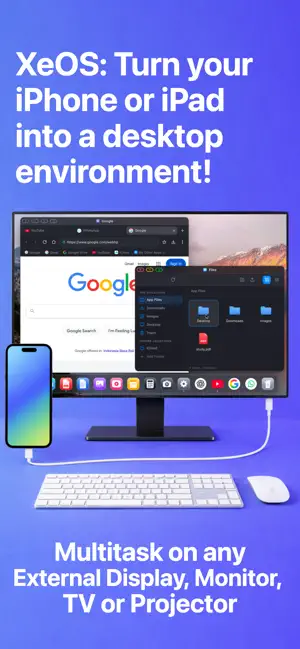
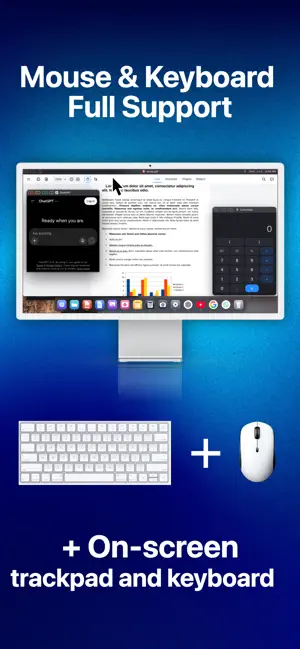
XeOS is the leading and most acclaimed desktop mode experience for iPhone, iPad, and the new iPhone Duo. Browse the web on a second screen, watch videos full-screen, work or study on your external monitor, TV, or projector powered only by your iPhone/iPad. Browse at full resolution, remove black bars, open PDFs and files in tabs, join calls with camera and microphone support, and enjoy a better iPhone/iPad extended display experience. • Full-resolution browsing on your external display from iPhone/iPad • Remove black bars for a cleaner full-screen view • Open PDFs and files in browser tabs • Download files directly from the browser • Watch YouTube and online video in full screen • Camera and microphone support for calls and meetings • Mouse and keyboard support for a desktop-like setup • Multitask with floating tabs - resize and reposition them anywhere on the screen • Use the on-screen trackpad when you don't have a mouse with you • Use the on-screen keyboard when you don't have a keyboard with you • More flexible iPhone/iPad external monitor to use anywhere • Enjoy a better iPhone/iPad to external monitor experience • Use iPhone/iPad extend display for work, travel, and entertainment • Privacy-focused by design, with no server account or remote processing; your browsing session, files, and activity stay on your device • Integrated ad-blocker disables many known intrusive trackers and ads • Built on Safari and iOS security standards, with proper system permissions IMPORTANT: This app works only with iPhone/iPads supporting video output when connecting via cable or adapter! Most iPhone/iPads support it, except the Air and E models, but check your iPhone/iPad's compatibility! The app works with some iPads but we advise you to use the free trial to test it with your model first! If wired connection doesn't work for your model try the wireless mode via AirPlay. The app's onboarding guides your through connecting all peripherals and your external monitor. If you encounter any issues or need help please contact support in the app. IMPORTANT: Note that the app has a few minor limitations. Due to browser engine security restrictions, users may be unable to interact with remote iframes in certain situations. When this happens, the app provides a button to temporarily switch to the phone layout, allowing you to complete the required action. Afterward, you can return to the fullscreen, black-bar-free experience. By using this app, you agree to Apple's Terms of Use (EULA): https://www.apple.com/legal/internet-services/itunes/dev/stdeula/
Ratings & reviews
4.1
17 ratings
What’s new
Version 2.8.2 · Updated October 21, 2026
Version 2.8.0 brings true desktop mode to the new iPhone Duo! You can even use the inner screen as a second display along your monitor or TV! But there are even more exciting features on top of that too: - Improved Smart Search with clipboard history, category filters, keyboard shortcuts, and better clipboard management. - New SSH Terminal for managing servers and transferring files securely, including VSCode Remote Tunnels. - New external screen screenshots and screen recording, with keyboard shortcuts. - Improved web apps with file handling, default app settings, better window navigation, and easier in-app support access. - Improved Chinese and Japanese typing, display scaling, frame rate, status bar customization, and mouse and keyboard diagnostics.
App privacy
The developer, Marian-Daniel Filipovici, reported these privacy practices to Apple.
Data Not Linked to You
The following data, which may be collected but is not linked to your identity, may be used for the following purposes:
- Identifiers: Device ID
- Usage Data: Product Interaction
- Diagnostics: Crash Data
Used for: Analytics, App Functionality
Alternatives to External Display Desktop: XeOS
Looking for apps like External Display Desktop: XeOS? Here are 6 similar apps on the App Store. The highest rated is InfiniteX2P Pro — Desktop Mode (5.0/5), and all 6 are free to download.
-
 Desktop Mode OS: ProDocktive
4.6
Desktop Mode OS: ProDocktive
4.6
-
 DeskState
3.0
DeskState
3.0
-
 InfiniteX2P Pro — Desktop Mode
5.0
InfiniteX2P Pro — Desktop Mode
5.0
-
 Any Display: Second Monitor
1.0
Any Display: Second Monitor
1.0
-
 ScreenExtend - Second Monitor
1.0
ScreenExtend - Second Monitor
1.0
-
 PXS External Screen Desktop
5.0
PXS External Screen Desktop
5.0
| App | Rating | Price | Last updated | Compare |
|---|---|---|---|---|
| External Display Desktop: XeOS | 4.1 / 5 (17 ratings) | Free | October 21, 2026 | |
| Desktop Mode OS: ProDocktive | 4.6 / 5 (24) | Free | Oct 6, 2026 | Compare |
| DeskState | 3.0 / 5 (2) | Free | Oct 16, 2026 | Compare |
| InfiniteX2P Pro — Desktop Mode | 5.0 / 5 (1) | Free | Oct 19, 2026 | Compare |
| Any Display: Second Monitor | 1.0 / 5 (1) | Free | Oct 12, 2026 | Compare |
| ScreenExtend - Second Monitor | 1.0 / 5 (1) | Free | Oct 21, 2026 | Compare |
| PXS External Screen Desktop | 5.0 / 5 (4) | Free | Oct 14, 2026 | Compare |