

InfiniteX2P Pro — Pro Desktop
Joonwoo Kim Productivity iPhoneiPadiPod touch
InfiniteX2P Pro — Pro Desktop is a free Productivity app for iPhone and iPad by Joonwoo Kim. Requires iOS 26.0. Updated September 27, 2026.
- Price
- Free
- on the App Store
- Size
- 438 MB
- Age 17+
- Updated
- Sep 27
- 2026 · v2.0.2
Screenshots

About InfiniteX2P Pro — Pro Desktop
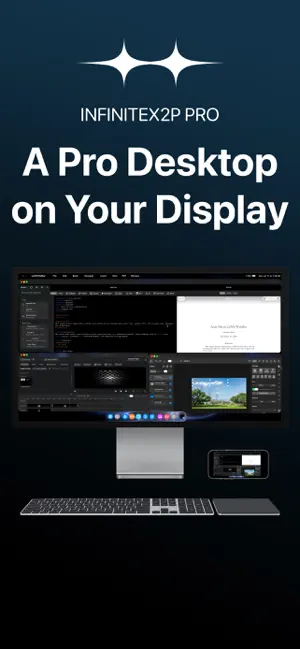
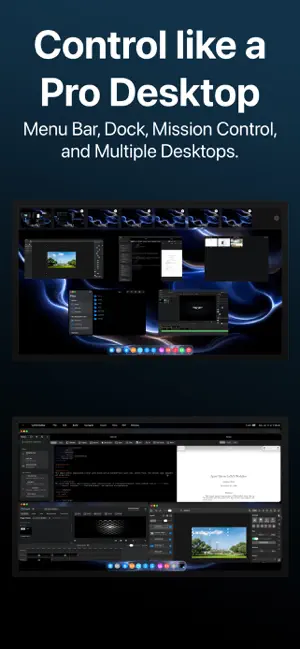
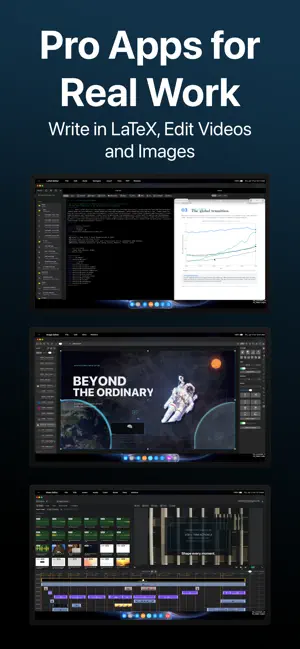
InfiniteX2P Pro transforms iPhone into a Pro Desktop and gives iPad a powerful desktop-style creative workspace. Built for both iPhone and iPad, InfiniteX2P Pro brings movable windows, pro creation tools, Files integration, iCloud Calendar, Contacts, Apple Music, a rebuilt Web Browser, rebuilt Web Apps, and external display support into one unified environment. Use it directly on iPhone with external display as a pocket Pro Desktop Computer. Connect an external display when you want more room for editing, browsing, writing, files, and multitasking. PRO TOOLS BUILT IN Video Editor: • Create video projects • Import media • Arrange clips on a timeline • Work with video and audio tracks • Preview edits • Adjust audio and color settings • Configure export options • Export completed videos Image Editor: • Create image projects with layers • Add text, shapes, fills, brush strokes, and effects • Crop, arrange, rotate, resize, and flip content • Adjust opacity and blend modes • Export as PNG, JPEG, or HEIC LaTeX Editor: • Create and manage LaTeX projects • Edit source files and compile locally with bundled LaTeX/Tectonic support • Preview generated PDFs and view compile logs • Use templates, snippets, symbols, tables, images, citations, and bibliography tools • Run package, document class, accessibility, arXiv, and review checks • Export ZIP projects and app archives IPHONE & IPAD INTEGRATION InfiniteX2P Pro works with the tools and data already on your device. • Files integration for browsing, organizing, importing, and exporting documents • iCloud Calendar access for viewing, creating, and editing events • Contacts access for browsing your address book • Apple Music access inside the workspace • Photo and media import workflows for creative projects • Local document, download, and project storage DESKTOP-STYLE WORKSPACE InfiniteX2P Pro gives iPhone and iPad a flexible window-based interface. • Movable, resizable app windows • Minimize and maximize controls • Dock, Launchpad, Mission Control, and multiple Spaces • Keyboard shortcut support • Pointer and touch-friendly controls • Workspace restoration and profiles Keep your browser, files, calendar, contacts, music, notes, and creative editors open together instead of constantly switching between separate full-screen apps. REBUILT WEB BROWSER The Web Browser in InfiniteX2P Pro has been reworked from the ground up. • Rebuilt browser architecture • Improved SSO sign-in flow • Tab view with page previews • Tabbed browsing • Bookmarks and downloads • Address and search tools • Mobile/desktop website switching • Find and page tools • Better workspace integration REBUILT WEB APPS Web Apps have also been reworked from the ground up, making websites feel more integrated inside the InfiniteX2P Pro workspace. • Add websites as workspace apps • Launch saved web apps from the desktop-style environment • Keep web apps alongside files, editors, calendar, contacts, and other tools • Use web apps as part of a larger multitasking workflow FILES & DOCUMENT MANAGEMENT Manage documents and project files from inside InfiniteX2P Pro. • Browse Documents and Downloads • Create files and folders • Rename, move, copy, and delete items • Add sidebar shortcuts • Switch between list and icon views • Use drag-and-drop where supported • Preview files through Lookup • Import and export project content • Work with documents used by the Pro editors EXTERNAL DISPLAY SUPPORT Use InfiniteX2P Pro directly on iPhone or iPad, or connect to an external display for a larger desktop-style setup with mirroring support, external display resolution options, and more room for editing, browsing, writing, and file management. Terms of Use (EULA): https://www.apple.com/legal/internet-services/itunes/dev/stdeula/ Privacy Policy: https://github.com/kjwamlex/InfiniteX2P-Pro-Privacy-Policy/blob/main/README.md
What’s new
Version 2.0.2 · Updated September 27, 2026
This update introduces NEMESIS, a new foundation for a faster, more reliable InfiniteX2P Pro experience. It also improves PDF readability, adds full-screen video playback to Web Browser and Web Apps, fixes drag-and-drop file uploads in Notion, and includes improvements to windowing, external displays, document handling, and overall stability. New Features - Introducing NEMESIS, a new application system designed to make InfiniteX2P Pro more responsive, reliable, and capable. - Apps now run more independently, helping keep the desktop responsive if an app encounters an issue. - Improved multitasking allows apps, windows, documents, and external displays to work together more reliably. - Apps can now recover more gracefully from unexpected interruptions, with options to reopen affected windows. - PDF documents are now clearer and easier to read, with improved rendering and presentation. - Web Browser and Web Apps now support full-screen video playback for a more immersive viewing experience. - Window resizing is smoother and more responsive across supported apps, including when using an external display. - Documents and app state are handled more reliably when opening files, switching apps, and restoring a workspace. Bug Fixes and Improvements - Fixed an issue that prevented files from being uploaded to Notion using drag and drop. - Improved file drag and drop across Web Browser, Web Apps, Files, and supported apps. - Fixed issues that could cause files with the same name to be imported incorrectly. - Improved document saving and file handoff between apps. - Fixed issues affecting PDF display, editing, and saving. - Improved video playback and presentation on external displays. - Fixed an issue that could cause duplicate audio during external video playback. - Improved window resizing performance and visual stability. - Fixed app windows occasionally appearing blank or failing to open correctly. - Improved app recovery following an unexpected interruption. - Fixed menus occasionally remaining visible after interacting with an app. - Improved pointer, touch, keyboard, and drag-and-drop interactions. - Includes additional performance and stability improvements throughout InfiniteX2P Pro. - Fixed repeated clicks on menus freezing InfiniteX2P Pro - Fixed unresponsive Image Editor menu bar items - Fixed Image Editor crash after exporting image - Fixed Image Editor's text showing duplicate layer when editing text
App privacy
The developer, Joonwoo Kim, reported these privacy practices to Apple.
Data Not Collected
The developer does not collect any data from this app.
Alternatives to InfiniteX2P Pro — Pro Desktop
Looking for apps like InfiniteX2P Pro — Pro Desktop? Here are 6 similar apps on the App Store. The highest rated is iOS Desktop Mode: ProDocktive (4.6/5), and all 6 are free to download.
-
 External Display Browser: XeOS
4.5
External Display Browser: XeOS
4.5
-
 iOS Desktop Mode: ProDocktive
4.6
iOS Desktop Mode: ProDocktive
4.6
-
 DeskState
3.0
DeskState
3.0
-
 Lok Board
4.6
Lok Board
4.6
-
 KDE Connect
4.2
KDE Connect
4.2
-
 Shadow PC
3.7
Shadow PC
3.7
| App | Rating | Price | Last updated | Compare |
|---|---|---|---|---|
| InfiniteX2P Pro — Pro Desktop | – | Free | September 27, 2026 | |
| External Display Browser: XeOS | 4.5 / 5 (11) | Free | Sep 24, 2026 | Compare |
| iOS Desktop Mode: ProDocktive | 4.6 / 5 (22) | Free | Sep 9, 2026 | Compare |
| DeskState | 3.0 / 5 (2) | Free | Sep 19, 2026 | Compare |
| Lok Board | 4.6 / 5 (182) | Free | Mar 11, 2025 | Compare |
| KDE Connect | 4.2 / 5 (275) | Free | Aug 21, 2026 | Compare |
| Shadow PC | 3.7 / 5 (1,946) | Free | Aug 19, 2026 | Compare |