

Any Display: Second Monitor
FULLSTACKHUB Productivity iPhoneiPadiPod touch
Any Display: Second Monitor is a free Productivity app for iPhone and iPad by FULLSTACKHUB. Rated 3.0/5 from 2 ratings. Requires iOS 16.0.
- Rating
- 3.0
- 2 ratings
- Price
- Free
- on the App Store
- Size
- 26 MB
- Age 4+
- Updated
- Oct 30
- 2026 · v1.9.0
Screenshots


About Any Display: Second Monitor
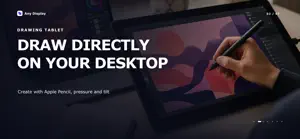
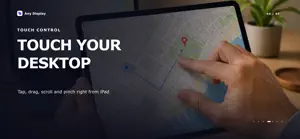
Turn your iPad into a second monitor, drawing tablet, touch controller, mobile webcam, and customizable Control Pad for your Mac or Windows PC. Any Display brings your workspace, input, camera, and desktop actions together in one app. SECOND DISPLAY • Extend your desktop for more workspace • Mirror the full display or an individual app window • Hear computer audio on the connected iPad • Connect over the same Wi-Fi network or a USB cable • Choose the resolution, frame rate, and image quality that fit your connection TOUCH, TRACKPAD & DRAWING • Control your computer with tap, double-tap, drag, scroll, and pinch gestures • Use direct touch or move the pointer in trackpad mode • Draw, write, and sign with Apple Pencil in compatible desktop apps • Send supported pressure and tilt input to your computer MOBILE WEBCAM • Use the front or rear iPhone or iPad camera as AnyDisplay Camera on your computer • Adjust camera resolution and frame rate • Keep the image level as the device rotates CONTROL PAD • Turn your tablet into a customizable control surface • Run shortcuts, launch apps, control media, and use supported desktop plugins • Configure buttons and profiles in the Any Display desktop app • Use Control Pad alongside an extended or mirrored display PHONE MIRRORING • Mirror your iPhone screen to a compatible Mac or Windows desktop host • On Mac, optional Bluetooth and AssistiveTouch setup can also enable computer input for your iPhone Install the Any Display desktop app from anydisplay.app, open the mobile app, and connect to your computer.
What’s new
Version 1.9.0 · Updated October 30, 2026
Features now follow the extension modules you own. Plan names are gone and only the trial label remains. If you try a feature from a module you have not purchased, the app tells you the license is required.
App privacy
The developer, FULLSTACKHUB, reported these privacy practices to Apple.
Data Linked to You
The following data, which may be collected and linked to your identity, may be used for the following purposes:
- Purchases: Purchase History
- Contact Info: Email Address, Name
- Identifiers: User ID, Device ID
Used for: Analytics, App Functionality
Data Not Linked to You
The following data, which may be collected but is not linked to your identity, may be used for the following purposes:
- Location: Coarse Location
- Usage Data: Product Interaction
- Diagnostics: Crash Data, Other Diagnostic Data
Used for: Analytics, App Functionality
Alternatives to Any Display: Second Monitor
Looking for apps like Any Display: Second Monitor? Here are 6 similar apps on the App Store. The highest rated is OpenDisplay (4.7/5), and all 6 are free to download.
-
 External Display Desktop: XeOS
4.2
External Display Desktop: XeOS
4.2
-
 BeMyDisplay
3.0
BeMyDisplay
3.0
-
 OpenDisplay
4.7
OpenDisplay
4.7
-
 ScreenExtend - Second Monitor
1.0
ScreenExtend - Second Monitor
1.0
-
 Tab Display-Expand Your Tablet
4.1
Tab Display-Expand Your Tablet
4.1
-
 Desktop Mode OS: ProDocktive
4.6
Desktop Mode OS: ProDocktive
4.6
| App | Rating | Price | Last updated | Compare |
|---|---|---|---|---|
| Any Display: Second Monitor | 3.0 / 5 (2 ratings) | Free | October 30, 2026 | |
| External Display Desktop: XeOS | 4.2 / 5 (19) | Free | Oct 30, 2026 | Compare |
| BeMyDisplay | 3.0 / 5 (1) | Free | Aug 17, 2025 | Compare |
| OpenDisplay | 4.7 / 5 (21) | Free | Oct 29, 2026 | Compare |
| ScreenExtend - Second Monitor | 1.0 / 5 (1) | Free | Oct 21, 2026 | Compare |
| Tab Display-Expand Your Tablet | 4.1 / 5 (18) | Free | Oct 19, 2026 | Compare |
| Desktop Mode OS: ProDocktive | 4.6 / 5 (24) | Free | Oct 6, 2026 | Compare |