

ScreenExtend - Second Monitor
Creact SRL Productivity iPhoneiPadiPod touch
ScreenExtend - Second Monitor is a free Productivity app for iPhone and iPad by Creact SRL. Rated 1.0/5 from 1 ratings. Requires iOS 16.4.
- Rating
- 1.0
- 1 ratings
- Price
- Free
- on the App Store
- Size
- 31 MB
- Age 4+
- Updated
- Oct 21
- 2026 · v1.0.8
Screenshots


About ScreenExtend - Second Monitor
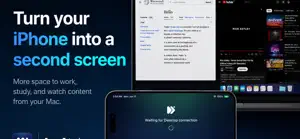
Turn your iPad or iPhone into a second monitor for your Mac. No Wi-Fi, no complicated setup—just a cable. Need more space to work, study, or organize your windows? With **ScreenExtend**, you can use your iPad or iPhone as an additional display for your Mac, wherever you are. And the best part? You get 1 hour for free every single day. No need to carry an extra monitor. No Wi-Fi networks to configure. Simply connect your device to your Mac with a cable, and start working with more screen real estate. ### WHY CHOOSE SCREENEXTEND? A second screen, always with you Turn your iPad or iPhone into an external monitor for your Mac. Perfect for working on the go, traveling, or expanding your workspace without having to buy another display. Wired connection—no Wi-Fi required ScreenExtend uses a direct USB cable connection, providing a stable and responsive experience that doesn't rely on the quality of a wireless network. High definition and smooth performance Enjoy crisp images and optimized video transmission with H.264 and H.265 support—ideal for multitasking and everyday tasks. 1 hour free, every day Use ScreenExtend for free for up to 60 minutes a day. Need more time? Upgrade to Premium to use your second screen with no time limits. Simple setup Install the app on your iPhone or iPad, download the Mac application from screenextend.com, and connect your devices using a cable. ### PERFECT FOR THOSE WHO WORK ON THE GO • Developers: Keep your code, documentation, and tools on separate screens. • Designers and creatives: Expand your workspace for your projects. • Students: Consult your notes and study materials while working on your Mac. • Professionals: Manage emails, documents, chats, and video conferences with more screen space at your disposal. • Digital nomads: Carry a dual-screen setup with you—no need to lug around an extra monitor. ### COMPATIBILITY • iPhone and iPad running iOS/iPadOS 16.0 or later • Mac running macOS 14.0 or later • Direct connection via cable • Desktop app available at screenextend.com ### FREE EVERY DAY. PREMIUM WHENEVER YOU WANT. With ScreenExtend, you get 60 minutes of free use every single day—no subscription required. If you’d like to use your second screen for longer, you can upgrade to ScreenExtend Premium directly within the app. Subscriptions are managed via the App Store and can be cancelled through your Apple account settings. Your Mac needs more screen space. Your iPad or iPhone is already good to go. Download ScreenExtend and discover how easy it is to always have a second monitor with you. Learn more: https://screenextend.com Terms of Use: https://www.creact.it/eula/ Privacy Policy: https://www.creact.it/privacy-policy/
What’s new
Version 1.0.8 · Updated October 21, 2026
ScreenExtend keeps getting better! In this version, we’ve worked to make the experience even simpler, smoother, and more enjoyable. • HD second monitor: Turn your iPhone or iPad into an additional display for your Mac. • Wired connection: Work without Wi-Fi, using a stable and responsive connection. • 60 minutes free every day: More space to work, study, and organize your tasks. • Unlimited Premium: Use ScreenExtend for as long as you like. We’re constantly improving ScreenExtend to provide you with an ever-better experience. Your second monitor is already with you—just connect it and get started!
App privacy
The developer, Creact SRL, reported these privacy practices to Apple.
Data Not Collected
The developer does not collect any data from this app.
Alternatives to ScreenExtend - Second Monitor
Looking for apps like ScreenExtend - Second Monitor? Here are 6 similar apps on the App Store. The highest rated is Desktop Mode OS: ProDocktive (4.6/5), and all 6 are free to download.
-
 Tab Display-Expand Your Tablet
4.1
-
 Flex Extend Display
-
 External Display Desktop: XeOS
4.0
-
 Any Display: Second Monitor
3.0
-
 DeskState
3.7
-
 Desktop Mode OS: ProDocktive
4.6
| App | Rating | Price | Last updated | Compare |
|---|---|---|---|---|
| ScreenExtend - Second Monitor | 1.0 / 5 (1 rating) | Free | October 21, 2026 | |
| Tab Display-Expand Your Tablet | 4.1 / 5 (18) | Free | Oct 19, 2026 | Compare |
| Flex Extend Display | – | Free | Jul 28, 2026 | Compare |
| External Display Desktop: XeOS | 4.1 / 5 (20) | Free | Nov 1, 2026 | Compare |
| Any Display: Second Monitor | 3.0 / 5 (2) | Free | Oct 30, 2026 | Compare |
| DeskState | 3.7 / 5 (3) | Free | Oct 16, 2026 | Compare |
| Desktop Mode OS: ProDocktive | 4.6 / 5 (24) | Free | Oct 6, 2026 | Compare |