

NoPhoto - Quick Photo Cleanup
菁阳 黄 Photo & Video iPhoneiPadiPod touch
NoPhoto - Quick Photo Cleanup is a free Photo & Video app for iPhone and iPad by 菁阳 黄. Rated 5.0/5 from 1 ratings. Requires iOS 16.0. Updated April 23, 2026.
- Rating
- 5.0
- 1 ratings
- Price
- Free
- on the App Store
- Size
- 5 MB
- Age 4+
- Updated
- Apr 23
- 2026 · v1.4.0
Screenshots

About NoPhoto - Quick Photo Cleanup
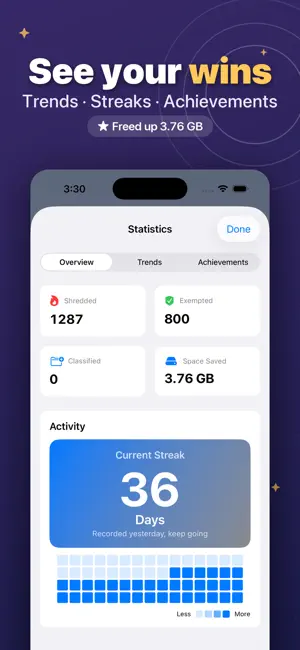
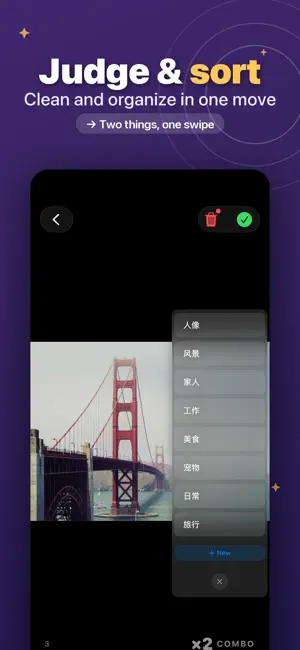
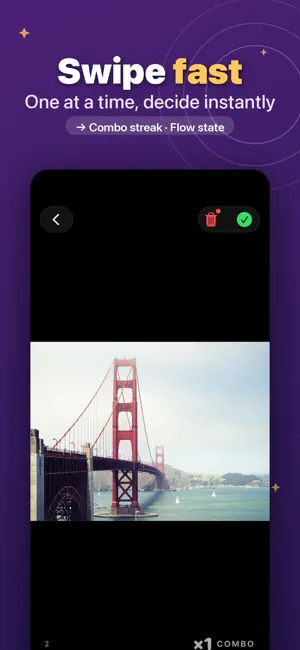
NoPhoto — Timed Decisions, Clean Albums Fast Beat decision paralysis — use timed judgment mode to quickly decide the fate of every photo! HOW IT WORKS: Tap "Start Judgment" to enter timed decision mode. Each photo gets a 1-10 second countdown. Swipe or tap to decide. After judging, confirm all deletions at once. Don't worry about mistakes — the trash keeps photos for 30 days. DUAL CONTROL MODES: • Swipe Mode: Four directions for four actions (keep, shred, classify, exempt), each fully customizable • Button Mode: Three clear action buttons, tap to decide, simple and direct KEY FEATURES: • Timed Judgment: 1-10 second adjustable countdown, auto-execute on timeout • Live Photo Support: Auto-plays Live Photos with separate decision time setting • Album Classification: Classify photos into albums during judgment • Year View: Browse your library grouped by capture year — long-press to open that year's curated trial • Random Shuffle: Randomize photo order to avoid timeline-based emotional bias • Advanced Filters: Filter by media type, album, or date range • Hardcore Mode: Skip trash and permanently delete immediately • Statistics Dashboard: Weekly trends, total decisions, average decision time • Achievement System: Unlock badges for milestones • Face-to-Face Sharing: Create LAN rooms to browse photos with friends • Combo Streaks: Consecutive shreds trigger combo effects across six tiers SAFETY FIRST: • 30-Day Trash: Recover accidentally deleted photos within 30 days • Exemption List: Exempted photos never appear in judgment again • Batch Confirm: Confirm all deletions at once after judgment • iCloud Sync: Settings and stats sync across devices • Privacy: All processing happens locally, no photo uploads LANGUAGES: 简体中文 / 繁體中文 / English / 日本語 / 한국어 / Español
What’s new
Version 1.4.0 · Updated April 23, 2026
Sharper judging • New Undo button — take back your last decision in a tap • Swipe sensitivity is now adjustable — tune it to your hand • Edge glow hints show exactly which direction you're swiping Smarter classification • Photos classified into an album are auto-exempted — no more repeat prompts • Year view drills down by month for more focused trials Easier to pick up • New 4-step interactive onboarding — learn by doing • Built-in release notes panel to revisit highlights any time Smoother scrolling • Large albums lazy-load per cell for buttery scrolling
App privacy
The developer, 菁阳 黄, reported these privacy practices to Apple.
Data Not Collected
The developer does not collect any data from this app.
Alternatives to NoPhoto - Quick Photo Cleanup
Looking for apps like NoPhoto - Quick Photo Cleanup? Here are 6 similar apps on the App Store. The highest rated is MemoDrop: Photo Journal, Diary (5.0/5), and all 6 are free to download.
-
 MemoDrop: Photo Journal, Diary
5.0
MemoDrop: Photo Journal, Diary
5.0
-
 QuellCut - Silence Remover
4.5
QuellCut - Silence Remover
4.5
-
 PhotoMeow: Photo Organizer
5.0
PhotoMeow: Photo Organizer
5.0
-
 zizaiRemote
5.0
zizaiRemote
5.0
-
 Blur Video - Mosaic AI
4.6
Blur Video - Mosaic AI
4.6
-
 PicsFold: Separate Photo Album
3.2
PicsFold: Separate Photo Album
3.2
| App | Rating | Price | Last updated | Compare |
|---|---|---|---|---|
| NoPhoto - Quick Photo Cleanup | 5.0 / 5 (1 rating) | Free | April 23, 2026 | |
| MemoDrop: Photo Journal, Diary | 5.0 / 5 (3) | Free | Oct 12, 2026 | Compare |
| QuellCut - Silence Remover | 4.5 / 5 (2) | Free | Oct 1, 2026 | Compare |
| PhotoMeow: Photo Organizer | 5.0 / 5 (5) | Free | Oct 10, 2026 | Compare |
| zizaiRemote | 5.0 / 5 (1) | Free | Sep 21, 2026 | Compare |
| Blur Video - Mosaic AI | 4.6 / 5 (9) | Free | Aug 29, 2026 | Compare |
| PicsFold: Separate Photo Album | 3.3 / 5 (4) | Free | Oct 12, 2026 | Compare |