

QuellCut - Silence Remover
Cihat Salik Photo & Video iPhoneiPadiPod touch
QuellCut - Silence Remover is a free Photo & Video app for iPhone and iPad by Cihat Salik. Rated 4.5/5 from 2 ratings. Requires iOS 17.0.
- Rating
- 4.5
- 2 ratings
- Price
- Free
- on the App Store
- Size
- 11 MB
- Age 4+
- Updated
- Nov 9
- 2026 · v1.7.0
Screenshots
Save to Pinterest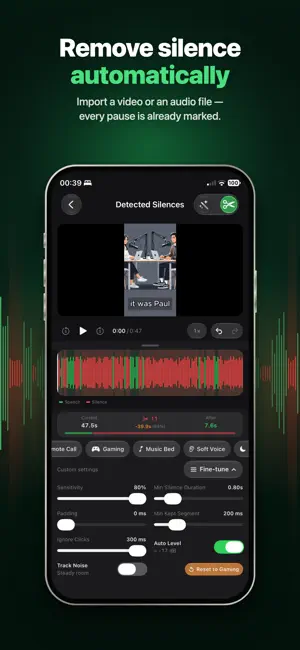


About QuellCut - Silence Remover
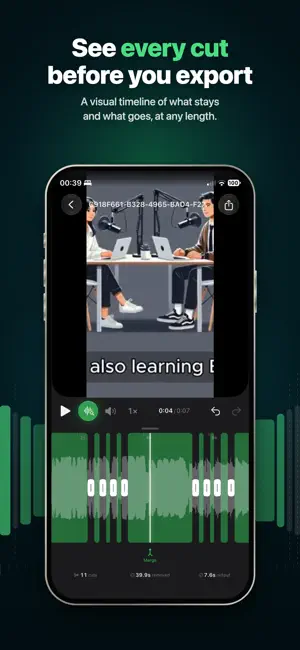
Tired of manually cutting awkward pauses from your videos? QuellCut automatically detects and removes silent segments — so your content sounds polished and professional in minutes, not hours. Whether you're a podcaster, YouTuber, educator, or content creator, QuellCut saves you hours of tedious editing by intelligently finding every pause, dead air moment, and unnecessary silence in your footage. KEY FEATURES: ▸ VIDEO AND AUDIO FILES Not just video. Import MP3, M4A, AAC, WAV, AIFF, FLAC and CAF to clean up podcasts, interviews and voice memos, then export as M4A (AAC) or WAV. ▸ AUTOMATIC SILENCE DETECTION Import a video or audio file and QuellCut analyzes the waveform to find every silent moment. Start from a preset for podcasts, interviews, vlogs, tutorials and more, or fine-tune the threshold yourself. ▸ FILLER WORD REMOVAL Go beyond silence. QuellCut detects and removes filler words like "um," "uh," "you know," and more. Clean up speech automatically for a professional result. ▸ REPETITION DETECTION Stumbled over a sentence? QuellCut identifies repeated phrases and false starts so you can remove them with one tap. ▸ SHORTS & CLIPS EXTRACTION Automatically find the most engaging moments in your video and export them as vertical 9:16 Shorts — ready for YouTube Shorts, Instagram Reels, or TikTok. ▸ AUDIO NORMALIZATION Balance your audio levels automatically to broadcast-standard loudness (-16 LUFS) for consistent, professional sound. ▸ HANDLES ANY LENGTH From 30-second clips to 24+ hour recordings — QuellCut handles it all without breaking a sweat. Perfect for long podcasts, lectures, live streams, and interviews. ▸ FULL CONTROL Review every detected cut on a visual timeline. Toggle individual segments on or off. Adjust padding, minimum silence duration, and blip removal to get exactly the edit you want. ▸ PRIVATE BY DESIGN Silence detection, editing and export run on your iPhone — your files are never uploaded. Filler-word detection uses Apple speech recognition, on device wherever your language supports it. ▸ FLEXIBLE EXPORT Choose your output quality and resolution. Export with original aspect ratio preserved. Share directly or save to your photo library. HOW IT WORKS: 1. Import a video from your library 2. QuellCut analyzes and marks all silent segments 3. Review, adjust, and export your polished video Perfect for: • Podcasters who want clean, tight episodes • YouTubers who need fast turnaround • Educators creating lecture content • Anyone who records video and wants to remove dead air Download QuellCut and turn hours of editing into minutes. EXPORTS AND PLANS Import, edit and preview as much as you like. You get 3 free exports every month. QuellCut Pro unlocks unlimited exports with a Yearly or Monthly plan, or a one-time Lifetime purchase. The Yearly plan starts with a 7-day free trial for eligible new subscribers. Payment is charged to your Apple ID at confirmation. Subscriptions renew automatically unless cancelled at least 24 hours before the end of the current period; manage or cancel them in your App Store account settings. Unused free-trial time is forfeited when you buy a subscription. Privacy Policy: https://apps.cihat.dev/quellcut/privacy-policy/ Terms of Use: https://www.apple.com/legal/internet-services/itunes/dev/stdeula/
What’s new
Version 1.7.0 · Updated November 9, 2026
What's new in 1.7.0: • Settings has two new links: Rate QuellCut and Send feedback. • If an export fails, a Send feedback button takes you straight to support. • QuellCut asks for a rating less often, and never after an error. • Exporting the same project again no longer uses up another of this month's exports. • A notification now reminds you 2 days before your plan first renews. • Plan names on the upgrade screen now appear in your language.
App privacy
The developer, Cihat Salik, reported these privacy practices to Apple.
Data Not Collected
The developer does not collect any data from this app.
Alternatives to QuellCut - Silence Remover
Looking for apps like QuellCut - Silence Remover? Here are 6 similar apps on the App Store. The highest rated is MemoDrop: Photo Journal, Diary (5.0/5), and all 6 are free to download.
-
 Blur Video - Mosaic AI
4.6
-
 MemoDrop: Photo Journal, Diary
5.0
-
 PhotoMeow: Photo Organizer
5.0
-
 NoPhoto - Quick Photo Cleanup
5.0
-
 SnapLapse: Progress Photos
5.0
-
 zizaiRemote
5.0
| App | Rating | Price | Last updated | Compare |
|---|---|---|---|---|
| QuellCut - Silence Remover | 4.5 / 5 (2 ratings) | Free | November 9, 2026 | |
| Blur Video - Mosaic AI | 4.6 / 5 (9) | Free | Aug 29, 2026 | Compare |
| MemoDrop: Photo Journal, Diary | 5.0 / 5 (3) | Free | Oct 25, 2026 | Compare |
| PhotoMeow: Photo Organizer | 5.0 / 5 (7) | Free | Oct 18, 2026 | Compare |
| NoPhoto - Quick Photo Cleanup | 5.0 / 5 (1) | Free | Apr 23, 2026 | Compare |
| SnapLapse: Progress Photos | 5.0 / 5 (3) | Free | Oct 9, 2026 | Compare |
| zizaiRemote | 5.0 / 5 (1) | Free | Sep 21, 2026 | Compare |