

Blur Video - Mosaic AI
Shenzhen Mengmi Technology Co., Ltd. Photo & Video iPhoneiPadiPod touch
Blur Video - Mosaic AI is a free Photo & Video app for iPhone and iPad by Shenzhen Mengmi Technology Co., Ltd. Rated 4.6/5 from 9 ratings. Requires iOS 16.0.
- Rating
- 4.6
- 9 ratings
- Price
- Free
- on the App Store
- Size
- 32 MB
- Age 4+
- Updated
- Aug 29
- 2026 · v1.3
Screenshots
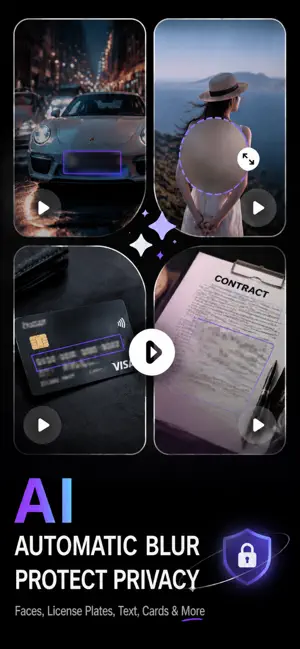

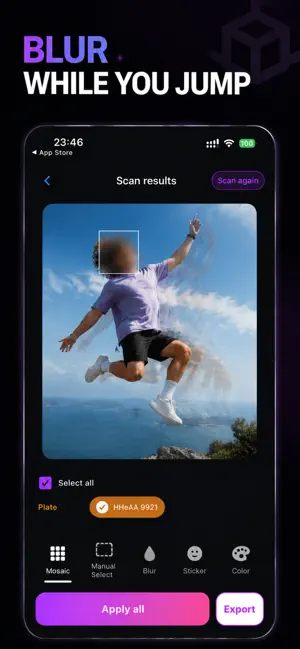
About Blur Video - Mosaic AI
VideoBlur helps you protect privacy in photos and videos before you share them. Blur faces, license plates, QR codes, and sensitive text in just a few taps — all processed locally on your device. Whether you're posting to social media, sending screenshots, or sharing family photos, VideoBlur makes it easy to hide anything you don't want the world to see. KEY FEATURES • Blur & Mosaic — Apply smooth blur or pixel mosaic to any area of a photo or video. • Automatic Detection — Faces, license plates, QR codes, and some sensitive text are recognized automatically. • On-Device Processing — Editing happens locally, so your media stays on your phone. • Photo & Video Support — Works with both still images and video clips. • Manual Control — Tap or drag to blur exactly the areas you choose. • Adjustable Strength — Fine-tune blur and mosaic intensity for the right look. PERFECT FOR • Hiding faces in group photos and street shots • Covering license plates before selling a car or posting online • Blurring QR codes, addresses, and personal details in screenshots • Protecting kids' faces on social media • Redacting confidential text in documents and receipts WHY VIDEOBLUR Sharing photos and videos shouldn't mean giving up privacy. VideoBlur puts you in control, letting you censor sensitive content quickly and precisely — without complicated tools. Download VideoBlur and share with confidence. Privacy Policy: https://blur.aonovel.com/privacy.html Terms of Use: https://blur.aonovel.com/terms.html Support: [email protected]
Ratings & reviews
4.6
9 ratings
What’s new
Version 1.3 · Updated August 29, 2026
- Manual region blur correction. - In-app getting started guide.
App privacy
The developer, Shenzhen Mengmi Technology Co., Ltd., reported these privacy practices to Apple.
Data Linked to You
The following data, which may be collected and linked to your identity, may be used for the following purposes:
- Purchases: Purchase History
- Identifiers: Device ID
- Usage Data: Product Interaction
- Diagnostics: Other Diagnostic Data
Used for: Analytics
Alternatives to Blur Video - Mosaic AI
Looking for apps like Blur Video - Mosaic AI? Here are 6 similar apps on the App Store. The highest rated is MemoDrop: Photo Journal, Diary (5.0/5), and all 6 are free to download.
-
 MemoDrop: Photo Journal, Diary
5.0
MemoDrop: Photo Journal, Diary
5.0
-
 QuellCut - Silence Remover
4.5
QuellCut - Silence Remover
4.5
-
 PhotoMeow: Photo Organizer
5.0
PhotoMeow: Photo Organizer
5.0
-
 SnapLapse: Progress Photos
5.0
SnapLapse: Progress Photos
5.0
-
 AllPic
5.0
AllPic
5.0
-
 PicsFold: Separate Photo Album
3.2
PicsFold: Separate Photo Album
3.2
| App | Rating | Price | Last updated | Compare |
|---|---|---|---|---|
| Blur Video - Mosaic AI | 4.6 / 5 (9 ratings) | Free | August 29, 2026 | |
| MemoDrop: Photo Journal, Diary | 5.0 / 5 (3) | Free | Oct 12, 2026 | Compare |
| QuellCut - Silence Remover | 4.5 / 5 (2) | Free | Oct 1, 2026 | Compare |
| PhotoMeow: Photo Organizer | 5.0 / 5 (5) | Free | Oct 10, 2026 | Compare |
| SnapLapse: Progress Photos | 5.0 / 5 (3) | Free | Oct 9, 2026 | Compare |
| AllPic | 5.0 / 5 (1) | Free | Sep 27, 2026 | Compare |
| PicsFold: Separate Photo Album | 3.3 / 5 (4) | Free | Oct 12, 2026 | Compare |