

PicsFold: Separate Photo Album
ONUR ARDA OZ Photo & Video iPhoneiPadiPod touch
PicsFold: Separate Photo Album is a free Photo & Video app for iPhone and iPad by ONUR ARDA OZ. Rated 3.3/5 from 4 ratings. Requires iOS 15.0.
- Rating
- 3.3
- 4 ratings
- Price
- Free
- on the App Store
- Size
- 86 MB
- Age 4+
- Updated
- Oct 12
- 2026 · v1.0.6
Screenshots

About PicsFold: Separate Photo Album
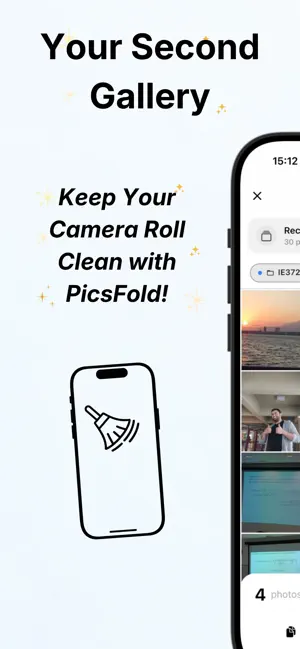
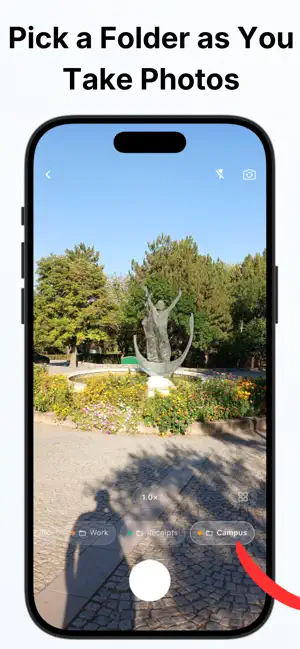
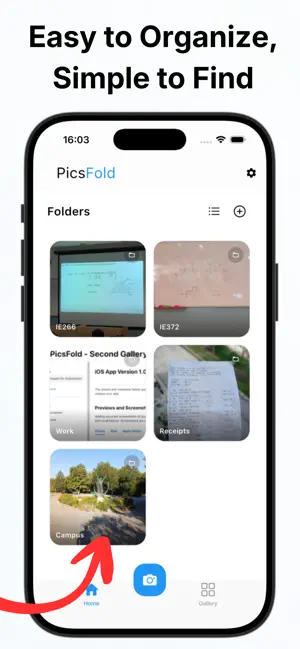
Your camera roll was never meant to be a filing cabinet. Receipts, class notes, work pictures, screenshots, reference images, and photos you only need to remember something all end up beside the pictures you actually want to see. PicsFold gives them a place of their own. PicsFold is a second photo gallery built around folders. Take photos directly into the folder where they belong, or import pictures you already have. Everything stored in PicsFold stays separate from your main Photos library, making it easier to organize and easier to find. WHAT YOU CAN DO WITH PICSFOLD • Create separate folders for work, school, receipts, projects, hobbies, or anything else. • Choose a folder while taking photos. • Take photos directly into PicsFold without adding them to your main Photos library. • Copy existing photos into PicsFold while keeping the originals in Photos. • Import photos and remove the originals from your main Photos library after confirmation. • Browse everything in a separate gallery, grouped by date. • Select and manage multiple photos or folders at once. • Export photos whenever you need them elsewhere. • Create backups and restore your PicsFold library later. HOW PICSFOLD WORKS 1. Create a folder for the photos you want to keep together. 2. Use the PicsFold camera to take photos directly into that folder, or add existing photos from your library. 3. Find them later by opening the folder or browsing your separate PicsFold gallery. When importing a photo, you can keep the original in your main Photos library or choose to remove it after it has been copied into PicsFold. A system confirmation appears before deletion. USE PICSFOLD FOR • Receipts, documents, and IDs • Class notes, presentation slides, and whiteboards • Work and project photos • Before-and-after pictures • Screenshots and reference images • Hobby collections and visual ideas • Photos you need to keep but do not want mixed into your main library PRIVACY BY DESIGN No account is required. Your photos are stored locally on your device and are never uploaded to a PicsFold server. If you choose to enable optional crash reporting, technical diagnostic information may be sent to help identify problems and improve app stability. Because your PicsFold library is stored locally, remember to create a backup before deleting the app or moving to another device. PICSFOLD PRO PicsFold includes optional Pro features available through in-app purchase. If you choose a subscription, it renews automatically unless canceled at least 24 hours before the end of the current subscription period. You can manage or cancel your subscription from your Apple Account subscription settings. Keep your main library for the photos you want to see. Let PicsFold organize the rest. Terms of Use (EULA): https://www.apple.com/legal/internet-services/itunes/dev/stdeula/ Terms of Service: https://onurardaoz.com/projects/picsfold/terms-of-service/ Privacy Policy: https://onurardaoz.com/projects/picsfold/privacy-policy/ Email: [email protected]
What’s new
Version 1.0.6 · Updated October 12, 2026
- Share photos to PicsFold from Photos and other apps, and choose a folder before saving. - Hide, reorder, and color the Photos albums shown in the camera. - Preserve original image quality and available capture date and location data when saving to Photos. - If saving to Photos fails, PicsFold can keep a copy so you can try again later. - Get a heads-up in the camera when your device is running low on storage. - ZIP export now checks for free space before it starts. - Clearer import date options, a refreshed Pro screen, and other fixes.
App privacy
The developer, ONUR ARDA OZ, reported these privacy practices to Apple.
Data Not Linked to You
The following data, which may be collected but is not linked to your identity, may be used for the following purposes:
- Purchases: Purchase History
- Diagnostics: Crash Data, Other Diagnostic Data
Used for: Analytics, App Functionality
Alternatives to PicsFold: Separate Photo Album
Looking for apps like PicsFold: Separate Photo Album? Here are 6 similar apps on the App Store. The highest rated is AllPic (5.0/5), and 5 of the 6 are free to download.
-
 ChillClean - Photo Cleaner
-
 AllPic
5.0
AllPic
5.0
-
 PhotoMeow: Photo Organizer
5.0
PhotoMeow: Photo Organizer
5.0
-
 Photo Legacy: Album Scanner
-
 FaceIdent: AI Face Finder
4.2
FaceIdent: AI Face Finder
4.2
-
 VideoRecord: Pause & Resume
5.0
VideoRecord: Pause & Resume
5.0
| App | Rating | Price | Last updated | Compare |
|---|---|---|---|---|
| PicsFold: Separate Photo Album | 3.3 / 5 (4 ratings) | Free | October 12, 2026 | |
| ChillClean - Photo Cleaner | – | Free | Oct 4, 2026 | Compare |
| AllPic | 5.0 / 5 (1) | Free | Sep 27, 2026 | Compare |
| PhotoMeow: Photo Organizer | 5.0 / 5 (5) | Free | Oct 10, 2026 | Compare |
| Photo Legacy: Album Scanner | – | Free | Oct 15, 2026 | Compare |
| FaceIdent: AI Face Finder | 4.2 / 5 (10) | Free | Sep 27, 2026 | Compare |
| VideoRecord: Pause & Resume | 5.0 / 5 (3) | 2.99 USD | Sep 10, 2026 | Compare |