

FocusScreen: Lock Screen Tasks
璞 菅 Productivity iPhoneiPadiPod touch
FocusScreen: Lock Screen Tasks is a free Productivity app for iPhone and iPad by 璞 菅. Requires iOS 18.6. Updated October 27, 2026.
- Price
- Free
- on the App Store
- Size
- 10 MB
- Age 4+
- Updated
- Oct 27
- 2026 · v5.2
Screenshots


About FocusScreen: Lock Screen Tasks
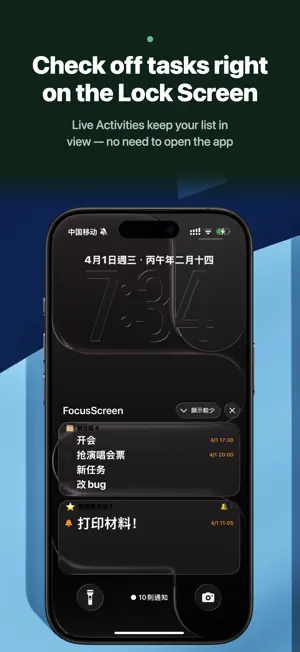
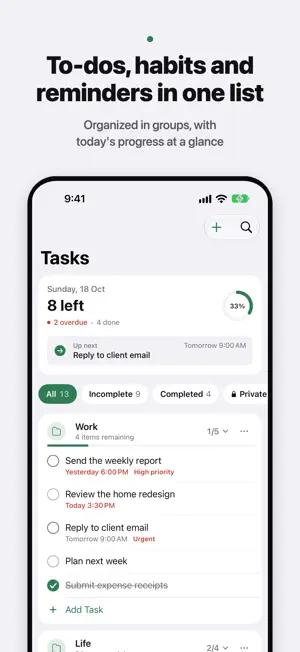
FocusScreen puts today's tasks on your Lock Screen and in the Dynamic Island. See what's next at a glance and check it off with a tap — no need to open the app. LIVE ACTIVITIES ON YOUR LOCK SCREEN • Grouped tasks stay on the Lock Screen and Dynamic Island with clear progress • Complete tasks right from the Lock Screen; the app stays in sync • Adjust item count, font size, color and opacity to suit any wallpaper THREE KINDS OF TASKS, ONE LIST • To-dos with due dates, priorities and repeat rules • Daily check-ins that reset every midnight for building habits • Reminders that alert you right on time PLAN SMARTER • AI Summary turns your list into one sentence about what matters today • Smart reminders notify you ahead of scheduled time DESIGNED FOR IPHONE DUO Check things off on the outer display when closed. Open it and the list becomes two columns; when partly folded, content stays clear of the fold, and every posture change transitions smoothly. PRIVACY AND PERSONALITY • Private Space protected by Face ID, never shown on the Lock Screen • Home Screen widgets, plus quick task entry with Siri • Labs: 11 interface styles to choose from FocusScreen Pro unlocks multiple Lock Screen groups, more visible items, Private Space, smart reminders, AI Summary and every interface style. Subscriptions renew automatically for the selected period and can be cancelled anytime in Settings. Terms of Use: https://www.apple.com/legal/internet-services/itunes/dev/stdeula/ Privacy Policy: https://www.freeprivacypolicy.com/live/5daf2aaa-018e-4125-ab59-34e22297c747
What’s new
Version 5.2 · Updated October 27, 2026
Introducing QingTeng Account: one sign-in for every QingTeng app — plus a fresh launch animation and a round of reliability fixes. NEW: QINGTENG ACCOUNT • Sign in from Me › QingTeng Account with Apple, GitHub or Microsoft • Link several sign-in methods; your personal account card sits at the top of the page • Sign out or delete your account anytime — your local to-dos, groups and settings are never touched CLEARER PRIVACY CHOICES • AI Summary asks for your consent before it runs. You can withdraw it anytime, and everything else works either way POLISH & FIXES • A new launch animation • The launch screen works better with VoiceOver, and sign-in and account flows are more reliable
App privacy
The developer, 璞 菅, reported these privacy practices to Apple.
Data Not Collected
The developer does not collect any data from this app.
Alternatives to FocusScreen: Lock Screen Tasks
Looking for apps like FocusScreen: Lock Screen Tasks? Here are 6 similar apps on the App Store. The highest rated is Kenotex: AI Task Planner (5.0/5), and all 6 are free to download.
-
 Kenotex: AI Task Planner
5.0
Kenotex: AI Task Planner
5.0
-
 ViewDo - Lock Screen To-Do
4.7
ViewDo - Lock Screen To-Do
4.7
-
 MOMOTODO - Lock Screen To-Do
-
 Filled Days
5.0
Filled Days
5.0
-
 MoTime · Celebrity Routine
5.0
MoTime · Celebrity Routine
5.0
-
 时笺:让生活更简单、更高效。
| App | Rating | Price | Last updated | Compare |
|---|---|---|---|---|
| FocusScreen: Lock Screen Tasks | – | Free | October 27, 2026 | |
| Kenotex: AI Task Planner | 5.0 / 5 (1) | Free | Oct 29, 2026 | Compare |
| ViewDo - Lock Screen To-Do | 4.7 / 5 (12) | Free | Sep 19, 2026 | Compare |
| MOMOTODO - Lock Screen To-Do | – | Free | Oct 30, 2026 | Compare |
| Filled Days | 5.0 / 5 (4) | Free | Oct 6, 2026 | Compare |
| MoTime · Celebrity Routine | 5.0 / 5 (1) | Free | Sep 6, 2026 | Compare |
| 时笺:让生活更简单、更高效。 | – | Free | Oct 3, 2026 | Compare |