

MOMOTODO - Lock Screen To-Do
卓 孔 Productivity iPhoneiPadiPod touch
MOMOTODO - Lock Screen To-Do is a free Productivity app for iPhone and iPad by 卓 孔. Requires iOS 18.0. Updated November 12, 2026.
- Price
- Free
- on the App Store
- Size
- 32 MB
- Age 4+
- Updated
- Nov 12
- 2026 · v1.1.6
Screenshots
Save to Pinterest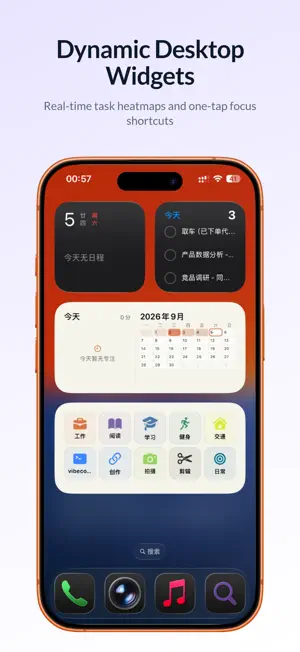
About MOMOTODO - Lock Screen To-Do
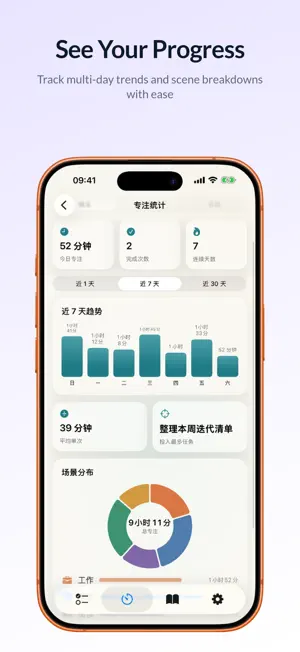
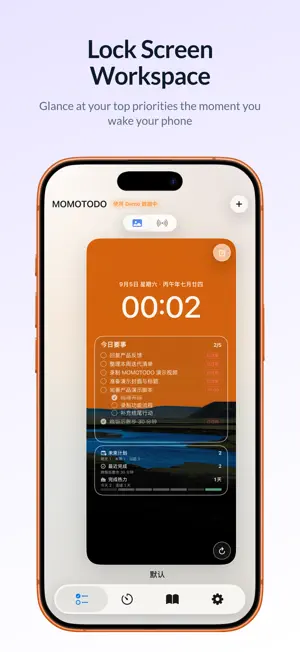
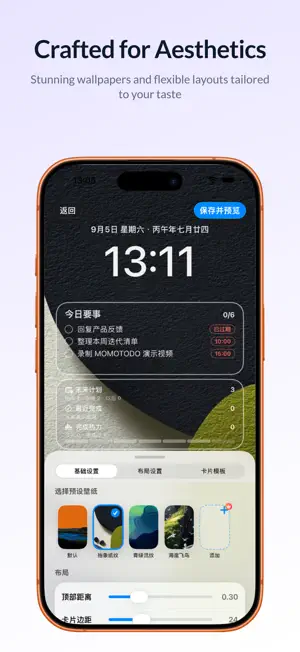
Turn your plans into action. MOMOTODO brings Apple Reminders and calendar events to your iPhone Lock Screen. See what matters today whenever you pick up your phone, without repeatedly opening a to-do app. Start a focus timer when you begin a task, then review what you completed and where your time went. There is no need to build another task system. The lists you already keep in Apple Reminders become prompts to act, right on your Lock Screen. LOCK SCREEN TASKS | Keep your plans in sight Organize today's priorities, selected Reminders lists and calendar events into clear Lock Screen cards. Customize backgrounds, fonts, card styles and layouts to put important tasks where you can easily see them. APPLE REMINDERS | No duplicate task management Read and use your tasks directly from Apple Reminders, without entering them again. Choose which lists to show, adjust the number of tasks, and review recently completed items. LIVE ACTIVITIES AND DYNAMIC ISLAND | Stay up to date View today's tasks through Lock Screen Live Activities and quickly complete reminders when supported by the current system state. Dynamic Island keeps the task you are working on in sight. FOCUS TIMERS | Move from planning to doing Use count-up timers, countdown timers and custom focus scenes. Link a focus session to a reminder, or track time spent studying, working or doing other activities on its own. TIME TRACKING | See your daily effort Review focus records and completed tasks in day, week and month views. Use timelines, calendars and heatmaps to understand where your time goes. SHORTCUTS AND WIDGETS | Connect your daily workflow Use Shortcuts to create, find and complete reminders, switch card sources, generate Lock Screen wallpapers, and control focus timers. Combine Lock Screen and Home Screen widgets to build a task workflow that suits you. FREE FEATURES AND MOMOTODO PRO Use basic reminder syncing, Lock Screen wallpapers, a single theme, basic card settings and selected Shortcuts for free. Pro unlocks more custom themes, Lock Screen Live Activities, focus timers, time tracking and advanced Shortcuts. A lifetime option is available as a one-time purchase. You can also choose to claim a 72-hour Pro trial, which does not renew automatically. USAGE NOTES Your reminders stay in Apple Reminders. Some features require access to Reminders, Calendars or notifications. Lock Screen wallpapers are updated through Shortcuts. To change them automatically at a set time or in a particular context, configure a personal automation in Shortcuts. iOS manages the display and duration of Live Activities. Some interactions may require unlocking your device.
What’s new
Version 1.1.6 · Updated November 12, 2026
Run multiple focus timers at once. Time different tasks separately, switch between active timers on the Focus screen, and save each session when you finish. · Start a count-up or countdown timer from a reminder in your agenda and see its progress without leaving the agenda. · The daily focus timeline shows all running timers, so you can see what's in progress at a glance. · Start or stop a scene's timer independently from the Scene Timer widget. The Focus Month Calendar now fits the full month's heatmap into a small widget. · If several timers are running, the End Focus shortcut lets you choose which one to stop.
App privacy
The developer, 卓 孔, reported these privacy practices to Apple.
Data Not Collected
The developer does not collect any data from this app.
Alternatives to MOMOTODO - Lock Screen To-Do
Looking for apps like MOMOTODO - Lock Screen To-Do? Here are 6 similar apps on the App Store. The highest rated is Moki AI日历:日程管理与待办清单 (5.0/5), and all 6 are free to download.
-
 Remi - AI Reminders & To-Dos
3.5
-
 每日工作台
-
 锁屏待办
-
 Moki AI日历:日程管理与待办清单
5.0
-
 倍刻List
-
 RockFocus - Focus Tracker
| App | Rating | Price | Last updated | Compare |
|---|---|---|---|---|
| MOMOTODO - Lock Screen To-Do | – | Free | November 12, 2026 | |
| Remi - AI Reminders & To-Dos | 3.5 / 5 (2) | Free | Oct 29, 2026 | Compare |
| 每日工作台 | – | Free | Aug 12, 2026 | Compare |
| 锁屏待办 | – | Free | Sep 24, 2026 | Compare |
| Moki AI日历:日程管理与待办清单 | 5.0 / 5 (1) | Free | Nov 9, 2026 | Compare |
| 倍刻List | – | Free | Nov 2, 2026 | Compare |
| RockFocus - Focus Tracker | – | Free | Nov 5, 2026 | Compare |