

Filled Days
GreenWood Technology Limited Productivity iPhoneiPadiPod touch
Filled Days is a free Productivity app for iPhone and iPad by GreenWood Technology Limited. Rated 5.0/5 from 4 ratings. Requires iOS 17.6.
- Rating
- 5.0
- 4 ratings
- Price
- Free
- on the App Store
- Size
- 72 MB
- Age 4+
- Updated
- Oct 6
- 2026 · v7.3
Screenshots



About Filled Days
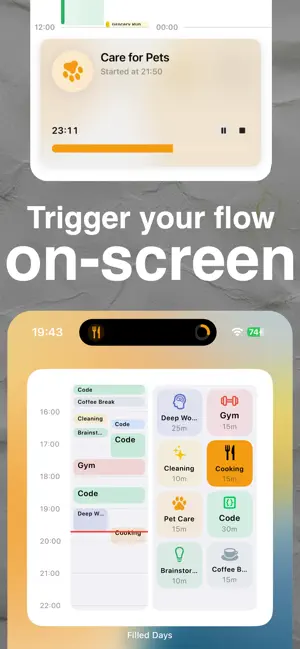
I’ve procrastinated. A lot. So I built the tool I needed: a calendar that nudges me to start and makes each tiny action feel rewarding. Why it works • On-screen triggers. Start right from Lock Screen, Home widgets, or Dynamic Island—no app hunting, no friction. • Visual, not vague. See time as colorful blocks; watch empty gaps shrink as your day fills up. • Micro-wins. Pre-set 5/10/15/20/30/40-minute sessions make “just start” effortless. • Behavior cues. I researched what actually helps: clear next step + visible progress bar = momentum. What I do with it • Tap a tile (Code, Deep Work, Gym, Cleaning, Cooking… you choose) → timer starts → progress shows on Lock Screen. • Quick-log board for instant actions; no typing, no setup. • Day / Week / Month / List views to plan and review at a glance. • Color-coded categories keep context obvious and motivating. • Smart reminders surface the right nudge at the right time. Designed for humans • Gentle, friendly UI—high contrast, readable, and calm. • Built for short bursts or deep focus. • Feels like a game of filling your day, not a chore list. Perfect if you • Want an anti-procrastination calendar that actually gets you to start. • Love time-blocking but hate friction. • Believe small habits create big change. I finally found a way that sticks. If you’ve struggled like me, try filling just one block—then another. Your day will take care of itself.
What’s new
Version 7.3 · Updated October 6, 2026
Your bottle, today—and PlayBooks that keep pace with you. • Home Screen bottle widgets always show a real bottle photo. On a new day, before you open the app, they show an empty bottle instead of a previous day's full one; after logging from a widget, Live Activity or Day view they keep today's newest photo until the Bottle view refreshes it. • PlayBook Live Activity and Dynamic Island show the running task's own name, icon and countdown, and switch to the next task exactly when it ends, even while Filled Days is closed. • Quick Flow returns automatically after a task finishes. • New Settings → Display → Size Customization: make bottle objects larger or smaller and tune how much bigger long activities are. • Tell us how it’s going: after a few finished tasks, Filled Days asks once whether you’d like to rate it on the App Store or email us about a problem. The same choice is always in Settings → Help & Preferences → Feedback. • The bottle keeps its true proportions on every iPhone and iPad and stays fully visible while you rotate it; tilting and rolling sounds are back. • Clearer Filled Days Plus plans in all six languages.
App privacy
The developer, GreenWood Technology Limited, reported these privacy practices to Apple.
Data Not Collected
The developer does not collect any data from this app.
Alternatives to Filled Days
Looking for apps like Filled Days? Here are 6 similar apps on the App Store. The highest rated is Focus Fridge: Pomodoro Timer (5.0/5), and all 6 are free to download.
-
 Focus Fridge: Pomodoro Timer
5.0
-
 Focus Sailor - Pomodoro Timer
5.0
-
 ZanZan: Effort into Rewards
-
 TimeSeed
-
 Soymilk: Focus & Voice Planner
5.0
-
 Tilo – Time Log & Focus
5.0
| App | Rating | Price | Last updated | Compare |
|---|---|---|---|---|
| Filled Days | 5.0 / 5 (4 ratings) | Free | October 6, 2026 | |
| Focus Fridge: Pomodoro Timer | 5.0 / 5 (1) | Free | Oct 31, 2026 | Compare |
| Focus Sailor - Pomodoro Timer | 5.0 / 5 (3) | Free | Jan 31, 2026 | Compare |
| ZanZan: Effort into Rewards | – | Free | Nov 2, 2026 | Compare |
| TimeSeed | – | Free | Aug 9, 2026 | Compare |
| Soymilk: Focus & Voice Planner | 5.0 / 5 (2) | Free | Oct 27, 2026 | Compare |
| Tilo – Time Log & Focus | 5.0 / 5 (2) | Free | Oct 23, 2026 | Compare |
Compare Filled Days with the top alternatives: ratings, updates, ASO score and keyword gaps →