

Kenotex: AI Task Planner
锴 徐 Productivity iPhoneiPadiPod touchMac
Kenotex: AI Task Planner is a free Productivity app for iPhone and iPad by 锴 徐. Rated 5.0/5 from 1 ratings. Requires iOS 26.0. Updated November 16, 2026.
- Rating
- 5.0
- 1 ratings
- Price
- Free
- on the App Store
- Size
- 70 MB
- Age 4+
- Updated
- Nov 16
- 2026 · v1.4.9
Screenshots
Save to Pinterest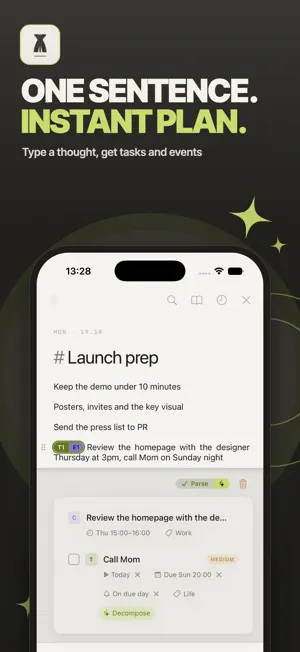


About Kenotex: AI Task Planner
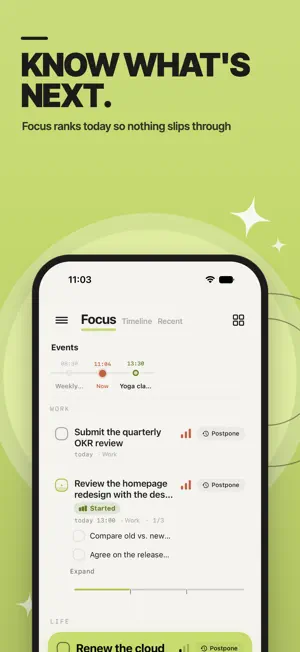
Turn one sentence into a plan you can act on. Write "Review the homepage with the designer Thursday at 3pm, call Mom on Sunday night", then tap Parse. Kenotex lays out an event and a task, with times and categories filled in. Focus ranks your day, the calendar shows tasks and events together, and check-ins keep your habits going. CAPTURE NATURALLY • Write in plain language or hold the microphone button to dictate • Open Spark from Capture to break an idea into actions • Add several thoughts as separate blocks and customize the draft cursor • Use Siri shortcuts to create items, hear today's todos, or save an idea to a draft without parsing • Get structured results immediately, then adjust or discard • Tap Parse when ready; typing does not trigger automatic parsing IMAGES AND SCREENSHOT CAPTURE Combine text and images in the same Ideas block for AI parsing. Delete individual generated items directly from the result card. Capture to Kenotex, the iOS Shortcut, saves a screenshot as an image and starts AI parsing when image sending is enabled. Typing alone does not start parsing. Relevant images are sent with text for AI parsing and Spark; turn off Send Images When Parsing in Settings > AI Service for text-only requests. FOCUS ON WHAT MATTERS • See urgent and upcoming tasks in Focus • Organize projects and categories with Shelves • Add priorities, start dates, deadlines, reminders, and recurrence • Postpone or skip tasks without losing the bigger plan • Review completion history PUT TASKS AND EVENTS ON ONE TIMELINE See todos and calendar events together. Use Calendar and Agenda to understand today and the days ahead, with holidays, birthdays, anniversaries, and lunar calendar details when available. BUILD ROUTINES THAT STICK Create check-in habits with flexible schedules, multiple check-ins per day, reminders, streaks, and progress statistics. LOCAL-FIRST, WITH OPTIONAL ICLOUD SYNC Your organizer data is stored locally by default. Enable iCloud to sync tasks, events, Ideas, check-ins, and settings across iPhone, iPad, and Mac. MADE FOR THE APPLE ECOSYSTEM See your plans with Home Screen and Lock Screen widgets and Live Activities, and check in directly from the habit widget. On Mac, use keyboard shortcuts plus Raycast, local API, and MCP integrations. With Apple Reminders import enabled, new reminders can be imported while the app is in the foreground. Choose a single import device across synced devices, and optionally keep the originals. Holiday data can update without an app update. MAKE PLANNING FIT YOUR SCHEDULE Set rotating shifts, alternating workweeks, or exceptions for individual days. Workday recurrence follows your schedule. Choose whether AI defaults to tasks, events, or decides automatically, and set keyword rules. KENOTEX PRO The free version includes a daily AI parsing allowance. Kenotex Pro unlocks unlimited AI parsing, Spark idea breakdown, the Paper and Graphite themes, Focus timeline styles, and additional parsing animation styles. FOUNDING MEMBER When available in the app, the Founding Member plan is a one-time purchase for lifetime Pro access, with no automatic renewal. Eligible paid monthly or annual subscribers may receive upgrade credit; eligibility and localized prices are shown in the app. A lifetime purchase does not cancel an existing subscription: manage its renewal in the App Store. Kenotex is for people who want to capture what they just thought of, turn it into a clear next action, and follow through without juggling separate apps. Privacy Policy: https://kenxcomp.com/kenotex/legal/privacy.html Terms of Use (EULA): https://www.apple.com/legal/internet-services/itunes/dev/stdeula/
What’s new
Version 1.4.9 · Updated November 16, 2026
【NEW FEATURES】 • Set alternating workweeks, rotating shifts, or exceptions for specific days. Workday repeats follow your schedule. • Choose whether AI favors tasks or events. Combine text and images in one draft block, remove individual results, and customize the cursor. • Use Siri to create tasks, events, or habits, capture ideas, or hear a summary of today's tasks. 【IMPROVEMENTS】 • Automatically import new Apple Reminders while the app is in the foreground. Choose one device to handle imports across devices. 【BUG FIXES】 • Improved draft drag and drop, Focus navigation, Live Activity countdowns, and recurring item sync.
App privacy
The developer, 锴 徐, reported these privacy practices to Apple.
Data Linked to You
The following data, which may be collected and linked to your identity, may be used for the following purposes:
- Purchases: Purchase History
- Identifiers: User ID, Device ID
- Usage Data: Product Interaction
- Diagnostics: Crash Data, Performance Data, Other Diagnostic Data
- User Content: Photos or Videos, Other User Content
Used for: Analytics, App Functionality
Alternatives to Kenotex: AI Task Planner
Looking for apps like Kenotex: AI Task Planner? Here are 6 similar apps on the App Store. The highest rated is ArkNote: ADHD-Friendly Notes (5.0/5), and all 6 are free to download.
-
 Remi - AI Reminders & To-Dos
3.5
-
 ArkNote: ADHD-Friendly Notes
5.0
-
 insighto 洞见笔记-闪念·回顾·待办·洞察
-
 Firefly Todo: Calendar Planner
5.0
-
 Ply Note - Capture Daily Life
5.0
-
 无事记 - 计划·备忘·记录·待办·清单
| App | Rating | Price | Last updated | Compare |
|---|---|---|---|---|
| Kenotex: AI Task Planner | 5.0 / 5 (1 rating) | Free | November 16, 2026 | |
| Remi - AI Reminders & To-Dos | 3.5 / 5 (2) | Free | Nov 16, 2026 | Compare |
| ArkNote: ADHD-Friendly Notes | 5.0 / 5 (3) | Free | Oct 28, 2026 | Compare |
| insighto 洞见笔记-闪念·回顾·待办·洞察 | – | Free | Nov 12, 2026 | Compare |
| Firefly Todo: Calendar Planner | 5.0 / 5 (1) | Free | Nov 17, 2026 | Compare |
| Ply Note - Capture Daily Life | 5.0 / 5 (1) | Free | Oct 21, 2026 | Compare |
| 无事记 - 计划·备忘·记录·待办·清单 | – | Free | Nov 13, 2026 | Compare |