

Firefly Todo - Drag Calendar
馨洁龙 郑 Productivity iPhoneiPadiPod touchMac
Firefly Todo - Drag Calendar is a free Productivity app for iPhone and iPad by 馨洁龙 郑. Rated 5.0/5 from 1 ratings. Requires iOS 17.0. Updated October 2, 2026.
- Rating
- 5.0
- 1 ratings
- Price
- Free
- on the App Store
- Size
- 40 MB
- Age 4+
- Updated
- Oct 2
- 2026 · v1.6.1
Screenshots
About Firefly Todo - Drag Calendar
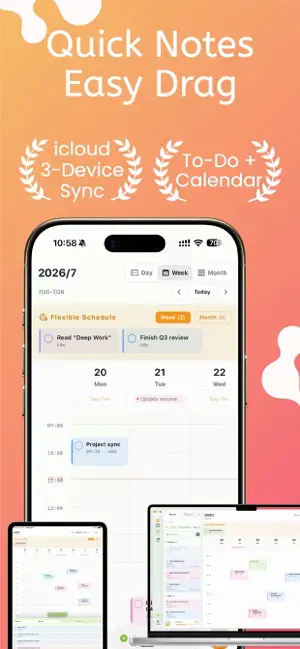
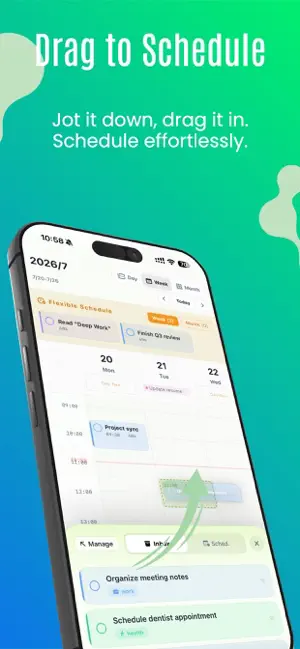
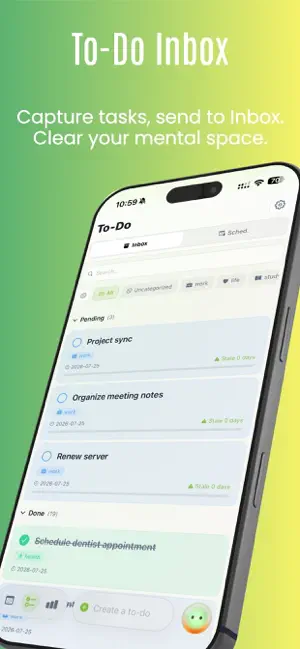
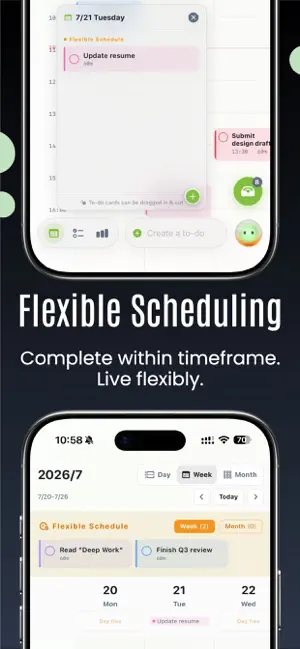
Stop letting your to‑do list feed your anxiety. Firefly Todo combines a zero‑pressure inbox with an intuitive drag‑and‑drop calendar, so you can capture thoughts instantly, schedule with flexibility, and review gently — helping every task find its calm place. 1、Zero‑Pressure Inbox — Clear your mind in seconds Dump any thought, idea, or errand into the inbox without deciding where or when. It acts as a pure “thought holding zone,” banishing the hesitation of “where should I put this” and freeing your mental cache. Items left too long are gently highlighted in red, nudging you to schedule them. 2、Drag & Drop — Move tasks like sticky notes Your inbox and calendar are connected by a fluid drag gesture. Slide a task from the inbox into a time slot on the calendar to plan it; drag it back out to reconsider. It feels as natural as moving a physical sticky note — far lighter than editing a form. 3、Flexible + Fixed Scheduling — Plans that bend without breaking Not every task deserves a minute‑precise alarm. Flexible scheduling (Daily, Weekly, Monthly) gives soft time boxes for “sometime this month” items, alerting you only as the window nears its end. Fixed scheduling locks in non‑negotiable events. This hybrid mode keeps plans adaptable and under control. 4、AI Assistant Firefly — Adjust your week with a sentence When things go sideways, don’t drag tasks one by one. Just tell Firefly: “I’m away Monday to Wednesday — move all my scheduled tasks to Thursday and Friday.” Your calendar restructures instantly. Firefly can also parse text and links to create tasks for you, slashing the maintenance effort. 5、Gentle, Multi‑dimensional Reviews — See the shape of your time Get completion rates, average lingering time, overdue trends, contribution heat maps, and category breakdowns — all visualized with zero judgment. It’s a journey of self‑discovery that helps you spot your energy patterns and adjust gently, turning review into reflection rather than a trial. 6、Real‑time Sync Across All Apple Devices Your inbox, scheduled items, and even your AI conversation context stay in perfect sync via iCloud across iPhone, iPad, and Mac. Jot a thought on the subway, plan at your desk — every device shows you the same up‑to‑date state. Download Firefly Todo for free and enjoy core features: inbox management, drag‑and‑drop calendar, dual flexible/fixed scheduling, and basic review. Upgrade to Premium for the full AI scheduling conversation, in‑depth review panels, and the desktop Pomodoro timer. We take your privacy seriously. All data syncs exclusively through your personal iCloud account and is never uploaded to third‑party servers. Privacy Policy:https://tcnxzymbii7r.feishu.cn/docx/Exged5fh3o1LSBxNYR8clFl5nZf?from=from_copylink Terms of Use:https://tcnxzymbii7r.feishu.cn/docx/BqoFd0yXto3eLUxgnhKcJEY5n8f?from=from_copylink
What’s new
Version 1.6.1 · Updated October 2, 2026
Optimize performance to reduce overheating and stuttering
App privacy
The developer, 馨洁龙 郑, reported these privacy practices to Apple.
Data Not Collected
The developer does not collect any data from this app.
Alternatives to Firefly Todo - Drag Calendar
Looking for apps like Firefly Todo - Drag Calendar? Here are 6 similar apps on the App Store. The highest rated is Remi - AI Reminders (5.0/5), and all 6 are free to download.
-
 简日历:日程安排&待办提醒
-
 BeanDo: To-Do&Reminder Planner
1.0
BeanDo: To-Do&Reminder Planner
1.0
-
 拾序:GTD待办清单
-
 Remi - AI Reminders
5.0
Remi - AI Reminders
5.0
-
 Doit Todo&Time
5.0
Doit Todo&Time
5.0
-
 MOMOTODO
| App | Rating | Price | Last updated | Compare |
|---|---|---|---|---|
| Firefly Todo - Drag Calendar | 5.0 / 5 (1 rating) | Free | October 2, 2026 | |
| 简日历:日程安排&待办提醒 | – | Free | Sep 30, 2026 | Compare |
| BeanDo: To-Do&Reminder Planner | 1.0 / 5 (1) | Free | Sep 23, 2026 | Compare |
| 拾序:GTD待办清单 | – | Free | Sep 15, 2026 | Compare |
| Remi - AI Reminders | 5.0 / 5 (1) | Free | Oct 3, 2026 | Compare |
| Doit Todo&Time | 5.0 / 5 (1) | Free | Aug 18, 2026 | Compare |
| MOMOTODO | – | Free | Sep 24, 2026 | Compare |