

BeanDo: To Do List & Tasks
ChangLin Yang Productivity iPhoneiPadiPod touch
BeanDo: To Do List & Tasks is a free Productivity app for iPhone and iPad by ChangLin Yang. Rated 5.0/5 from 2 ratings. Requires iOS 17.
- Rating
- 5.0
- 2 ratings
- Price
- Free
- on the App Store
- Size
- 93 MB
- Age 4+
- Updated
- Oct 27
- 2026 · v1.261025
Screenshots


About BeanDo: To Do List & Tasks
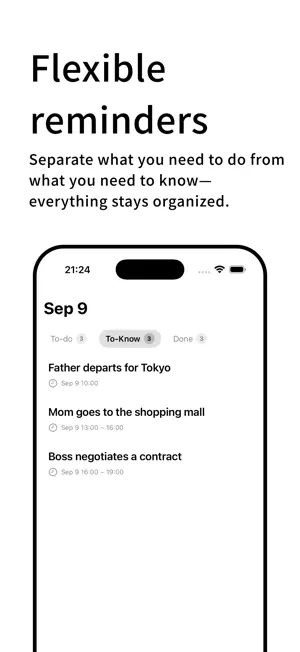
BeanDo is a personal productivity app that brings together task management, flexible reminders, habit tracking, calendar integration, and smart date recognition. From everyday tasks to complex recurring schedules, BeanDo provides versatile tools to help you manage your personal life with ease. Simple and Flexible Task Management • Organize tasks with dates, times, tags, notes, priority markers, subtasks, attachments, and reminders. • Separate actionable tasks from information you simply need to know. • View today's tasks, completed items, and important information in one place. • Customize themes and reminder preferences. Flexible Recurring Reminders Choose from a wide range of reminder rules to fit different routines and needs. • One-time, daily, weekly, monthly, and yearly reminders. • Workday, public holiday, and adjusted working day reminders. • A/B week schedules, specific dates, date ranges, and interval-based repeats. • Multiple reminder times, snooze options, notifications, and enhanced system reminders. Holiday and adjusted workday settings support Mainland China, Hong Kong, Japan, and South Korea, with more regions planned. Habit Tracking Build consistent habits and track your progress. • Set target counts and tracking periods. • Schedule habit reminders. • Track consecutive check-ins. • Review habit records and statistics. Small Do · Quick Pickup Slips Designed for parcel pickup and food collection, Small Do recognizes relevant information from screenshots and images, helping you organize pickup codes, identifiable brand names, and addresses into convenient slips. • Quickly capture pickup information. • View and present details when needed. • Focused recognition scope: parcel pickup and food collection. Uncertain information is not arbitrarily classified. Small Do processes information primarily on-device. Results depend on image content and recognition conditions. Smart Date Recognition · Pro+ Enter natural language and let BeanDo recognize dates, times, and recurring rules. Tap recognized date information to apply the corresponding settings and create tasks more efficiently. Smart Date Recognition works offline and is available with Pro+. Built for iPhone • Home Screen and Lock Screen widgets. • Live Activities and Dynamic Island in supported scenarios. • Siri and Shortcuts for supported actions. • Optional calendar integration with your permission. • Notifications and snooze options. Availability depends on your iOS version and settings. Local-First and Privacy-Focused BeanDo's core task management features do not rely on a self-hosted server. • Data is stored locally on your device by default. • Use local features without enabling iCloud. • Optionally sync supported data across devices through iCloud. • Calendar access requires your permission. Sync and attachment availability may depend on network connectivity, account settings, and available storage. BeanDo Pro / Pro+ BeanDo includes core features, with optional subscriptions for additional capabilities. • BeanDo: Essential personal task management. • Pro: Advanced features included in the Pro subscription. • Pro+: Pro benefits plus exclusive features such as Smart Date Recognition. Current benefits, pricing, and free trial terms are shown in the app and on the App Store. Subscriptions renew automatically unless canceled. Manage or cancel your subscription in your Apple Account settings. If a free trial is offered, review its terms and cancel before it ends if you do not wish to continue. Supported Languages Simplified Chinese, Traditional Chinese, English, Japanese, and Korean. Technical Support: https://jishudao.github.io/BeanDo.github.io/BeanDoTechnicalSupportPage Privacy Policy: https://jishudao.github.io/BeanDo.github.io/BeanDoPrivacyPolicy Terms of Service: https://jishudao.github.io/BeanDo.github.io/BeanDoTermsOfService Feedback: [email protected] X: @yangcong_pro
What’s new
Version 1.261025 · Updated October 27, 2026
BeanDo Version 1.261025 Update 1.In previous versions, the developer mistakenly bound the statistics feature to the Check-in tag, which did not match the original design intent of the tag feature. Now, BeanDo introduces a third item scenario: "Habit." Habit items can be created for things with a target quantity to complete, such as "drink 3 glasses of water every day." The Check-in tag has now returned to its original pure design, and the statistics feature has been moved to Habit items. Like FYI items, Habit items require a Pro subscription. 2.Added multiple new desktop widgets, covering large widgets for To-dos and FYI items, medium and large widgets for small do package tracking, small/medium/large widgets for Habits, and mixed widget content. 3.small do receives a major upgrade! In addition to on-device recognition, it now integrates large models from other AI providers, enabling more accurate content recognition through the model connection. Package tracking also adds a location feature, allowing you to set a location to modify the auto-recognition position. 4.The two options at the top of the small do page (Paste Content and Select Image) have been moved to the create button position in the tab bar. When switching to the small do page, the create button automatically switches, and tapping it lets you choose Paste Content or Select Image. 5.The Today page has removed the Completed section. Completed to-dos will now automatically appear at the bottom of the to-do list in the To-do section. 6.Consolidated permission displays. All permission acquisition information is now integrated into the Permissions option in the Settings page for viewing. 7.Optimized some UI elements. 8.Fixed some known issues.
App privacy
The developer, ChangLin Yang, reported these privacy practices to Apple.
Data Used to Track You
The following data may be used to track you across apps and websites owned by other companies:
- Identifiers: Device ID
Data Not Linked to You
The following data, which may be collected but is not linked to your identity, may be used for the following purposes:
- Identifiers: User ID, Device ID
- Usage Data: Product Interaction, Advertising Data
Used for: Third-Party Advertising
Alternatives to BeanDo: To Do List & Tasks
Looking for apps like BeanDo: To Do List & Tasks? Here are 6 similar apps on the App Store.
-
 GewuDo: To-Do & Reminders
-
 Doggy Capture
-
 Dunit: To Do & Task
-
 DoNow — What to do now
-
 待办鸭-待办清单 灵感&备忘
-
 WanList: To-Do List & Planner
| App | Rating | Price | Last updated | Compare |
|---|---|---|---|---|
| BeanDo: To Do List & Tasks | 5.0 / 5 (2 ratings) | Free | October 27, 2026 | |
| GewuDo: To-Do & Reminders | – | Free | Oct 20, 2026 | Compare |
| Doggy Capture | – | Free | Jan 5, 2026 | Compare |
| Dunit: To Do & Task | – | Free | Oct 25, 2026 | Compare |
| DoNow — What to do now | – | Free | Aug 25, 2026 | Compare |
| 待办鸭-待办清单 灵感&备忘 | – | Free | Aug 26, 2026 | Compare |
| WanList: To-Do List & Planner | – | Free | Oct 14, 2026 | Compare |