

DoNow — What to do now
Hejia CHEN Productivity iPhoneiPadiPod touchMac
DoNow — What to do now is a free Productivity app for iPhone and iPad by Hejia CHEN. Requires iOS 18.0. Updated August 25, 2026.
- Price
- Free
- on the App Store
- Size
- 4 MB
- Age 4+
- Updated
- Aug 25
- 2026 · v1.3
Screenshots


About DoNow — What to do now
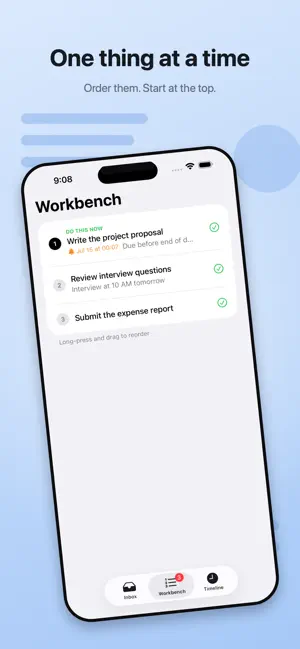
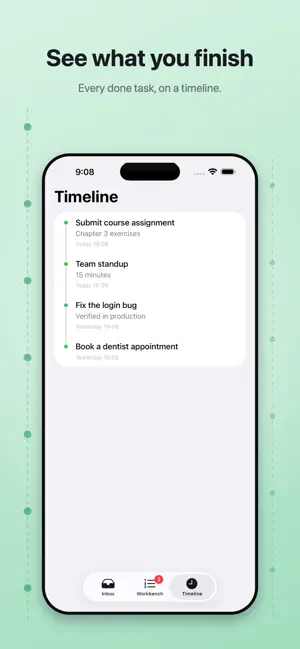
DoNow is not another to-do list. The problem with most to-do apps: you list 50 things, stare at all 50, and do none of them. The longer the list, the harder it is to start. DoNow answers one question: what do I do now? Three steps, from mess to motion: 1 / Inbox Dump anything on your mind. No categories, no priorities. Just empty your head. 2 / Workbench Pull out what you'll actually work on and lay it out in order. You face a few things, not fifty. The one on top is marked "Do this now" — the only thing you need to think about. 3 / Timeline Finished tasks sink into the timeline with a timestamp. Proof the day wasn't wasted. — Keep "what now" in front of you — • Live Activity & Dynamic Island: the current task stays on your screen, no need to open the app • Mac menu bar: always shows "DoNow: xxx" at a glance • Complete it right from the Live Activity — the next one takes its place — Also — • iCloud sync across iPhone, iPad, and Mac • Task reminders • Follows your system language: English, Simplified Chinese, Traditional Chinese, Japanese, Korean • Dark mode • Minimal design. No ads, no account, no subscription • Collects nothing. Your tasks live only in your own iCloud Lists are meant to be emptied, not collected. Now — do the first one.
What’s new
Version 1.3 · Updated August 25, 2026
DoNow v1.3 1. A More Consistent Interface Refined layout, spacing, and visual details across iPhone and Mac for clearer information. 2. More Reliable Reordering Fixed drag-to-reorder issues in Inbox and Workbench for smoother task ordering. 3. Choose Where New Tasks Appear In Settings, choose whether new Inbox tasks are added to the top or bottom of the list. 4. Quick Completion on Mac Fixed an issue that prevented tasks from being completed directly in the Mac Inbox. 5. A Better Timeline Improved Timeline presentation, search, and time details to make completed records easier to review. 6. Shortcuts Support Quickly add tasks with Shortcuts without repeatedly opening the app. 7. Workbench Widget See your current and upcoming tasks on the Home Screen, and complete them directly from the widget.
App privacy
The developer, Hejia CHEN, reported these privacy practices to Apple.
Data Not Collected
The developer does not collect any data from this app.
Alternatives to DoNow — What to do now
Looking for apps like DoNow — What to do now? Here are 6 similar apps on the App Store. The highest rated is Where'd I Put It — Find Stuff (5.0/5), and 5 of the 6 are free to download.
-
 Task Tabs
-
 Where'd I Put It — Find Stuff
5.0
Where'd I Put It — Find Stuff
5.0
-
 Sotto - Offline Auto Notetaker
-
 Inkoum: Tasks, Notes & Focus
3.0
Inkoum: Tasks, Notes & Focus
3.0
-
 Gratitude Forest — Good Days
-
 DOck-IT
| App | Rating | Price | Last updated | Compare |
|---|---|---|---|---|
| DoNow — What to do now | – | Free | August 25, 2026 | |
| Task Tabs | – | Free | May 28, 2026 | Compare |
| Where'd I Put It — Find Stuff | 5.0 / 5 (1) | Free | Sep 29, 2026 | Compare |
| Sotto - Offline Auto Notetaker | – | Free | Aug 24, 2026 | Compare |
| Inkoum: Tasks, Notes & Focus | 3.0 / 5 (1) | 0.49 USD | Aug 13, 2026 | Compare |
| Gratitude Forest — Good Days | – | Free | Aug 17, 2026 | Compare |
| DOck-IT | – | Free | Jul 27, 2026 | Compare |